





ServiceNow is heavily investing in training and certifications, as more and more companies are realizing the importance every day. This has been going on for over a decade, and the trust has grown rapidly over the past few years. The Certified Application Developer (CAD) is one of the earliest and longest-standing certifications introduced by ServiceNow.
Some may still remember the early days when there were only three ServiceNow certifications: CSA for admins, CAD for developers, and CIS for implementers. Now, there are over a hundred ServiceNow credentials for different personas, domains, and expertise. The interesting part is how fast the space is moving, with some being deprecated and others evolving.
For many ServiceNow Developers and Administrators, CAD was the second certification achieved, after the Certified System Administrator (CSA), as it marks a big shift from generic platform navigation, administration, and capabilities to a more technical and development-based approach. In the ServiceNow development world, these two usually come together as the entry point into this demanding market and a gateway to new opportunities.
So, if you’re here, you probably have the CSA certification or some experience with the platform. If so, you’re off to a great start. If you’re new and only evaluating your options, you’re in the right place to learn what you need before taking this path.
Having spent over a decade in the ServiceNow ecosystem, exploring various roles and wearing multiple hats, I came to realize how my technical knowledge of the platform and earning the relevant certifications had a positive impact on my career.
In this guide, I’ll take you on a journey of understanding what the ServiceNow CAD certification exam covers and how to prepare for it efficiently. I’ll explain the different domains of the exam, what features, tools, and capabilities they cover, and what comes next once you earn this certification. I’ll also share some of my experiences along the way.
Who Is This Path For?
If you’ve earned your CSA certification and are wondering what’s next, then you’re definitely in the right place! But even if you haven’t, it’s still the right path if you consider yourself technical or are interested in learning to build, fix, and improve in the IT world. You could be a Software Developer, Mobile App Developer, Software Engineer, Technical Lead, System Architect, Data Engineer, or just curious, as I once was.
As the name implies, it was originally designed for developers, engineers, architects, and those who design, build, and enhance the services, applications, and features on the platform. To get your CAD certification, you need some level of technical knowledge and experience in application development and/or system administration.
ServiceNow recommends six months of practical experience developing applications on the platform. However, everything relevant could help build that knowledge and experience. That could include your knowledge of coding and building applications. Or, it could be your development or admin experience with different applications and platforms.
When I started my ServiceNow CAD journey, I completed a range of training courses, including the Application Development Fundamentals. I stayed up to date with new release features, which helped me keep on top of the latest changes and enhancements. Over time, the add-on micro-certifications and delivery accreditations kept me going, especially when paired with AI and Otto skills. I was also lucky to see how they all work in a corporate instance and evolve as we’ve matured. I used that opportunity to gain experience and apply many of the features and capabilities to different platform solutions.
ServiceNow also keeps its training courses up to date with new releases, which helps you stay on top of the latest changes and enhancements.
Now, whether you are a ServiceNow customer, partner, or employee, or just new to the ServiceNow job market and interested in becoming a Certified Application Developer, this is the path for you.
Why the CAD Certification Matters
The CAD is one of the most recognized ServiceNow certifications in the market, ranking among the top three globally in terms of certification holders. It is a prerequisite for a couple of expert programs and supports your journey toward some of the ServiceNow Suite certifications.
The certification shows your ability to build robust applications to solve complex business challenges and contribute effectively to the broader ServiceNow ecosystem.
CAD is highly sought after by ServiceNow partners and customers looking to transform their digital experience. For many ServiceNow professionals and implementers, CAD was a turning point that opened up major opportunities and led to successful ServiceNow implementations and transformations.
With years of experience as a ServiceNow implementation specialist and certified practitioner, I can see how the platform knowledge and development skills I gained through the ServiceNow fundamentals, implementation, and advanced courses, followed by their dedicated certifications, have helped me earn industry recognition and competitive differentiation, leading to greater productivity and results.
When paired with relevant experience, these certifications offer a great opportunity to validate your expertise across the platform. This has become even more important as ServiceNow advances in its AI journey.
What to Expect on the Exam
This is one of those exams that has not changed much over the years – at least not in the format and structure of the exam. One day we may see how the shift toward AI tools and solutions will affect expectations…
The topics here are evenly spread across the exam, from designing data models and building user interfaces to implementing security measures, automating workflows, and integrating external data sources.
According to the ServiceNow exam blueprint, you’ll be tested on six domains and 22 subdomains, with 60 multiple-choice and multiple-select questions in 90 minutes. The domains are the key topics and specific objectives included in the exam.
This chart shows you the breakdown of domains and their share of exam questions.

You can register and schedule your exam through ServiceNow University, which redirects you to the Pearson VUE platform to book and take the exam online (proctored) or at an approved test center. After you complete the exam, you will receive your results, including a breakdown of domains and how you performed in each.
Deep Dive Into the Domains
The ServiceNow CAD exam covers platform features and functionality, applications and capabilities, and their architecture and configuration. The domains guide what to focus on, and the breakdowns suggest the topics you will be tested on.
Major themes include application creation and structure, including how to build tables using the Guided Application Creator, when to extend existing tables versus create new ones, and how to manage application files within the repository. Another key area is data management, specifically importing data via spreadsheets and mapping it correctly using Transform Maps and System Import Sets.
The CAD exam also tests knowledge of user interface configuration, such as designing forms with sections and generating basic charts directly from list views. Scripting, automation, and security form the remaining focus areas. For example, you must understand client-side and server-side APIs, recognize valid methods for both GlideUser and GlideForm, as well as the purpose of Script Includes as centralized, reusable script functions.
The exam also tests security concepts, such as table-level read access and script protection policies. Automation is represented by scenarios requiring the correct configuration of scheduled jobs, event triggering, and the logic behind email notification weighting when multiple alerts apply to a single record.
In this section, I have explained what each domain covers, what is included, and what to expect.
This domain covers the fundamentals of application design and creation on the platform.
First, you need to understand how to find out if an application is a good fit with ServiceNow. You don’t want to reinvent the wheel if a similar application is available out of the box. Then focus on designing and implementing a data model that works best, considering the data schema and how data connects and relates to other data on the platform.
This domain covers a lot about creating applications and modules, and using application scope for your builds.
This domain focuses on delivering a modern experience, especially through the user interfaces such as Workspaces for the agents and Employee Slate for the employees.
You need to understand the anatomy of a list and a form, and how to configure them. This includes creating, designing, and customizing forms, as well as adding or removing fields from forms and tables.
Scripting in ServiceNow is a vast topic, but for this exam, you need to understand the basics of client-side versus server-side scripting to maintain and enhance an instance effectively. You will be expected to know when and how to write, test, and debug client-side scripts for the desktop, as well as handle server-side scripts. You also should know how to use a Record Producer as an application’s UI.
Resources:
I have to be honest with you, this is an area that requires more practice. You need to understand application and access control, specifically Access Control List (ACL) rules that restrict access to data by requiring users to pass a set of requirements before interacting with it.
The domain covers how to restrict access to applications and modules, and how to manually and automatically create, test, and debug Access Controls. You should also know how to use GlideSystem methods to script security and use application scope to protect application artifacts.
This domain requires some knowledge of how to automate business processes across the enterprise using platform capabilities. You should know about writing, testing, and debugging Workflow and Flow Designer.
It also involves creating and using application properties. In addition, you need to know how to create Events, Scheduled Script Executions, and Utils Script Includes. Additionally, you need to understand notifications, specifically how to trigger and process email.
This is probably a more technical topic for many ServiceNow learners. This domain covers how to move and manage data.
Specifically, you will be tested on how to import data in CSV or Excel format. You will also need to know how to integrate with an external data source using REST, including testing and debugging.
This domain focuses on the lifecycle of your development work. It covers how to locate and install applications.
You also need to understand how to use Delegated Development to manage source code and code review. In addition, you should know how to use the ServiceNow Git integration to manage source code.
How to Prepare for the Exam
The ServiceNow CAD exam is all about practice and experience. Keywords and definitions won’t help much if you don’t know how to find your way around development challenges. Similar to other ServiceNow exams, my strongest recommendation is to gain hands-on experience.
If you don’t have enough build experience, start by developing and practicing in a test environment. ServiceNow University offers labs with various on-demand courses, such as “Welcome to ServiceNow” and Application Development Fundamentals. They can provide guidance and help you practice and build.
You need to take your time and understand how to automate flows, manage access controls, work with database tables and columns, and learn about the difference between application development and deployment.
You don’t need to be a professional developer or scripting expert to go for the CAD exam – however, it is highly recommended that you know the fundamentals of JavaScript and how it’s used in ServiceNow. The Scripting in ServiceNow Fundamentals course covers both client-side and server-side scripting. In this course, you will learn to write and debug Client Scripts and Business Rules, configure UI Policies, and create Script Includes. Additionally, you will learn about essential APIs like GlideSystem and GlideRecord, and implement scripting within Flow Designer using subflows and custom actions.
If you’re new to JavaScript, you can start with the Introduction to Scripting in ServiceNow course, which provides a basic understanding of scripting. Next, try Learning JavaScript on the Now Platform, a video series with lab exercises that covers basic syntax, flow control, and some complex objects. There’s also the Scripting in ServiceNow Primer course for basic JavaScript principles and hands-on simulation tasks to work on simple Client Scripts, UI Policies, Business Rules, and Script Includes. I’ve also found this YouTube course helpful for beginners learning JavaScript.
ServiceNow University offers an advanced administration course if you’re interested in the admin side. There are also the Application Developer learning path, credential path, and career journey. There are also pathways for Application Developer Skills and Additional Recommended Courses for Application Developers.
The Developer Portal is another great source of information with learning plans for Administrators, Citizen Developers, and Application Developers. The good thing is the course materials are regularly updated based on the new releases, and you can switch to your desired release to get matching content (e.g. from Australia to Brazil).
For example, the ServiceNow Application Developer learning plan guides you through a comprehensive curriculum starting with creating custom widgets, client-side scripting, and using Flow Designer. As you progress, the training covers specialized areas like developing domain-separated applications and developing Virtual Agent topics, alongside core integration and testing concepts in outbound REST integrations, Scripted REST APIs, and using the Automated Test Framework (ATF).
To round out your platform expertise, the final modules focus on managing backend logic and access by covering Scheduled Script Executions and Events, securing applications against access from other applications, Service Portal introduction, and application properties.
These courses, along with some of the ServiceNow University courses, can help extend your knowledge and prepare you for the CAD exam and beyond. I still enjoy reviewing these courses after a decade of working with ServiceNow, especially when a new release goes live. There’s always something new to learn, especially with all the innovations and AI advances.
Another effective way to build with confidence is on a Personal Developer Instance (PDI), which you can request for free on the ServiceNow Developer site. It provides you with an out-of-the-box environment in your desired release, with admin access and the ability to install and work on most of the applications you need, including many paid ones.
You can use your PDI to play around, break things, and then fix them. You can try creating new features or rebuilding existing functionality. This is the best way to see how things look with the base configurations versus a customized corporate environment.
My advice would be to explore and experiment. Set some goals for yourself and work towards them. Try to learn a new thing every day and put it into practice. And finally, use every opportunity to design, configure, build, and deploy.
For more tips, download our free eBook “How to Prepare for a ServiceNow Certification”:
What Comes Next?
Achieving your CAD is a great milestone, but it’s just the beginning! Once you complete this certification, you can pursue several pathways. These could include advancing and learning more, earning a new certification, or exploring career opportunities.
ServiceNow offers a wide range of credentials, from micro-certifications and delivery accreditations to high-stakes (mainline) and suite certifications. For the next certification in your journey, you can choose from a range of options based on your interests.
You can take your CAD certification to the next level by completing some micro-credentials. Completing the Flows, Integration Hub, UI Builder, and Automated Test Framework (ATF) micro-certifications will automatically grant you the Application Developer Core Skills suite certification, which shows you can build custom portal experiences, automate user journeys, test them thoroughly, and handle integrations without getting lost in custom coding.
This is a great starting point to bundle your accomplishments into a single suite. It was one of the recent suite certifications I aimed for because it brings key development capabilities into my skill set to support my day-to-day work.
Another helpful suite certification I earned was Workflow Data Fabric Professional, which bundled my CSA certification with the Integration Hub micro-certification, plus Automation Center, Process Mining Essentials, and Stream Connect for Apache Kafka delivery accreditations.
It is a great way to show your skills in enterprise-level automation and data orchestration. It can also demonstrate your ability to analyze business processes for bottlenecks and optimize workflow performance, effectively turning data into an actionable asset.
There are also so many development-related micro-credentials you can aim for next. I was fortunate to learn about them, complete some of these certifications, and put them into practice. Here are some of the common ones:
- Creator Studio delivery accreditation.
- Now Assist for Creator delivery accreditation.
- Introduction to App Engine Studio micro-certification.
- Moveworks Agent Studio Fundamentals delivery accreditation.
- Playbooks Essentials micro-certification.
- Playbooks Advanced micro-certification.
You can also explore other high-stakes (mainline) exams next, depending on the career pathway you want to pursue. A common trend is going with the implementation certifications. You can choose a domain based on your interests and market demand, such as IT Service Management (CIS-ITSM) or Customer Service Management (CIS-CSM), and build on top of your development skills.
Some examples of a career pathway are the Certified Platform Owner Associate (CPOA), Professional (CPOP), or Expert (CPOE) for the Platform/Product Owner career journey.
Last but not least, you can apply for a ServiceNow Expert program, such as Architecture Excellence (ArchX), and then pursue the Certified Technical Architect (CTA) and Certified Master Architect (CMA) by bringing in your CAD along with other mainline certifications.
I have put together this infographic to show you the different pathways you can take after earning your CAD certification.
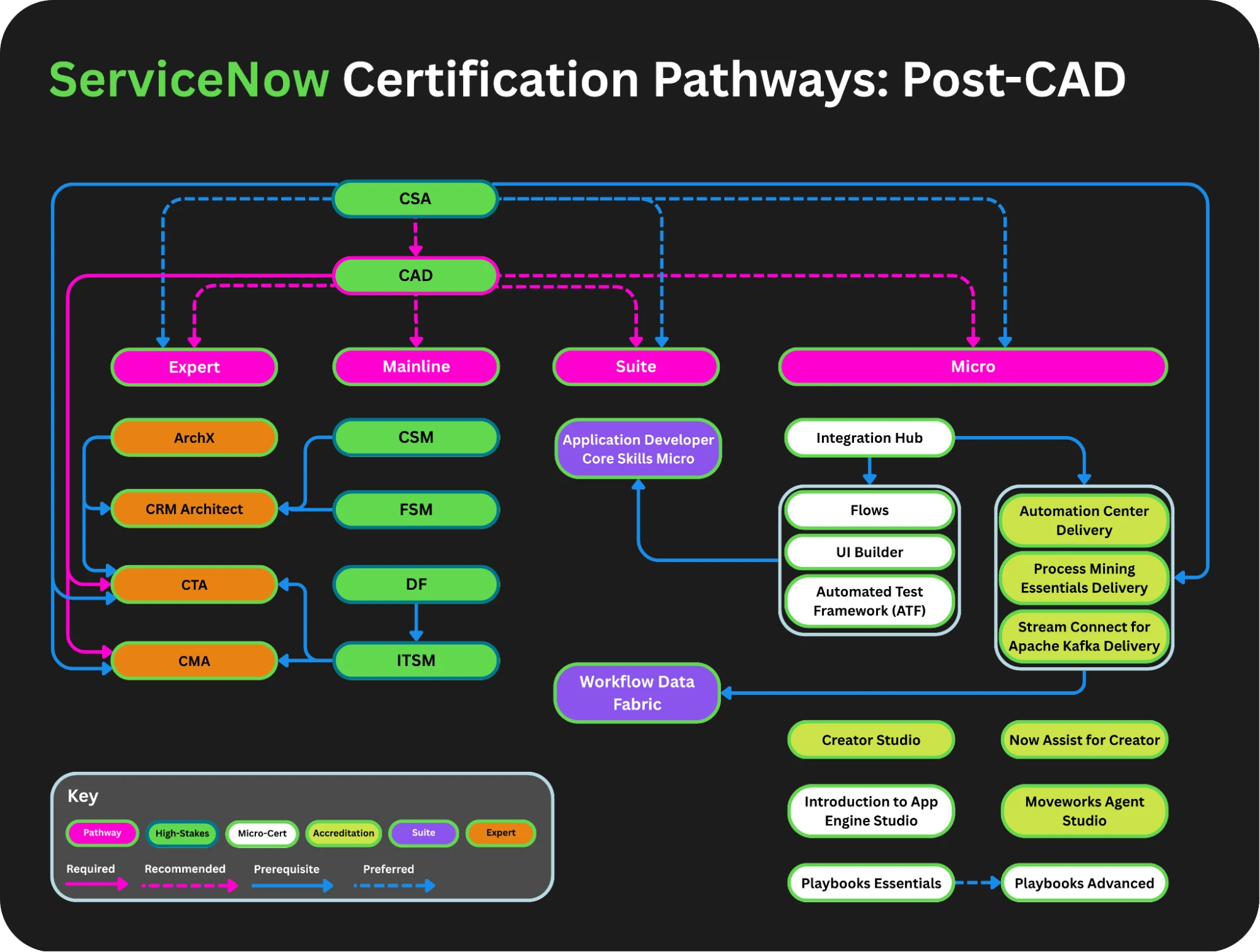
ServiceNow University offers the Certified Application Developer (CAD) learning path, along with a career progression pathway for AI Application Developer from Associate to Professional and Expert. You can also consider the AI System Administrator, AI Support Specialist, or AI Implementer career journey, based on your interest.
If you want to study further, there are some recommended ServiceNow University courses for application developers to supplement their knowledge and skills, such as:
- ServiceNow Studio Overview.
- Introduction to App Engine Studio for Developers.
- Flow Fundamentals and Error Handling.
- Integration Hub Fundamentals and Advanced.
- UI Builder Fundamentals and Advanced.
- ServiceNow User Interface Overview.
As with other ServiceNow mainline certifications, you must keep your CAD certification current by taking the annual delta exam as part of the ServiceNow certification maintenance program. The CAD Delta Exam Study Guide is a good preparation resource. It covers the latest product changes and new capabilities to help you build skills and keep your knowledge up to date.
Next, feel free to ask questions in the ServiceNow Community, take some on-demand courses you are interested in on the ServiceNow University site, and keep building on the ServiceNow Developer site.
Final Thoughts
The Certified Application Developer (CAD) is a widely recognized ServiceNow certification for anyone looking to build a serious career as a ServiceNow Developer, Admin, Consultant, or Architect, and a prerequisite for some advanced courses and certifications. It is highly sought after by ServiceNow partners and customers and is considered among the top three for the highest number of certification holders globally.
CAD, along with CSA, are the two long-standing ServiceNow certifications that are essential across nearly every technical path. Once bundled with a few implementation certifications, CTA can be tried next, which is probably the highest technical certification you can aim for.
The Certified Application Developer is commonly a challenging but incredibly rewarding certification that validates your ability to design, configure, enhance, build, and deploy powerful applications and solutions.
Earning this certification showcases not just your technical knowledge of the platform but also your deep understanding of how to align best practices with real-world business processes and great user experiences.
Reflecting on my own journey over the last decade, I see the developer path, along with its certifications, as a massive turning point. It gives you the technical foundation and expertise to go above and beyond. And it brings you the technical credibility and confidence to take true ownership of the development initiatives.
To succeed on this exam, you will need to commit, set aside time to study and review the ServiceNow University and ServiceNow Developer course materials, and practice on a test or Personal Developer Instance (PDI) to build the skills and experience you need.
My ultimate advice is to embrace hands-on practice. That hands-on experimentation is where real confidence and expertise are built. While the certification is a great way to showcase your product knowledge and skills, it doesn’t guarantee you can solve real business problems or handle complex, real-world scenarios unless you pair it with experience or significant practice.
Remember that validating your knowledge and expertise is a journey, and that being a ServiceNow-certified professional is a continuous process. You need to keep up to date and apply what you learn as you move up. The knowledge you gain here serves as a solid foundation as you explore different domains and industries, pursue advanced programs and suite certifications, and leverage AI-powered capabilities. The platform moves fast, and staying relevant means constantly testing out new features in your instance.
To help you reach this goal, I have created practice tests to familiarize you with the exam format in a simulated environment with questions similar to those you should expect on the exam. I have also created some tutorial videos on YouTube for ServiceNow exam preparation that provide additional guidance. So, feel free to browse and enjoy.
Achieving the CAD is a huge milestone that opens doors to new opportunities. Trust the process, use the available learning resources, keep building in your PDI or test instance, and you will see the results in your day-to-day work as a ServiceNow developer.
Good luck with your preparation, and I look forward to seeing where your ServiceNow journey takes you next!