





We’ve covered the Australia release’s top new enhancements for admins, and now we’re focusing on the developer-facing changes that have real architectural impact.
Australia is not just about adding more platform capabilities. The bigger shift is in how developers are expected to build.
Across the official release notes, Flow Designer updates, Playbook enhancements, and Now Assist for Creator changes, one pattern is clear:
- AI is becoming part of the development workflow.
- Automation design is becoming more modular.
- Troubleshooting and build experiences are becoming more assisted.
For developers, this changes how solutions are designed, implemented, and maintained.
1. AI Agent Action in Flow Designer
One of the most important additions in Australia is the ‘Use an AI agent’ action in Flow Designer.
This allows a flow to:
- Pass flow data into an AI agent.
- Configure and capture outputs.
- Use those outputs in later steps of the flow.
From a technical perspective, this introduces AI directly into orchestration design. A flow is no longer limited to deterministic branching and static actions. It can now invoke an AI-driven step and continue execution using structured results.
Why This Matters
This is one of the clearest signs that Flow Designer is evolving from a pure automation engine into an AI-assisted orchestration layer.
This is especially useful for:
- Intelligent ticket triage.
- AI-assisted decision support inside flows.
- Context-aware automation.
- Reducing repetitive manual analysis before routing or resolution.
- Combining deterministic workflow steps with AI-generated recommendations.
Real Use Case
In incident management, a flow can pass the short description, category, and recent activity into an AI agent. The output can then be used to suggest a likely resolution path, draft a response, or determine whether the incident should be escalated.
The real change is the orchestration model: AI agents are now easier to embed directly into workflow design.
2. Natural-Language Flow Generation in Studio/App Generation
Australia also expands the creator experience with Build Agent in ServiceNow Studio and Now Assist for app generation, including the ability to add flows using natural-language prompts.
Instead of building every automation manually, developers can describe the process in natural language and generate a draft implementation.
Why This Matters
This changes the first phase of development.
The workflow is shifting from manually building every flow from scratch to generating an initial implementation and refining it.
That is especially useful for:
- Prototyping.
- Repetitive internal workflow patterns.
- Workshop-led solution design.
- Faster validation with business stakeholders.
Real Use Case
During a design workshop, a business stakeholder describes an approval workflow with escalation and notification logic.
Instead of building it manually in real time, the developer can generate a draft flow and then refine the logic, conditions, and step sequencing.
3. Flow Execution Analysis
Australia adds flow execution analysis, which helps developers analyze a flow run, identify where execution failed, and surface likely fixes based on the execution details.
It sits on top of the existing flow history and execution information, but adds a more guided diagnostic layer so developers do not have to rely only on manual log inspection.
Why This Matters
This is one of the most practically valuable improvements in the release because troubleshooting has always been one of the slower parts of building with Flow Designer. In complex flows, especially those involving multiple conditions, integrations, approvals, and downstream actions, the time is rarely spent just finding the failed step.
The bigger effort is understanding why the failure happened and whether the issue sits in the flow logic, the input data, or an external dependency. Flow execution analysis makes that process more guided and reduces the amount of manual tracing required.
From an architecture perspective, this matters because supportability is part of solution design. A flow that is easy to build but difficult to diagnose becomes expensive over time. Australia improves this by making flow behaviour easier to interpret after execution.
This improves supportability for:
- Large enterprise flows.
- Integration-heavy automations.
- Production troubleshooting.
- Faster handover from development to operations teams
Real Use Case
In a multi-step integration flow, an outbound REST action fails only under certain payload conditions. Instead of manually investigating every step and execution detail, flow execution analysis highlights the most likely failure point and provides guidance on probable root causes.
4. Nested Playbooks
Australia introduces nested playbooks, which means one playbook can now be used inside another. This is one of the more important workflow design improvements in the release because it changes how guided processes can be structured. Nested playbooks support two major benefits: reusing activity sets across multiple playbooks to avoid duplication, and breaking up larger playbooks so they are easier to maintain and faster to load in Playbook Designer.
Why This Matters
This is a strong architectural improvement. Before this, large playbooks could become:
- Long.
- Tightly coupled.
- Difficult to reuse.
- Hard to maintain across multiple business processes.
Nested playbooks enable a more modular design style, where common guided-process segments can be reused across scenarios. There is also an important setup detail behind this feature. A child playbook cannot just be picked from any existing playbook. It must be created as Standalone, marked as nestable, and activated before it can be used inside a parent playbook.

Instead of building one oversized guided workflow, you can separate common guided-process segments into reusable child playbooks and then assemble them inside a parent playbook where needed.
This also matters from a maintainability perspective. ServiceNow explicitly connects nested playbooks to easier maintenance and faster load time in Playbook Designer, so the benefit is not only about cleaner design. It also improves how manageable large guided processes remain over time.

This is especially useful when teams need to:
- Reuse the same guided activities across multiple scenarios.
- Standardize repeated process segments without duplicating them.
- Break large playbooks into smaller maintainable units.
- Update a shared process segment once and have that change reflected everywhere it is reused.
Real Use Case
For employee lifecycle processes, separate playbooks can be designed for:
- HR onboarding
- IT provisioning
- Access setup
These child playbooks can then be reused across onboarding, role changes, and internal transfers instead of rebuilding the same guided steps every time. That reduces duplication, improves consistency, and makes future updates much easier because you only need to change the shared child playbook once.
5. ReleaseOps Runbook Tasks Brings Manual Release Work Into the Pipeline
Australia adds Runbook Tasks to ReleaseOps, extending release automation beyond deployment payload movement and into the manual work that often surrounds enterprise releases.
Runbook Tasks let teams define manual tasks within ReleaseOps playbook stages, assign them to people, and pause the playbook until those tasks are completed. They can be used before test deployment, after test deployment, before production readiness, or after deployment for production checkout activities.
Why This Matters
This is important because real releases are rarely fully automated. Even when deployments are technically orchestrated, many organizations still rely on spreadsheets, emails, and offline coordination for approvals, validation steps, fixed scripts, data loads, or operational sign-offs. Runbook Tasks bring that work into the same governed release flow, making the process more visible, repeatable, and easier to manage.
This is especially useful for:
- Deployment approval steps.
- Data loads and scripted post-deployment activities.
- Production validation and checkout tasks.
- Organization-specific release controls that cannot be fully automated.
These examples are implementation interpretations, but they are directly supported by the ReleaseOps Runbook Tasks model ServiceNow describes.
Real Use Case
In a controlled enterprise release, the technical deployment can move through ReleaseOps while the pipeline also pauses for mandatory activities such as business approval, XML import verification, data load completion, or post-production smoke checks.
Instead of tracking those steps outside the platform, the release team manages them as part of the same orchestrated release process.
Bonus Features Developers Should Know About
Australia also includes a set of smaller but still valuable developer features that are worth calling out.
Flow History Compare View
One of the more useful additions in the Australia release is the Flow history compare view. It lets developers compare two flow history entries side by side and quickly identify which flow components were added, removed, or changed using visual highlights and change indicators.
That matters because it makes regression analysis, troubleshooting, and change validation much easier in real projects, especially when flows evolve across multiple enhancement cycles.

Why It Matters
This is useful when validating changes, troubleshooting regression issues, or comparing behaviour across executions.
Business Calendar as a Scheduled Trigger
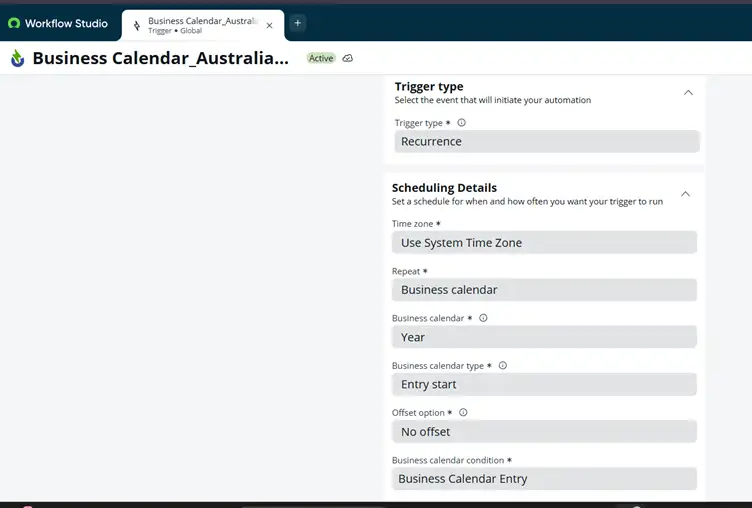
Australia adds the ability to trigger flows using a business calendar, allowing automation to run on existing business schedules instead of only basic time-based recurrence. This helps align flow execution with working days, shifts, holidays, and operating hours.
It connects Flow Designer scheduling to the broader Business Calendar capability in the platform, where calendars and calendar entries are defined separately and can then be reused. ServiceNow documents business calendars as records with associated calendar entries and filter options, which is why this matters – it supports reuse and centralized schedule governance.
Why It Matters
This is important in enterprise automation, where timing often needs to follow actual support windows, business operating hours, or plant schedules rather than simple time-based recurrence.
Playbook Testing With ATF
Australia adds support for testing playbooks with the Automated Test Framework, giving teams a more reliable way to validate guided process behaviour during development and regression testing.
Why It Matters
This improves delivery quality and makes playbooks easier to validate as part of governed implementation pipelines.
UI Interactions in UI Builder
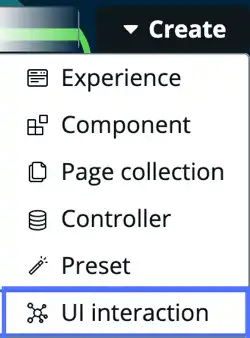
Australia adds UI Interactions in UI Builder, allowing developers to define reusable UI behaviour and logic that can be triggered by user actions or system events and reused across pages and experiences. This matters because it reduces duplicated client-side logic and supports a more modular front-end design approach across workspaces.
Why It Matters
This is a meaningful developer feature because it improves front-end modularity and reuse. Instead of rebuilding the same interaction logic across multiple workspace pages, developers can define it once and apply it consistently wherever needed.
That reduces duplicated logic, simplifies maintenance, and makes UI behaviour easier to govern across experiences.
API Enhancements
Australia also introduces a set of smaller but practical API enhancements, including CopyDynamicSchemaAPI, new methods on GlideDate and GlideTime, and GlideElement.getDynamicNamespace().
For example, CopyDynamicSchemaAPI can help replicate dynamic schema definitions in configurable applications, reducing the need to rebuild metadata structures manually.
The new GlideDate and GlideTime methods are useful when working with external date formats, service windows, or time-based business logic, making it easier to convert user-friendly values into platform-ready formats.
Here’s a simple example:
var gd = new GlideDate();
gd.setDisplayValueEx('Jan 28, 2026', 'medium');
Why It Matters
These may not be the headline features of the release, but they are valuable in advanced implementation scenarios such as metadata-driven applications, dynamic schema replication, scheduling logic, and integrations that require tighter control over date and time values.
How Does Australia Differ from Zurich?
Zurich expanded platform capability in several areas.
Australia feels different because it puts more emphasis on the developer experience and automation design patterns:
- From manual flow creation to AI-assisted generation.
- From pure execution logs to guided troubleshooting.
- From monolithic playbooks to modular, nested structures.
- From static automation to more context-aware orchestration.
That is the real developer story of this release. This is less about adding isolated features and more about changing the development model itself.
Final Thoughts
From a developer’s perspective, the Australia release is not defined by one major API or one standalone feature.
Here’s its real significance:
- AI is entering the build experience.
- AI is entering runtime orchestration.
- Workflow design is becoming more modular.
- Troubleshooting is becoming more assisted.
- Guided process design is becoming more reusable and testable.
That combination matters because it changes how teams build on the platform. Developers spend less time wiring every piece manually and more time shaping behaviour, validating outputs, and designing maintainable automation patterns.
Australia is “AAA”: AI-Assisted Australia – not just faster development, but better building with AI.