




There have been a lot of changes since ServiceNow acquired Moveworks in December last year, including the introduction of Otto, the new AI assistant; EmployeeWorks, the new AI front door for employees; and many other integrated AI innovations. With these, the whole user experience has shifted tremendously: the way users search, access, and interact.
It’s not a rebrand of the products or a refresh of the look and feel, but fundamental changes that reshape or replace some of the already successful products in the market: e.g., Employee Center, Now Assist, Now LLM, and the Now Mobile app. And it’s just the start, as market demand and supporting technologies are evolving faster than can be imagined.
Employee Slate is one of the latest AI-based and conversation-first experiences that is completely transforming employee interactions, and it’s soon becoming the face of your business, replacing your portals and intranet pages.
The Evolution of EmployeeWorks
ServiceNow EmployeeWorks has emerged by combining ServiceNow and Moveworks solutions to provide an overarching experience that sits across all your systems with a central place for employee interactions.
Moveworks is known for its AI capabilities that enhance the employee experience and connect with Otto, and ServiceNow is the workflow engine. EmployeeWorks brings together the best of both and is designed to be conversation-first from the very beginning, delivering a personalized AI experience to drive true productivity. It uses context-aware, specialized assistants that give you the answers and support you need based on your role, location, and other signals.
Moveworks offers conversational AI for all employees, from interacting with different systems and filling out forms to finding instant resolutions and taking actions. Employees use EmployeeWorks for everyday tasks and requests. A key aspect is that it breaks the silos between different experiences: portal, mobile, and conversational, so you get the same experience regardless of where and how you start the interactions.
EmployeeWorks solution covers the employee portion of ServiceNow Otto (i.e., Moveworks) and ServiceNow’s advanced UI/UX (i.e., Employee Slate). It also includes Employee Center Pro for customers who want to stay on it. Many of us will find a lot of overlap between EmployeeWorks and Now Assist; hence, the main question arises about the future of Now Assist.
What’s Next for Now Assist?
ServiceNow has made a lot of investment in its Now Assist capabilities over the last few years to make ServiceNow a true AI platform. However, the shift towards Moveworks has reshaped its AI landscape.
The main thing that distinguishes Now Assist from its Moveworks counterpart is its focus on automating complex workflows, given that business leads and fulfillers use it extensively across different domains. Because of this clear division, Now Assist serves as a powerful complement to Moveworks rather than a competitor.
For example, in the IT space, Now Assist can autonomously resolve incidents with intelligent routing, contextual assists, and recommendations, while EmployeeWorks enables users to skip the ticket tracking and get instant help with troubleshooting, managing distribution lists, provisioning applications, approvals, and so on.
Ultimately, these two distinct capabilities are brought together under Otto, the singular ServiceNow AI experience brand. Otto unites the fulfiller-focused power of Now Assist with the conversational frontend of Moveworks to serve different personas, channels, and use cases across the platform. For now, using both capabilities together provides the most comprehensive experience and value for customers.
Moving forward, ServiceNow will continue investing in both engines: Moveworks for employee experience and Now Assist for business operations. However, it is important to note that Now Assist will not receive enhancements on the employee experience side, since ServiceNow’s AI investment is heavily focused on Moveworks capabilities.
From a licensing perspective, your assist count now applies to both Moveworks and Now Assist. Whether obtained via an EmployeeWorks license or ITSM Prime, all assists are added up to a single pool.
This shift represents a broader evolution in the user experience. For example, moving from a traditional Virtual Agent based on Natural Language Understanding (NLU), to the Now Assist AI capabilities in Virtual Agent, and now to Moveworks capabilities for a better employee experience. Although Now Assist in Virtual Agent will still be used by agents in workspaces to leverage the workflows behind the scenes, the overall technology stack has evolved with the addition of Moveworks.
We are already seeing this transition across the platform. For instance, the Now Assist panel will soon be renamed the ServiceNow Otto panel. Additionally, the recently introduced Moveworks for Employee Center application will replace Now Assist with Moveworks Assistant on Employee Center. While work on Now Assist continues for some time, ServiceNow strongly advises customers to begin preparing for and switching to Moveworks solutions.
The Launch of ServiceNow Employee Slate
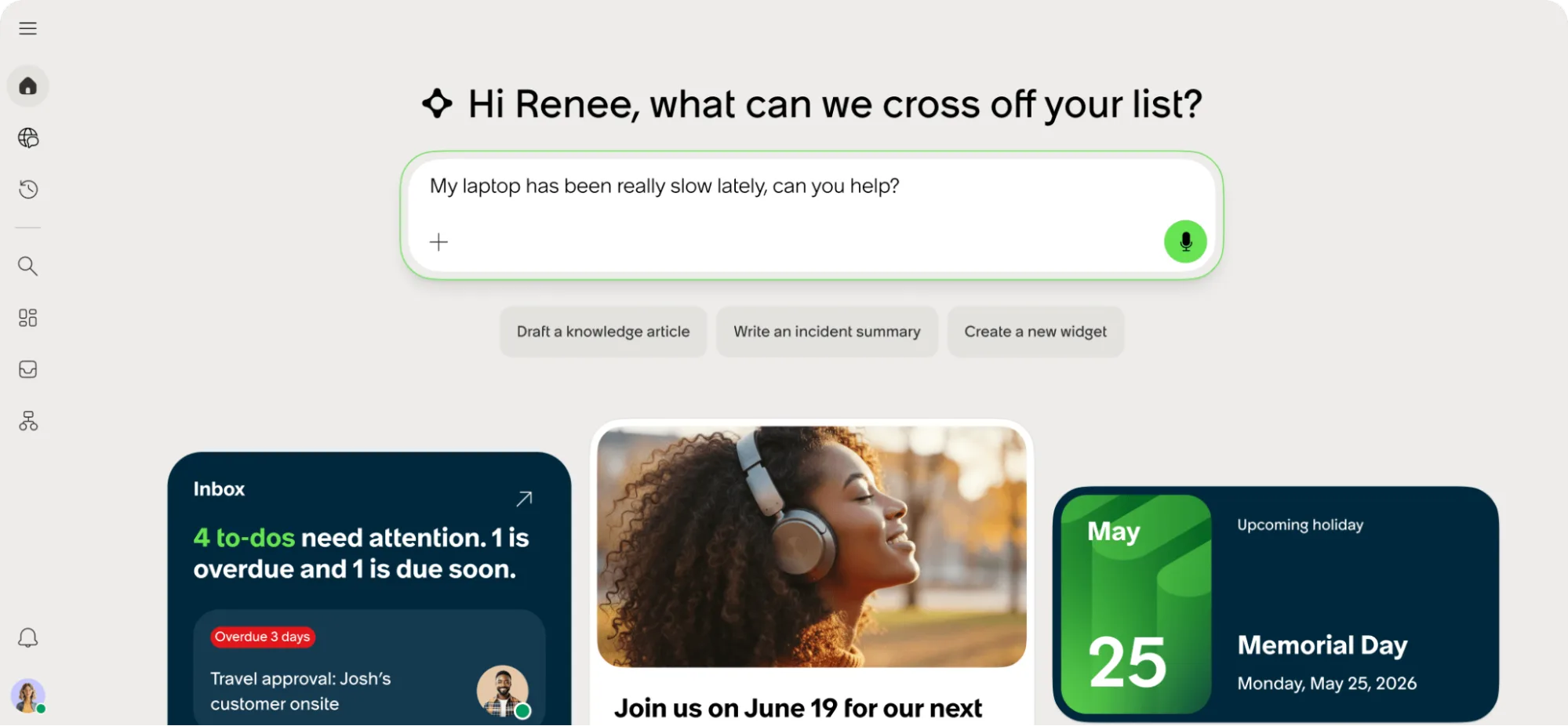
Employee Slate, launched in May this year, is the next-generation AI-powered experience that focuses on a conversation-first web experience based on ServiceNow Otto. It is the new employee experience that dynamically generates and brings up personalized data, insights, and notifications. However, ServiceNow is not calling it a portal but an experience.
Employee Slate is not a rebrand or a new design on top of Employee Center; it is built on a new Tech Stack, called the AI UX framework, which makes it more agile and efficient. For many, it is a move from a dominant browse experience to a more conversation-based experience while retaining some of the existing browse elements, such as widgets and pages.
The good thing about the ServiceNow Employee Slate experience is that employees do not need to worry about whether their inquiry is an Incident or a Request, or whether they fill the HR inquiry form, complete a finance request, or submit an IT catalog item. They just start a conversation with the AI, whether through texting, voice chat, video, or screen sharing.
The idea is for users to get a consistent experience regardless of how they’re interacting, even across different channels. For example, users could use Microsoft Teams on mobile. Moveworks’ assistant can be simply embedded to allow users to interact conversationally, or open a modal for additional support.
Employee Slate uses Kubernetes on the data center side for better rendering of experiences. This, together with the Lit.JS Tech Stack, helps accelerate the developer experience and makes it less dependent on the platform. It means ServiceNow can also auto-upgrade it as needed to offer enterprise-grade performance.
ServiceNow is continuously adding more configuration options, especially with their frequent updates plan. Unlike Employee Center, which was on quarterly releases, Employee Slate is on monthly releases, and that means faster enhancements and deliveries. And the good thing is ServiceNow is closely working with the partners and customers to get their feedback and adjust the products and experiences around Employee Slate.
What’s Next for ServiceNow Employee Center?
Employee Center (Pro) is the mainstream portal for employees to get what they need and will still be supported and maintained by ServiceNow. Thousands of customers are widely using it, and it covers use cases (e.g., desk reservation experience with Workplace Service Delivery) which are not yet supported by Employee Slate.
Also, Employee Center is still the recommended experience for non-AI customers, although it lacks advanced conversational AI capabilities, such as Enterprise Search and Specialized Assistants.
ServiceNow plans to bring Employee Slate to the same level as Employee Center Pro (EC Pro) by early 2027 so it covers all the same features, tools, and capabilities. A main consideration for ServiceNow customers is that Employee Slate is not sold as a standalone product, but as a complement in ServiceNow EmployeeWorks and new AI packages. The ServiceNow roadmap is for all customers to ultimately head to this new experience as the next version of Employee Center, although for now, they can also coexist.
Employee Slate Tiers
Similar to Employee Center, Employee Slate is being offered in separate base and premium tiers: Employee Slate Foundation and Employee Slate Advanced. The foundation is for any employee-related use case such as service delivery, along with a baseline experience across all ServiceNow products. The advanced tier adds new capabilities, especially around employee communications.
Employee Slate Foundation
The Foundation tier provides an AI-native service experience for all employees to improve their everyday productivity. Employees have a unified inbox for all their tasks, approvals, and requests in a single experience. And, they can ask anything, complete tasks, and automate actions seamlessly.
Employee Slate Advanced
On top of the Foundation capabilities, the Advanced tier offers a wide range of communications and engagement capabilities for employees, with targeted announcements, news, and, soon, events and multi-stage campaigns delivered across different channels. It also offers dynamic service-specific and departmental microsites and topic pages.
Another advanced-tier capability is the App Launcher, which enables easy access to all your tools and systems. There are also some widgets focused on portal consolidation and the intranet that are only offered in the advanced tier.
Deep Dive into Employee Slate
In this section, we are deep-diving into some of the key features and capabilities of Employee Slate.
AI Native Service
Employee Slate offers a completely different approach to accessing services, called AI Native Service. It provides a seamless assistant experience for knowledge and catalog, where users can initiate and monitor their requests and cases in a single prioritized view of tasks and approvals with AI summaries.
The AI can quickly look into all the connected systems and provide a consolidated response based on your conversation and the intent behind the question. The platform provides suggestions and relevant information while keeping you in the conversation and on the same page so you can review and follow up.
It could open a knowledge article or a new form in a split-view side-by-side, or give you the option to get help as a catch-all if you don’t find what you need or you don’t want to engage conversationally.

Hyper-Personalization
Your access to content and widgets, and the personalization offering, are all based on user criteria. The assistant personalizes the response based on who you are.
For example, if you ask for a fix to your laptop, it already knows what laptop you have, what the configuration is, what is installed on it, what the warranty details are, so the response is tuned exactly to your experience.
Or, you can ask for the same laptop as your manager, and you’re presented with the details and configurations, along with a summary of how to order one, along with a list of policies from different systems.
Of course, the level of personalization is based on how much data is available on the connected systems and the personalized profile information ingested for users within the Moveworks registry.
Enterprise Search
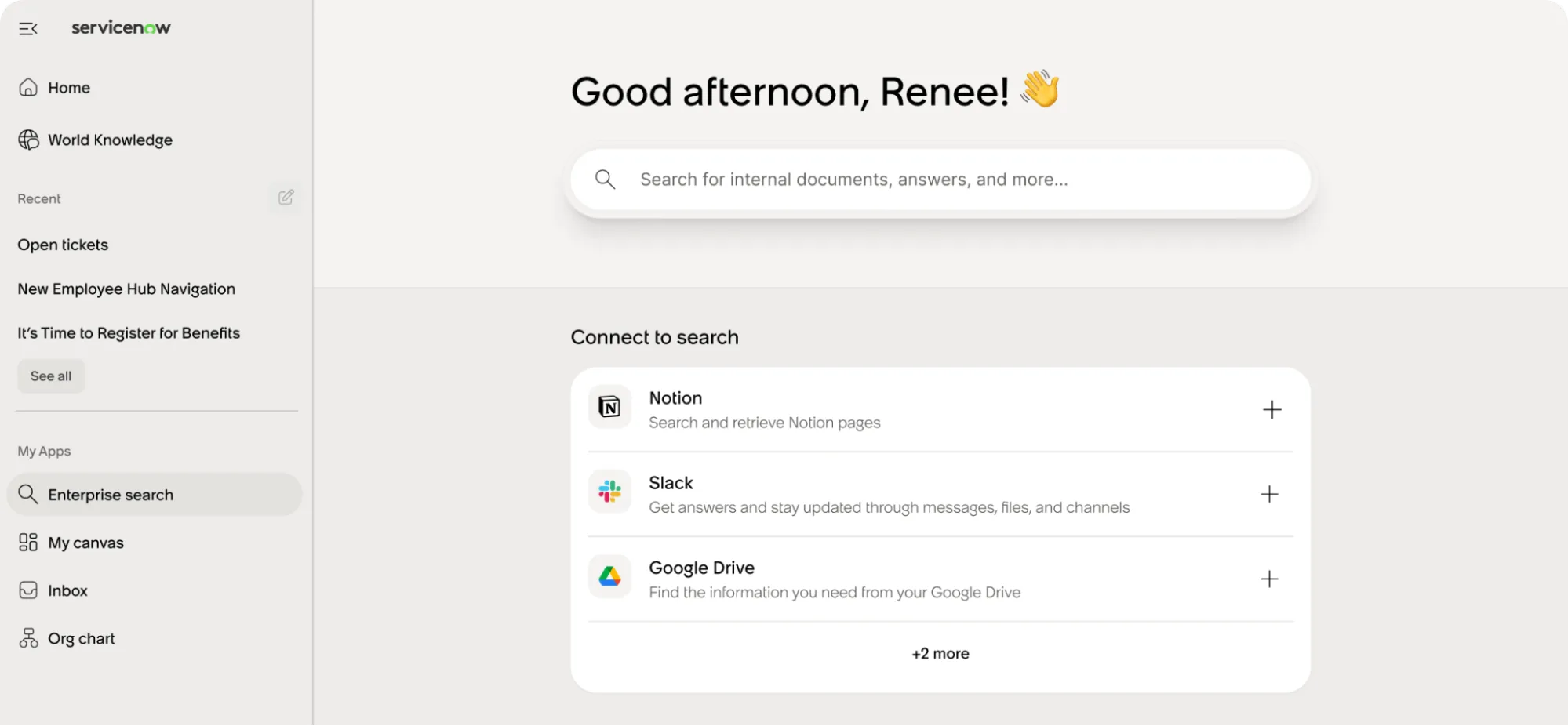
With Enterprise Search, you can search deeper across 50+ connectors (live or indexed search) on company sources or external, public knowledge. You can also research with AI summaries, apply search filters (e.g., source, date modified, content type), and deep-dive with the assistant.
Specialized Assistants
World Knowledge is an example of a specialized assistant that is predefined with relevant context. It searches and synthesizes information from the web and uploaded files but does not access your internal systems. Soon, there will be other specialized assistants such as calendar management or areas that cover particular use cases.
The Canvas
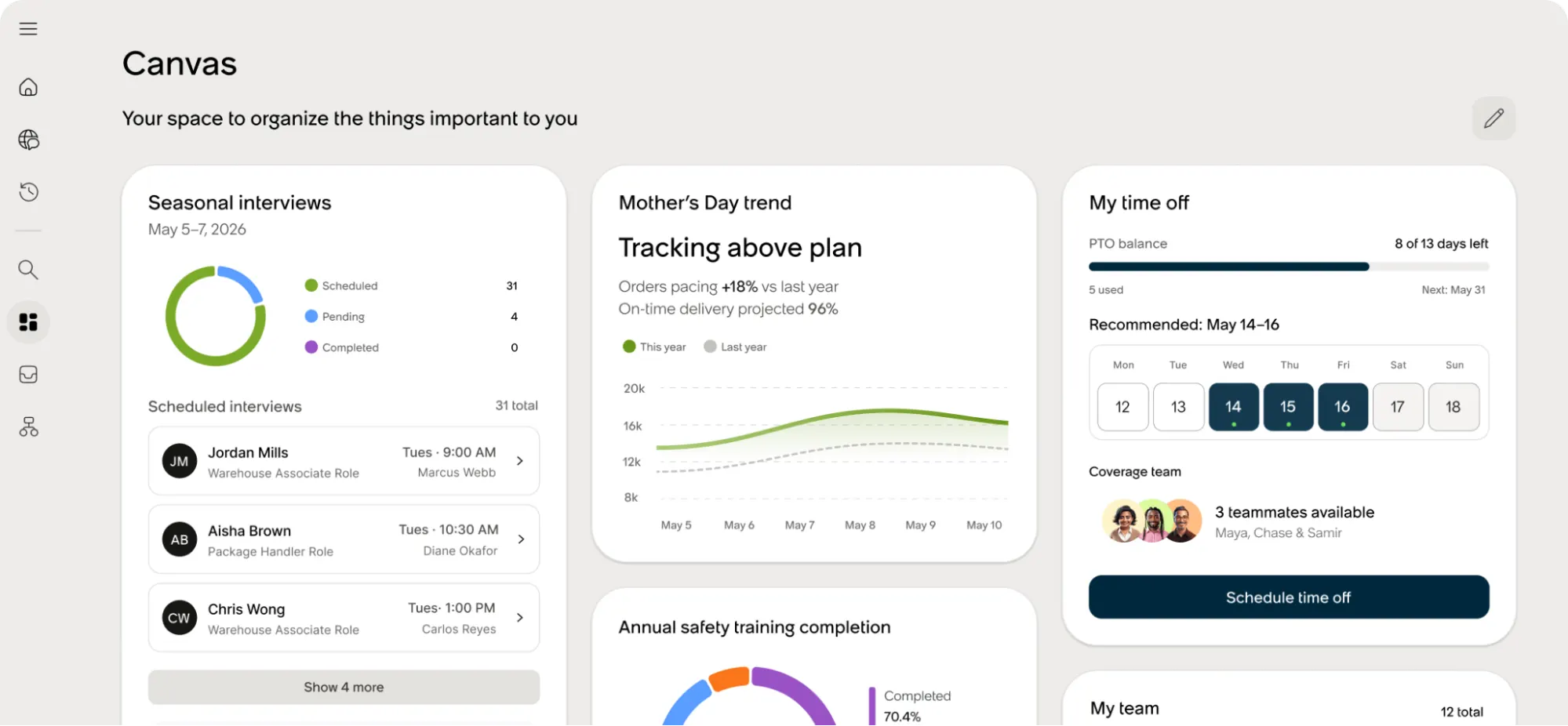
Employee Center comes with a personalized Canvas where design creativity comes to life. It’s a space for you to add and organize things that are most important to you, similar to Platform Analytics Dashboards.
Admins can define presets for different roles and personas, and users can personalize them. You can choose from a big list of widgets and add them where needed with simple drag-and-drop, resize them to your preference, or even remove them if they’re no longer relevant.
Widgets and Vibe Coding
Although custom widgets built for the Employee Center cannot be migrated into Employee Slate (yet), developers can easily build the widgets even with vibe coding, using a Now Assist for Creator skill. For example, you can ask to create a widget that shows all open P1 incidents with separate cards, specify what field values to show, and in what order and background color, all using a chat experience.
Front-End Authoring
The authoring experience is something that is now entirely on the front end in Employee Slate, so authors do not need to go back to the platform to write and publish content. The whole experience is included, from creating content (such as an announcement) and adding images, to setting the audience, publishing it, and promoting it to different audiences and channels (e.g., MS Teams or mobile). You can see a preview as you add the content and it becomes available in your Content Library once created.
Targeted Communications
A key Employee Slate capability, especially in the Advanced tier, is communications such as targeted employee announcements for more information or better engagement. For example, an employee may see an announcement that their laptop is due for a refresh or get a suggestion to apply for a benefit that they’ve just become eligible for.
ServiceNow is also working on building a native news authoring experience in Employee Slate that is tied to content publishing. This will include using the AI assistant capabilities for authoring and publishing. On top of that, there is also a content feed widget on canvas that provides more options.
Notifications
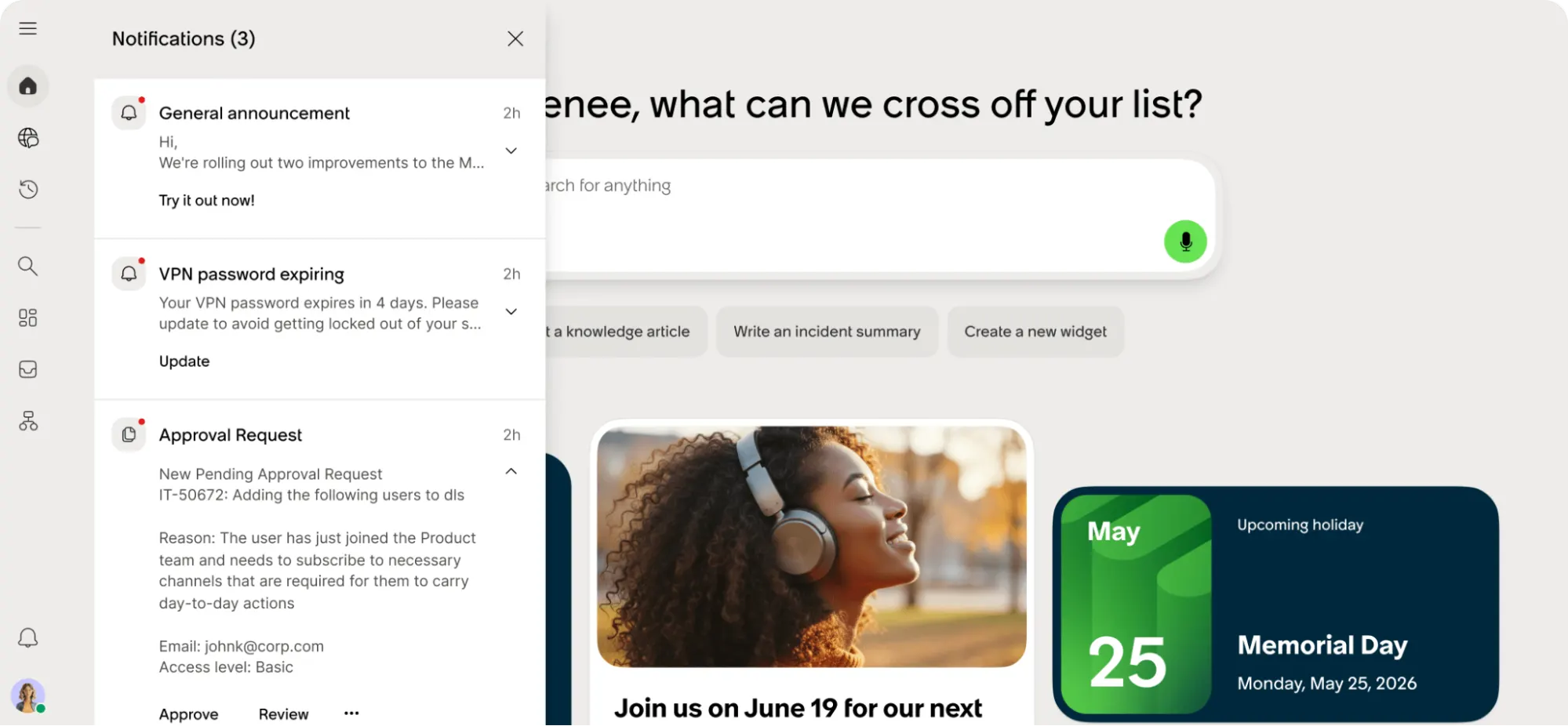
There’s a Notifications panel on Employee Slate that shows updates on ticket status changes, comments on tickets, general announcements, and any proactive communications sent from Moveworks. Not everything is currently displayed here as it will take some time for full integration with other capabilities, such as the Employee Communications module.
Unified Administration
The administration part of Employee Slate is also a unified, AI-powered experience. It offers an Admin Console for all configurations, such as configuring assistants and theming, in one place. For example, you can apply your own branding and theming. You can also apply multiple brands and themes at the same time, depending on criteria such as geography or department.
User Experience Analytics
ServiceNow’s User Experience Analytics now provides a consolidated unified analytics experience with dedicated dashboards that track every session, page visit, and widget render on Employee Slate. It includes prebuilt user journey flows and helps you understand engagement with Moveworks capabilities. It shows you how users are engaging with it, whether they are getting help, where numbers are dropping off, or what needs to change.
Compatibility
Employee Slate for Moveworks is compatible with Zurich patch 9 and Australia patch 3 releases and beyond.
What’s On the Roadmap?
A lot has changed since the initial launch of EmployeeWorks and Employee Slate, and so many enhancements and innovations are planned for the next few months. ServiceNow’s focus is currently on providing role-based and persona-based productivity.
In summary, this includes the uplift to the Now Mobile app to work with the Employee Slate experience, a library of prebuilt specialized assistants, a better browse and comms experience, and deeper ServiceNow integrations.
For users who’d like to keep the browse-like experience as an alternative, ServiceNow is planning to introduce default landing pages or microsites for different domains with prebuilt templates, built on top of the taxonomy and topic pages that are familiar to users from their experience with Employee Center. Still, the conversational experience is tied into it. Users can start in chat to get to a topic page and then continue browsing, or they can start browsing and transition into a conversation with the assistant.
Similarly, ServiceNow is introducing a curated company page, functioning like a traditional landing page but dedicated entirely to the company and its corporate communications.
As we go, new content types will be added to the experience, including news, events, and campaigns. AI-powered content authoring is the other area on the roadmap, enabling you to use prompts to create communications. For example, you can ask it to create an announcement from a knowledge article and publish it to a specific channel.
Beyond standard content, capabilities such as Daily Digest and scheduled newsletters are currently being worked on for a future release.
ServiceNow is heavily focused on specialized assistants (e.g., Calendar Assistant and IT ServOps Assistant), and this is a key differentiator for the employee experience. Additionally, the Assistant Builder and new templates will become available for users to create their own assistants.
Finally, there will be a Conversations API that allows you to build an integration leveraging Moveworks as an assistant. This will enable you to create custom conversations and receive responses via an API interface.
Summary
For years, we have focused on building complex, browse-heavy portals, essentially asking employees to learn our internal systems just to get the help they need. Now, that approach has shifted. We are moving away from traditional navigation menus and forms, stepping into a model where employees start a conversation and ask for what they need, and the platform actually understands and acts on their inquiry.
These changes have come to life through three connected parts. First, EmployeeWorks acts as the enterprise-wide AI front door for employees, helping us finally tear down the walls between IT, HR, and Finance. Behind the scenes, ServiceNow Otto is the AI experience that takes employee intent and turns it directly into completed work. Bringing this all together is Employee Slate, the new UX/UI that embeds Otto natively to deliver the experience.
It is important to recognize that this is not just a UI refresh or a simple upgrade. Employee Slate is a completely new employee experience deployment that will replace Employee Center. For those of us running these platforms, our job is no longer just turning on a new plugin or application – it is about planning a complete change in how our businesses deliver value.
The future of work is conversational, and the time to start planning our transition is now.