





In today’s fast-paced ServiceNow environments, organizations are delivering enhancements, bug fixes, integrations, and platform upgrades more frequently than ever before. Every June and December, ServiceNow ships a new release. Those releases bring exciting new features, security patches, and performance improvements.
They also bring risk. In organizations where ServiceNow is deeply embedded – running ITSM, HR workflows, procurement, security operations, or even custom-built applications – an untested upgrade can quietly break things that dozens of teams depend on every day. A form that no longer loads.
The traditional answer to this problem was manual regression testing: someone sits down, clicks through every major process, and tries to confirm that nothing has broken. If your team is small and your instance is straightforward, that might work. But for most enterprises, it is not sustainable. The scope is too wide, the testing window too narrow, and the stakes too high.
This is where ServiceNow’s Automated Test Framework (ATF) comes into play. This practical guide walks through everything you need to know about ATF: what it is, how it works, who it is designed for, what it costs, and how to use it effectively as part of your upgrade lifecycle.
What Is ATF and Why Does It Matter?
ATF enables organizations to automate repetitive testing activities, improve release quality, reduce regression risks, and gain confidence in platform changes.
Whether you’re implementing new functionality, applying patches, or preparing for a major upgrade, ATF can significantly reduce testing effort while improving overall reliability.
ATF can test the following:
- Form behavior and UI validation rules.
- Business rules and script includes (any logic or behavior).
- Workflow and flow logic (approvals, notifications, transitions).
- Access controls and role-based restrictions (whether someone can see or update).
- Integration scripts and REST message handlers (using REST methods).
- Catalog items and service portal functionality (opening a Catalog/Set Values).
- Scoped application logic (custom app forms and record producers on custom tables).

Steps for ATF Testing
Here are some out-of-the-box (OOB) steps provided by ServiceNow:
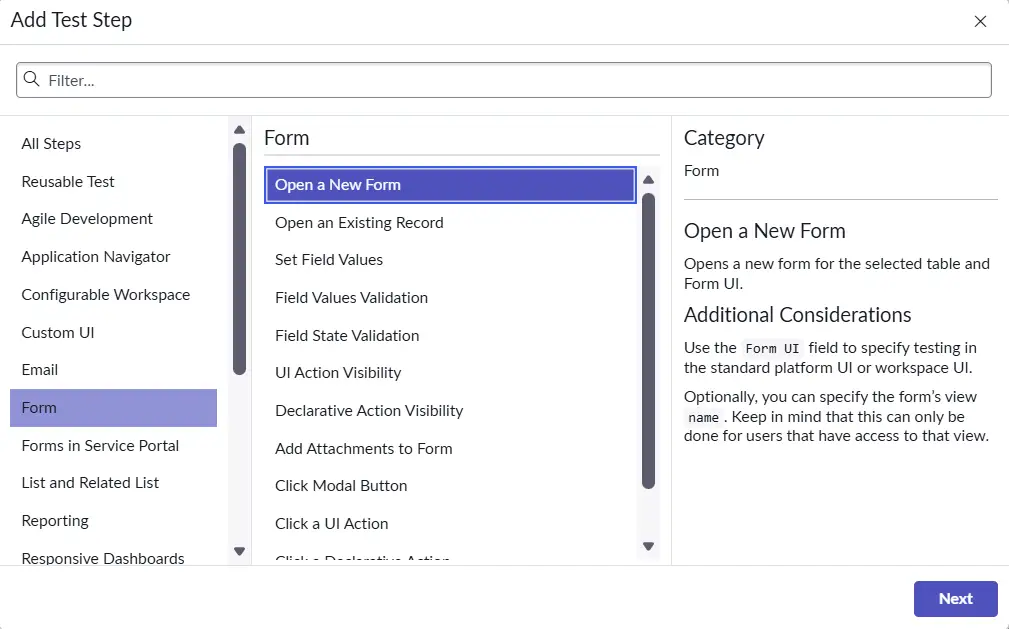
- Under Forms, these are various steps that are provided OOB by ServiceNow, which can be used to open a new or existing form, or perform any activity on the form level.
- Under Email, sending email, or validating the email arrived or sent by ServiceNow:

- Under Application Navigator, checking the module visibility or navigating to a module:

- Under Workspace, Open Workspace Page by passing the URL, or testing whether a page looks as expected:

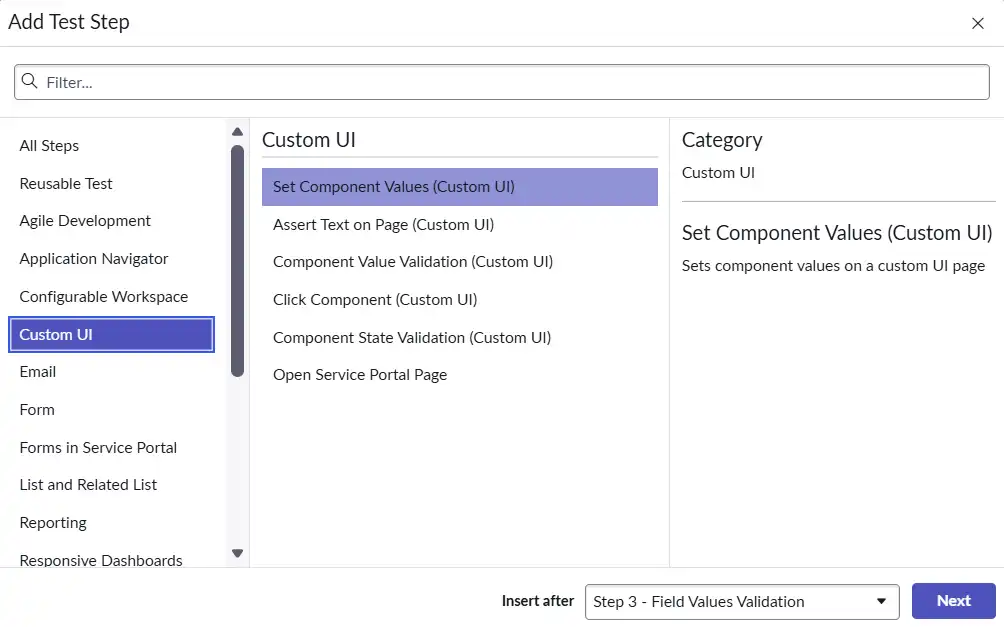
- Under Custom UI, setting values via custom UI steps, Open Service Portal Page, Click Components:
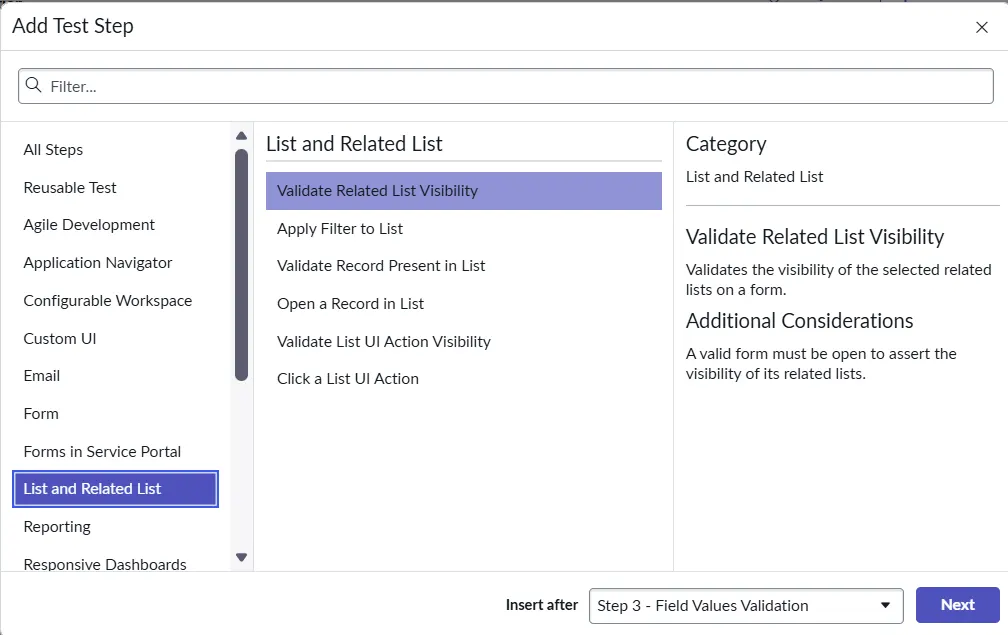
- Under Lists, checking the list visibility on form, applying a filter to a list, opening a record in a list, or validating the record presence:
What Does ATF Not Cover?
- Performance Testing: ATF won’t tell you whether a page loads slowly under load. It’s a functional framework, not a load or stress testing tool. You’d need something like Apache JMeter or a dedicated ServiceNow performance testing approach for that.
- Security / Vulnerability Scanning: ATF doesn’t analyze your code for security weaknesses or run penetration-style checks. It verifies functional behavior, not attack surfaces.
- Static Code Analysis: ATF requires a live, running instance to execute against. It doesn’t inspect code at rest – no linting, no syntax analysis, no dead-code detection without actually running things.
- Cross-Instance or External System Testing: ATF tests what happens inside your ServiceNow instance. It can call an integration script, but it can’t independently validate what happens on the other end of that integration (the external API, the downstream database, etc.).
- Non-ServiceNow Surfaces: If part of your process lives in a third-party system or a custom portal outside the ServiceNow domain, ATF can’t reach it.
- Production-Safe Continuous Monitoring: ATF tests create and modify records. Running them against production without careful scoping can generate noise or unintended data, so it’s not a drop-in replacement for real-time monitoring tools.
- Limited Widget and UI Component Support: ATF struggles with modern UI components built using the Now Experience UI Framework, such as forms, lists, and dashboards. Many of these components are not fully supported, leading to incomplete test coverage for custom workspaces.
- Inability to Interact with Complex UI Elements: Dynamic elements like tabs, related lists, drag-and-drop interactions, and pop-ups in SOW may not behave as expected during ATF testing. Asynchronous loading and heavy JavaScript usage can further complicate interaction and validation.
- Pop-up Windows and Modal Dialogs: Handling dynamic elements like pop-ups or modal dialogs is difficult for ATF. Custom scripts or test steps are often needed to interact with these elements effectively.
- Performance and Reliability Issues: Dynamic content in SOW can cause timing issues during testing. For instance, ATF tests may execute too quickly before the UI fully renders, leading to unreliable results or false negatives.
Core ATF Features and Capabilities
ATF has a fairly broad surface area, but the features described below represent the core capabilities:
| Capability | What It Does |
| Test Designer | It provides a low-code interface for building tests step by step. Non-developers like process owners/product owners etc. can easily create tests using a point-and-click workflow, choosing from a library of pre-built step templates. |
| Step Templates | It gives us reusable building components for common actions: open a record, set a field, click a UI element, run a script, call an API, check an output value. |
| Test Suites | It also provides logical containers that group related tests together. Suites can reference other suites. |
| ATF Runner | It is the execution engine. It runs tests and suites on demand or via automated triggers. Supports both server-side and client-side test execution. |
| Impersonation | ATF Tests can run as specific users or roles and ensure that the right people see – and cannot see – the right things. |
| Parameterization | Tests can also accept inputs via parameters and make it more dynamic, making it possible to run the same test logic against multiple data scenarios without duplicating the test definition. |
How to Create an ATF Test Case
Let’s see what the steps are to create the Test Cases in the Automated Test Framework:
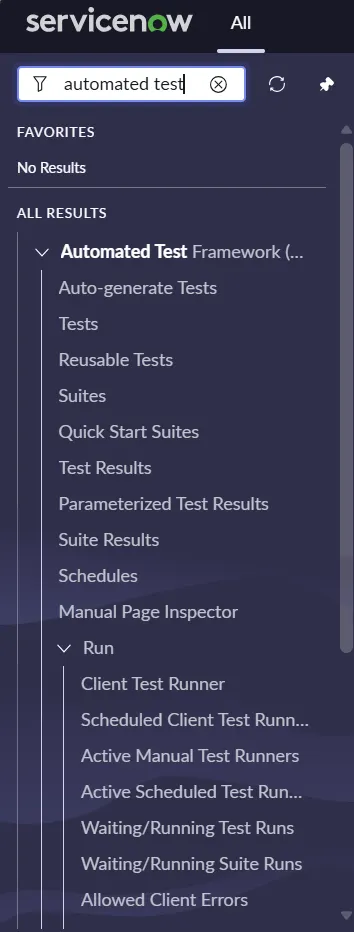
- Navigate to the Automated Test Framework application:
- Create a Test Case and update the Name and Description on the form:


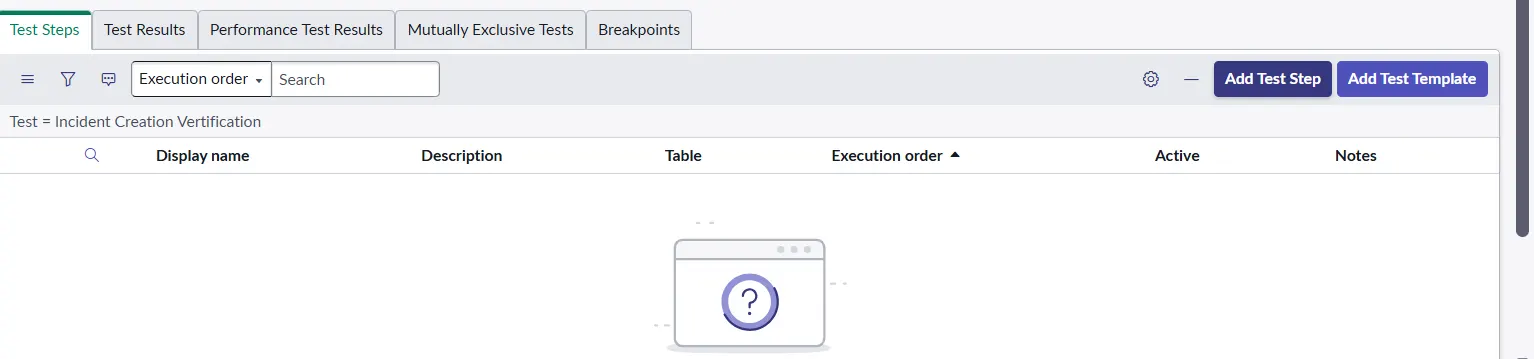
- Create a Test Step by clicking on Add Test Step:
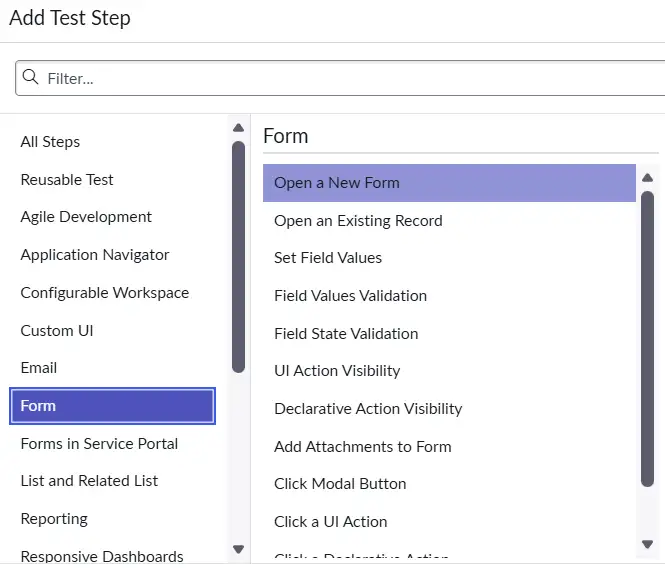
- Adding Test Steps to the Test Case:
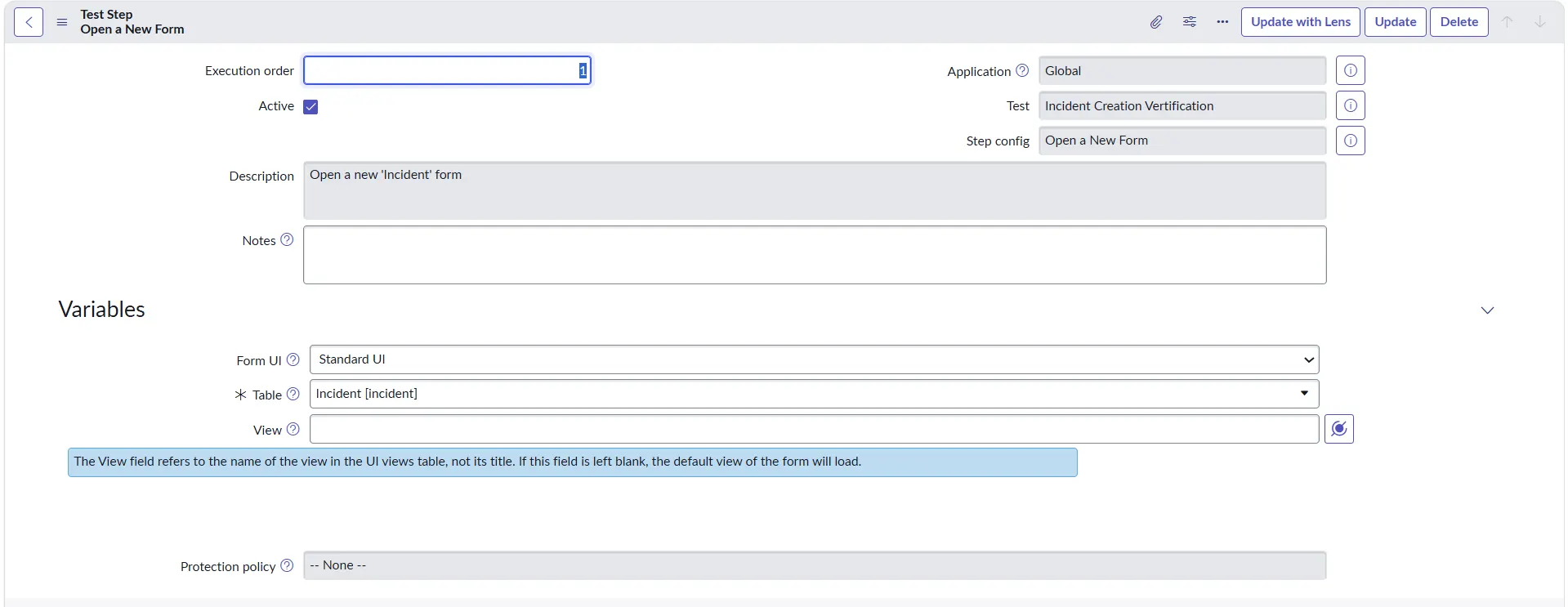
- Open a New Form Test Step and fill the required details like Table, View (Optional), etc:
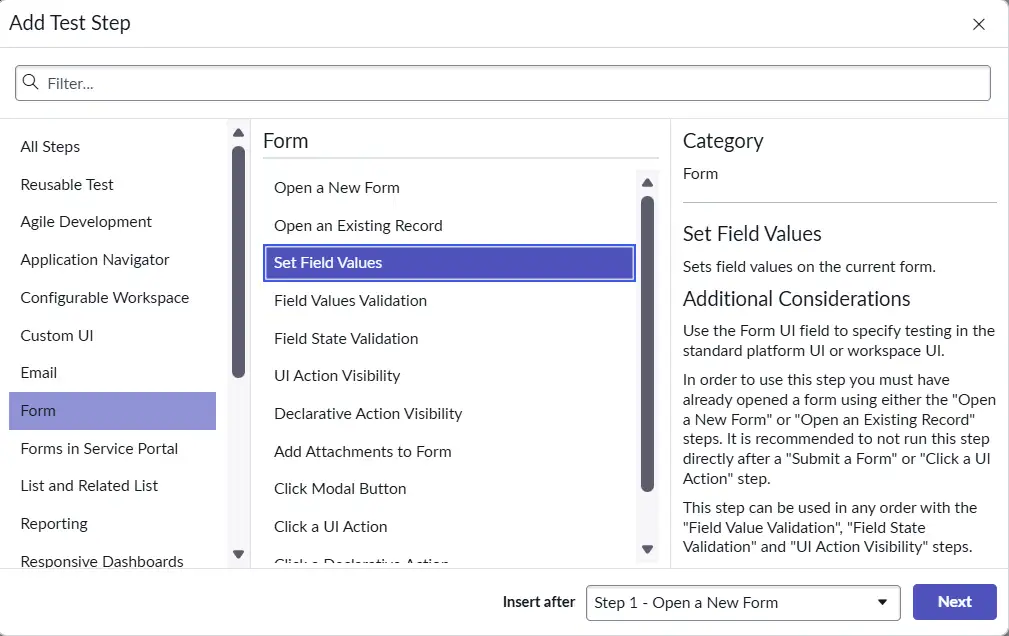
- Set the field values in an Incident form by selecting the Set Value Step:
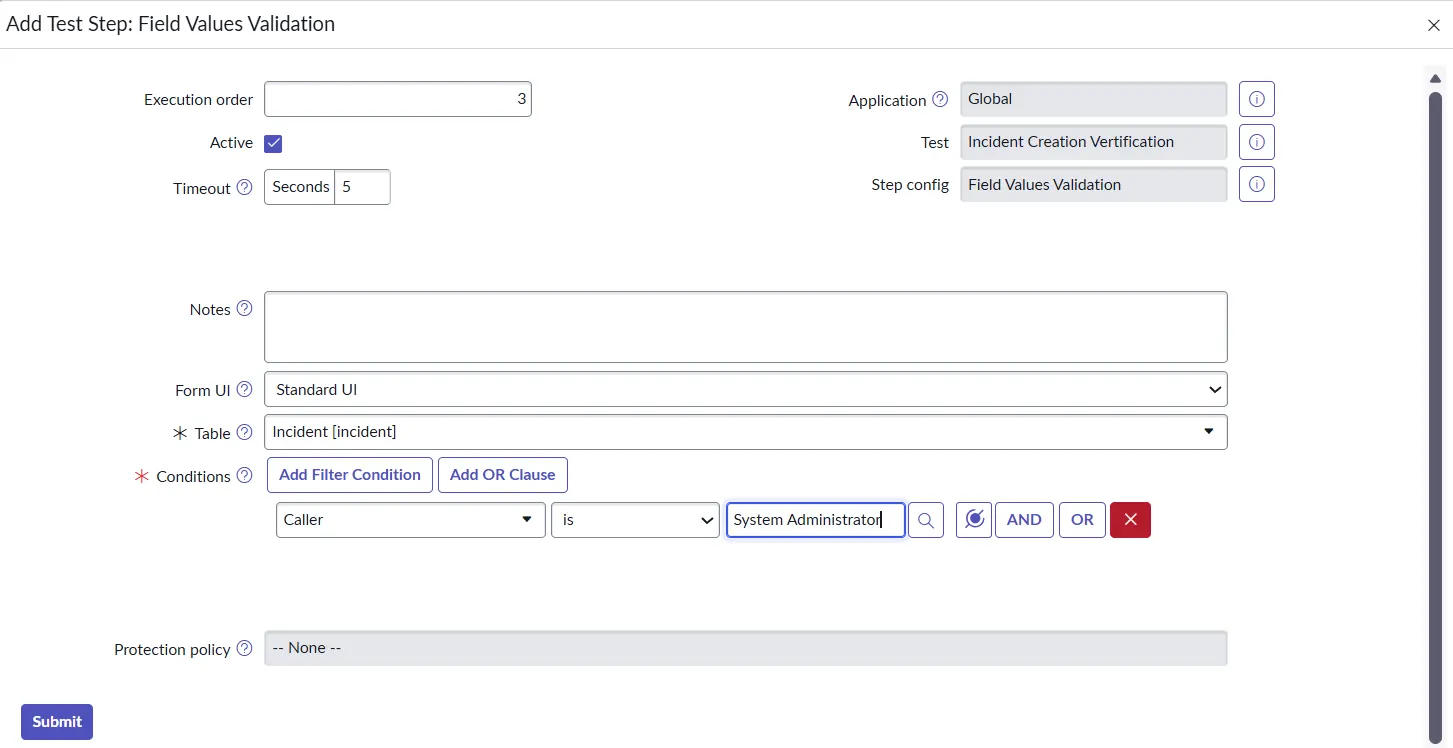
- Validating the field value by using the Test Step “Field Value Validation”:
- All the steps are added. Now you can click on Run Test:
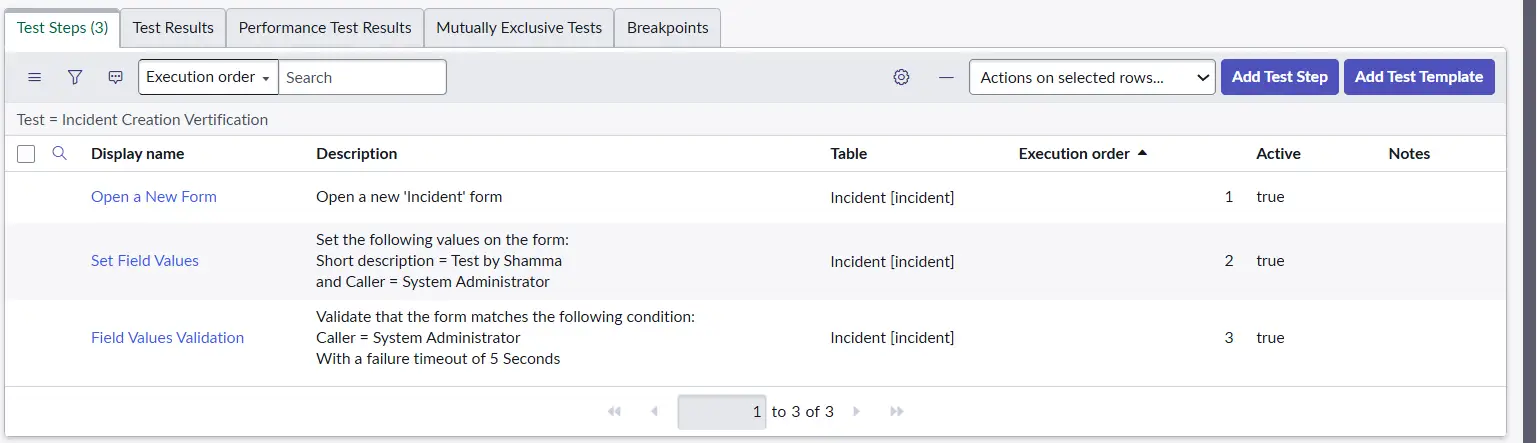

Similarly, you can automate any use case and its testing, which can help you identify issues during deployment or upgrades.
ATF Costs and Plugins
ATF is included with the ServiceNow platform license. If your organization has a ServiceNow subscription, you have access to ATF – there is no separate charge or extra license for the core framework.
This is a significant advantage compared to many third-party testing tools, which carry their own licensing costs and renewal cycles.
That said, certain advanced capabilities – particularly those related to CI/CD pipeline integration and cross-instance test orchestration – may require specific spoke licenses or platform packages depending on your subscription tier. If you are evaluating these features, it is worth confirming with your ServiceNow account team what is included in your current agreement.
ATF is delivered as a set of platform plugins. Most of these are available OOB on current instances, but some may need to be activated, particularly on older instances or in environments where they were not part of the initial setup.
The key plugins are:
- Plugin/Component: Automated Test Framework
- Plugin ID: com.glide.automated_testing_framework
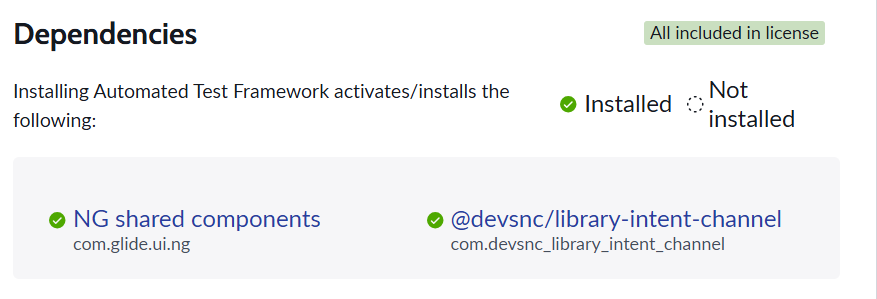
Note: Testing framework and tools that enable users to validate customizations prior to production deployments. This is the core plugin required for ATF.
Plugin Activation
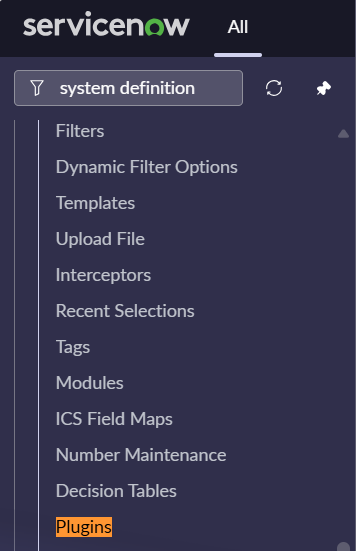
To activate a plugin, navigate to System Definition → Plugins in your instance and search by the plugin ID listed above.
Some plugins require a request through your ServiceNow account team if your contract tier does not include them. Always activate plugins in a non-production environment first and test before promoting to production.
Which ServiceNow Roles Use ATF?
ATF is relevant to a wider audience than many people initially assume. It is not just for developers or QA engineers – it touches almost everyone involved in running and maintaining a ServiceNow environment.
- ServiceNow Developers: Developers are typically ATF’s heaviest users. They use it to write regression tests alongside new features, to validate that a change to a script
- Platform Administrators: Admins are often responsible for coordinating upgrade preparation and regression testing windows.
- QA / Testing Teams: Organizations with dedicated QA functions use ATF to build formal test plans and execute them consistently.
- Business Process Owners: Process owners often have limited technical involvement in ServiceNow. But they have a strong interest in knowing that their processes still work correctly after an upgrade. ATF lets their technical counterparts demonstrate this in a concrete, documented way.
The Benefits of ATF
- Faster, More Confident Upgrades: ServiceNow upgrades are often treated as high-anxiety events because teams do not know the unknowns. Manual testing covers what people remember to check; automated testing covers what was defined.
- Earlier Detection of Issues: Bugs found in production after an upgrade are expensive and often require emergency patching that consumes developer time. ATF shifts defect detection earlier in the lifecycle, where fixes are faster and less disruptive.
- Reduced Reliance on Manual Effort: With ATF, much of that effort is replaced by automated execution. People are still needed to triage failures and validate new functionality, but the volume of manual clicking drops substantially.
- Living Documentation: A well-maintained ATF test library is also a form of documentation. It records what the platform is supposed to do under specific conditions.
| Before ATF | After ATF |
| 2-4 weeks of manual regression testing. | Automated regression completes in hours. |
| Inconsistent coverage across testers. | The same tests are run the same way every time. |
| Defects discovered post-upgrade in production. | Issues caught in development before promotion. |
| Testing evidence compiled manually for auditors. | ATF results serve as structured test evidence. |
| Developers reluctant to make changes near upgrades. | Developers can work with confidence up to go-live. |
ATF in the Upgrade Lifecycle: Best Practices
Phase 1: Steady State (Before/Between Upgrades)
ATF is not just an upgrade tool. The most effective teams treat test building as an ongoing activity, not something that happens in the sprint before an upgrade. Every time a developer builds a new feature or modifies an existing one, they should write tests alongside that work.
The goal during this phase is to maintain a test library that reflects how the platform actually behaves today. This means retiring tests that no longer apply, updating tests when intentional behavior changes, and building coverage for any new functionality introduced since the last upgrade.
- Assign test ownership to the team or individual responsible for each functional area.
- Set a minimum coverage target for core business processes.
- Run the full test suite on a regular schedule (weekly or bi-weekly) to catch drift early.
- Build tests as part of the definition of done for development work, not as an afterthought.
Phase 2: Sub-Production Validation
As the upgrade moves through sub-production environments (test, staging, or whatever your organization calls them), run the ATF suite again at each stage. Each environment may have slightly different data or configuration, and new failures can surface.
This is also the stage where you bring in additional validators – business process owners doing spot-checks on their critical workflows, alongside the automated test results.
- Run the ATF suite on every environment promotion, not just the first and last.
- Use ATF results as a gate for promotion approval in your change management process.
- Combine automated test results with targeted manual validation by business owners.
- Ensure the ATF Agent is installed and configured in each environment for client-side tests.
Phase 3: Post-Upgrade Monitoring
After the upgrade is applied to production, run a focused smoke test suite to confirm the most critical paths are working. This is not a full regression—it is a targeted confirmation that production is stable.
ATF can also be used in post-upgrade monitoring by scheduling regular test suite executions against production to catch any issues that emerge after go-live as users interact with the system in ways that pre-production testing did not cover.
- Execute a production smoke test suite within 1–2 hours of go-live.
- Schedule recurring ATF runs in production for ongoing assurance.
- Review results daily in the first week post-upgrade.
- Conduct a retrospective to identify gaps in test coverage revealed by the upgrade.
Key Takeaways
- It’s a platform-native tool, not a bolt-on. ATF lives inside ServiceNow — no external licenses, no sync problems, no separate infrastructure to maintain. That alone sets it apart from most testing tools.
- It’s included in your license. Core ATF costs nothing extra. The plugins you need can be activated on most instances. The investment is time, not budget.
- It’s for more than developers. Admins, QA teams, release managers, and business process owners all have a stake in ATF.
- The upgrade lifecycle is where it pays off most visibly. Running a full regression in hours instead of weeks changes how confident – and how fast – you can move through an upgrade cycle.
- It’s functional testing, not everything. ATF won’t cover performance, security, or static analysis. Know what it does well and pair it with the right tools for what it doesn’t.
ATF in Action
Keen to see how ATF works in real time? Join our upcoming webinar, hosted by NowBen in collaboration with me, Shamma, and Anjali Choudhary, ServiceNow Solutions Architect.