





At a recent SNUG event in Delhi, I asked the community this question: “what is the superpower of ServiceNow?”. One answer I received was that “it connects with everything”, and that is true – I can’t think of a legacy platform, SaaS platform, or any database it can’t integrate with, as ServiceNow rarely works in isolation.
In a typical enterprise, ServiceNow needs to communicate with systems such as Jira, Microsoft Teams, Slack, Salesforce, SAP, Active Directory, and many more third-party applications. For example, an incident created in ServiceNow may need to create a Jira issue, send a Teams notification, or update another monitoring application.
This is where Integration Hub comes in – a low-code way to connect ServiceNow with external systems and use those integrations as part of workflows. Instead of building every integration from scratch, developers can use spokes, reusable actions, and Flow Designer/Workflow Studio.
What Is ServiceNow Integration Hub?
In simple terms, Integration Hub helps ServiceNow communicate with other applications and automate work across them without using any scripting.
For example, we can integrate ServiceNow and Jira using Integration Hub without writing even a single line of code and an incident and its updates can flow between the two platforms.
Why Do We Need ServiceNow Integration Hub?
Imagine your organization uses ServiceNow for incidents and Jira for development. When a high-priority incident is created, you may want to:
- Create a Jira issue.
- Send a Teams notification.
- Update the ServiceNow incident with the Jira reference.
Now if we don’t have an Integration Hub, we will have to write integration scripts for the above requirements in Business Rules, Scripted REST API, REST messages, notifications and many more.
Instead of doing this manually, Integration Hub can make these activities part of the workflow in Flow Designer:
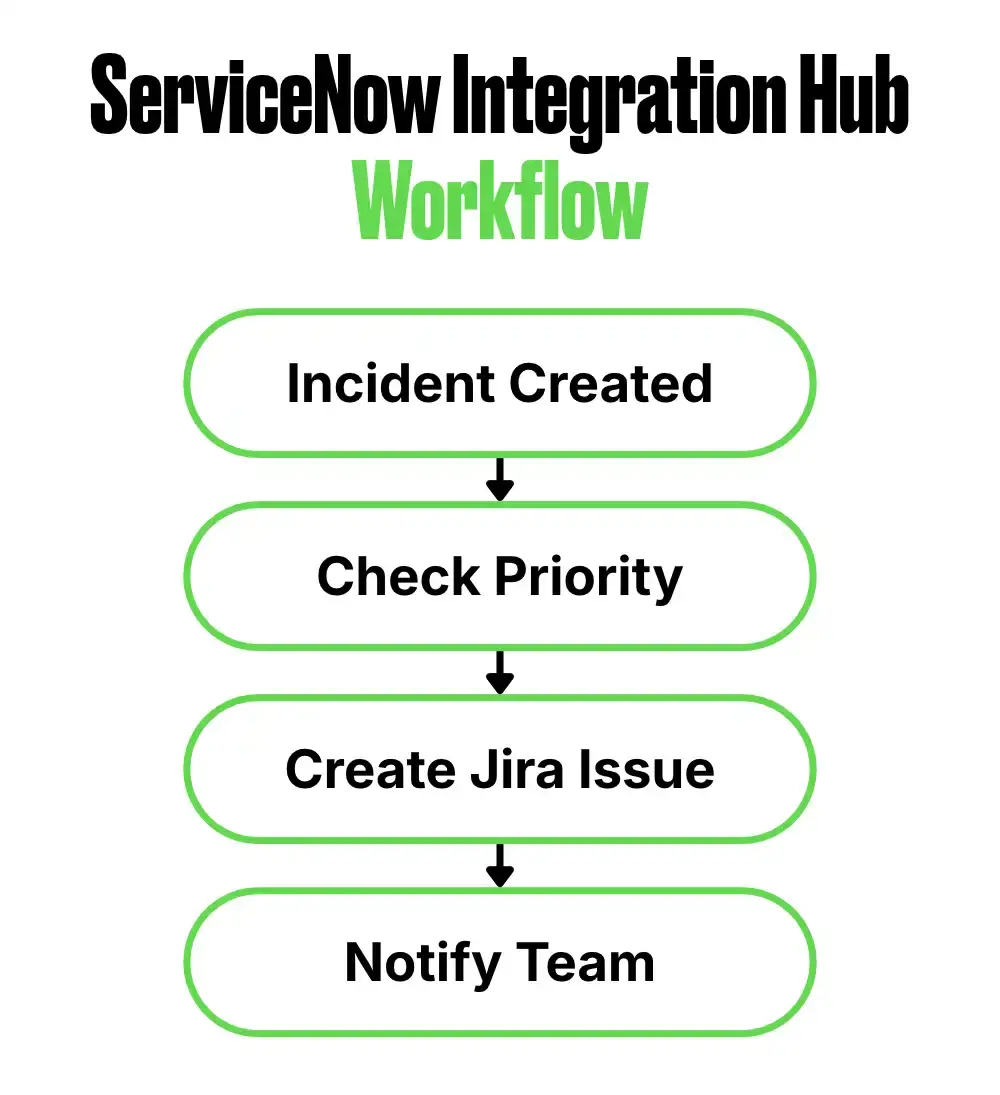
This is where Integration Hub becomes more than just an API integration tool, as it helps orchestrate business processes across applications.
Important Terminologies in Integration Hub
The following three terms are important to understand:
Spokes
A spoke is a reusable integration package for an application or service. You can install these packages in your ServiceNow instance and start integrating ServiceNow with other platforms.
ServiceNow provides spokes for platforms such as Jira, Microsoft Teams, Slack, Salesforce, and others.
Actions
Actions are the individual operations provided by a spoke. We can use these Actions in Flow Designers to do a task in the third-party tool.
For example, a Jira spoke can provide Actions to create or update a Jira issue. We will then be able to make changes to issues in Jira using ServiceNow.
Connections, Credentials, and Aliases
When we build an integration, knowing what system we are connecting to is only half the story. We also need to tell ServiceNow how to connect and how to authenticate with that system.
This is where Connections, Credentials, and Connection & Credential Aliases come into the picture.
- Connection: It defines the API or endpoint URL, which means where we are connecting to.
- Credential: It contains all the authentication details like usernames, passwords, OAuth tokens, or API keys.
- Connection & Credential Alias: Which connection and credential should the integration use?
For example, if we are connecting ServiceNow to an external application, the connection could contain the application’s endpoint, while the credential could contain the authentication information such as an API key, username/password, or OAuth configuration.
The Connection & Credential Alias provides an abstraction layer between the integration Action and the actual connection and credential being used.
This becomes particularly useful in enterprise environments. Instead of hardcoding a particular connection into an Action, we can reference an alias. The same integration can then use different connections for different environments. For example, Development, Test, and Production, without changing the underlying flow or Action.
Flows
These actions can then be used inside Flow Designer or Workflow Studio.
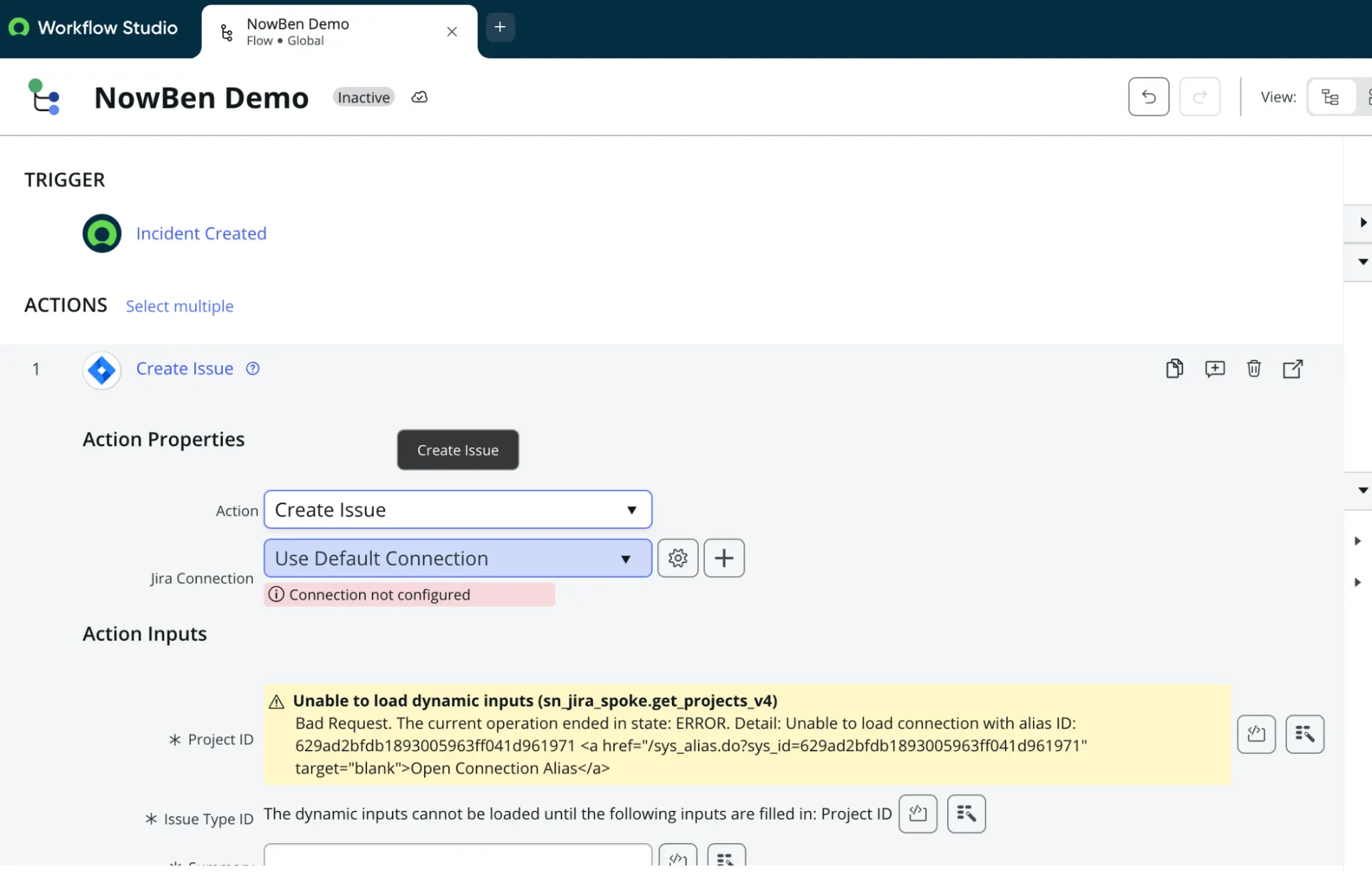
In the following screenshot, you would be able to see that we are creating an issue in Jira using an action inside a Flow Designer of ServiceNow.
ServiceNow Integration Hub and MID Server
If the third-party system is inside the organization’s network, ServiceNow Integration Hub can work with a MID Server to set up the integration.
This is particularly useful for integrations with on-premises systems. You can read more about MID servers here.
Error Handling and Troubleshooting
Since, the Actions are non-editable, the chances of Actions failing are almost none. However, when you are sending data to the third-party using these Actions, it can fail because of incorrect data or because of formatting of data. This is where error handling and troubleshooting becomes important.
Inside, Flow Designer error handling and troubleshooting are much simpler. Whenever there is some unexpected output or error, you should be able to debug these easily using Flow executions. So, personally I love that Integration Hub has to be implemented via Flow Designer.
My Personal Take
I’ve worked with ServiceNow integrations for many years, and I think the biggest value of Integration Hub is that it allows us to think beyond the question: “How do I call this API?”
Instead, I think: “What business process am I trying to automate, and where does the external system fit into that process?”
That shift makes ServiceNow Integration Hub much more powerful. As developers, we can start learning it without waiting for a customer project. A PDI + Jira spoke is enough to understand connections, credentials, actions, data pills, flow execution, and troubleshooting.
Once you’re comfortable with a prebuilt spoke, you can move on to building custom actions and spokes.
Final Thoughts
Integration Hub provides a simple way to connect ServiceNow with the applications used across an enterprise. Spokes provide the integration, Actions perform the operation, and Flows automate the business process.
If you’re new to Integration Hub, my recommendation is simple: open your PDI, activate the Jira spoke, build a small flow, and see the integration work for yourself.
For a broader understanding of ServiceNow integrations, you can also read my earlier article: