





How does a cloud-based ServiceNow instance communicate with systems that are sitting inside an organization’s private network? The answer is often the ServiceNow MID Server.
In simple terms, a MID Server serves as a bridge between ServiceNow and systems that ServiceNow cannot directly access. It is commonly used when organizations need ServiceNow to communicate with on-premises applications, servers, databases, or infrastructure.
In this guide, we will cover what a MID Server is, why organizations need it, and how it works, as well as the basic steps for installation.
What Is a ServiceNow MID Server?
MID stands for Management, Instrumentation, and Discovery. It is a lightweight application that runs inside an organization’s network and allows the ServiceNow instance to communicate with systems that are not directly accessible from the internet.
Think of it as a messenger, without which ServiceNow cannot talk to any software, databases, or applications.
ServiceNow is in the cloud, while an organization’s internal systems may be protected behind firewalls. Instead of allowing ServiceNow direct access to those systems, the MID Server sits inside the organization’s network and handles the communication.
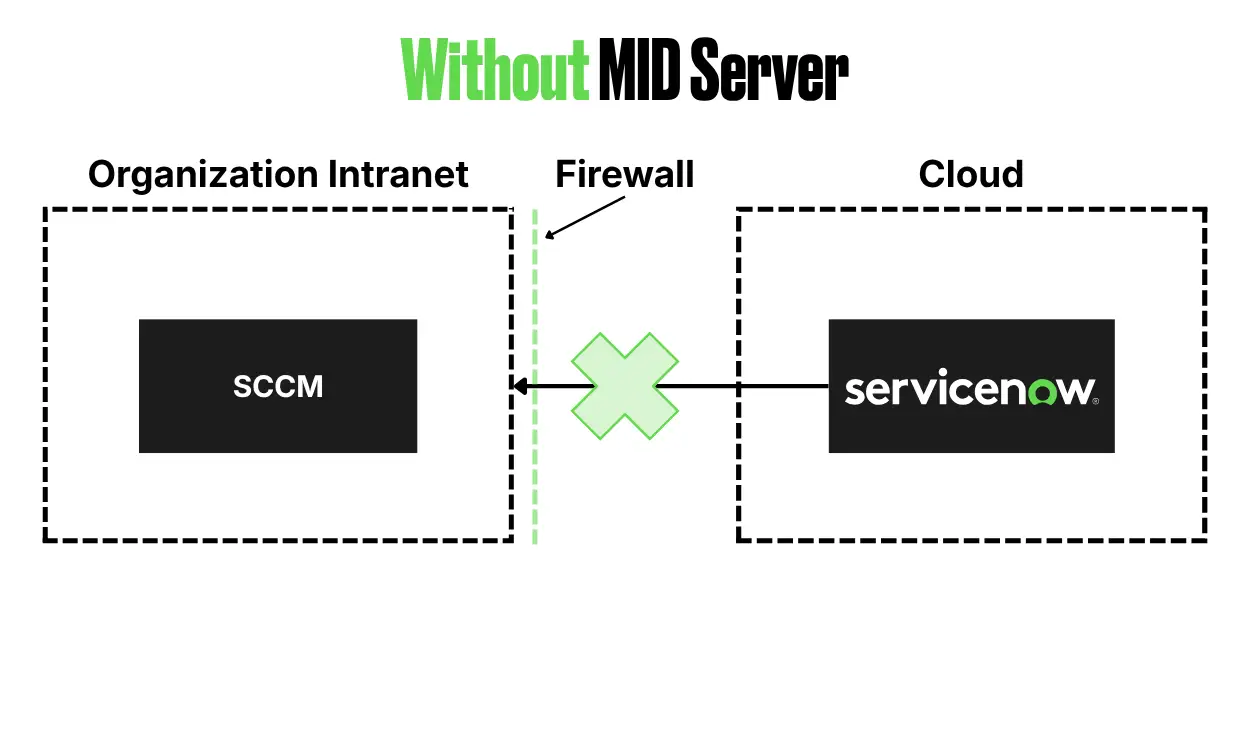
In the following image, we see that ServiceNow cannot access the organization’s data because of firewall restrictions.
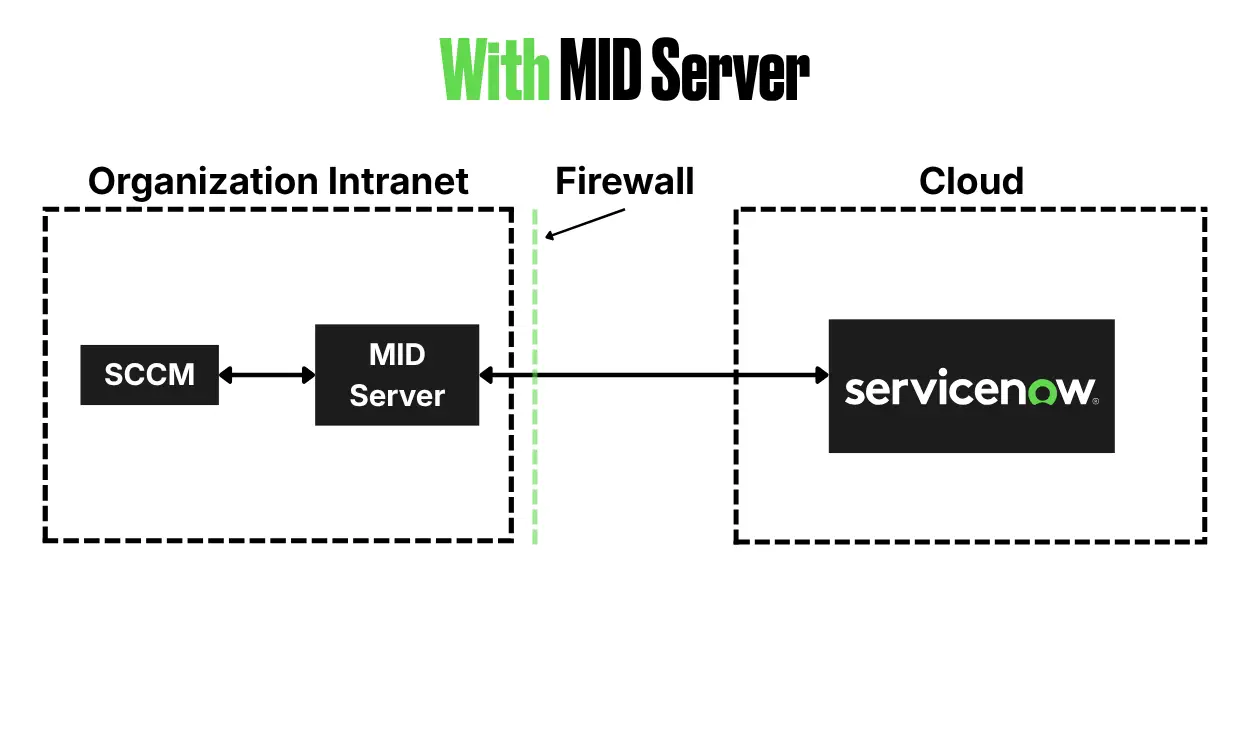
In the next image, we will see that a MID Server is installed in one of the organization’s infrastructures, which can contact a specific ServiceNow instance and communicate with internal systems.
Why Do You Need a ServiceNow MID Server?
The main reason is network security and connectivity.
Most enterprises don’t expose their internal systems directly to the internet. Their servers, databases, Active Directory environments, and other applications may sit behind firewalls.
For example, imagine an organization wants ServiceNow to discover servers running inside its data center. ServiceNow cannot simply connect directly to those servers because they are inside the organization’s private network.
Instead:
- ServiceNow sends the request to the MID Server.
- The MID Server communicates with the internal servers.
- It collects the required information.
- The information is sent back to ServiceNow.
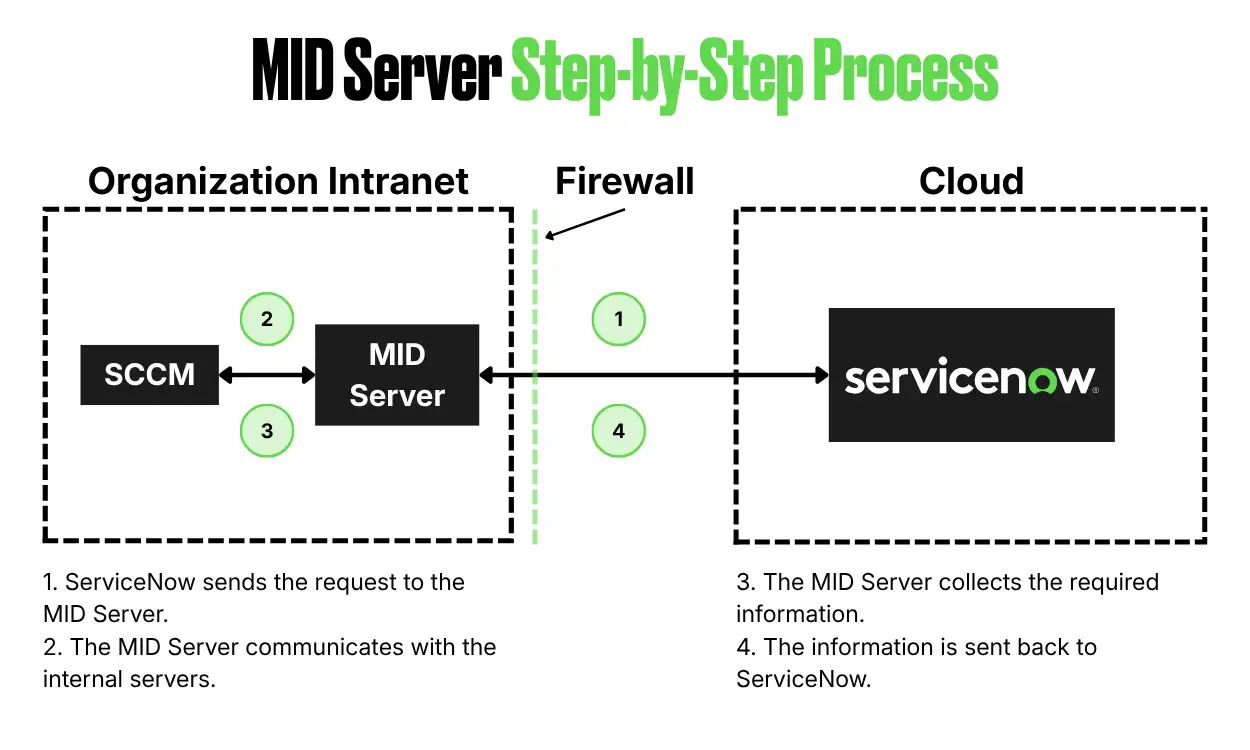
This allows organizations to keep their internal systems protected while still allowing ServiceNow to interact with them.
How to Install a ServiceNow MID Server
Installing a MID Server is relatively straightforward, but the exact steps can vary depending on the operating system and your organization’s network architecture.
For this example, let’s look at the basic Windows installation process.
1. Log in to the Windows Server
Log in to the server with admin permissions to then log in to ServiceNow from a browser with admin credentials.
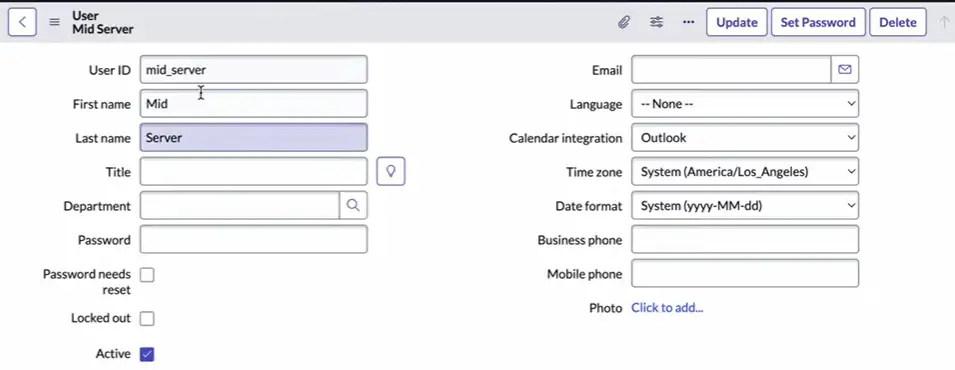
2. Create a New User in ServiceNow
Create a new user in ServiceNow and ensure the user has the mid_server role.
3. Download MID Server File
In your ServiceNow instance, navigate to MID Server → Downloads, and then download the Windows MSI file.

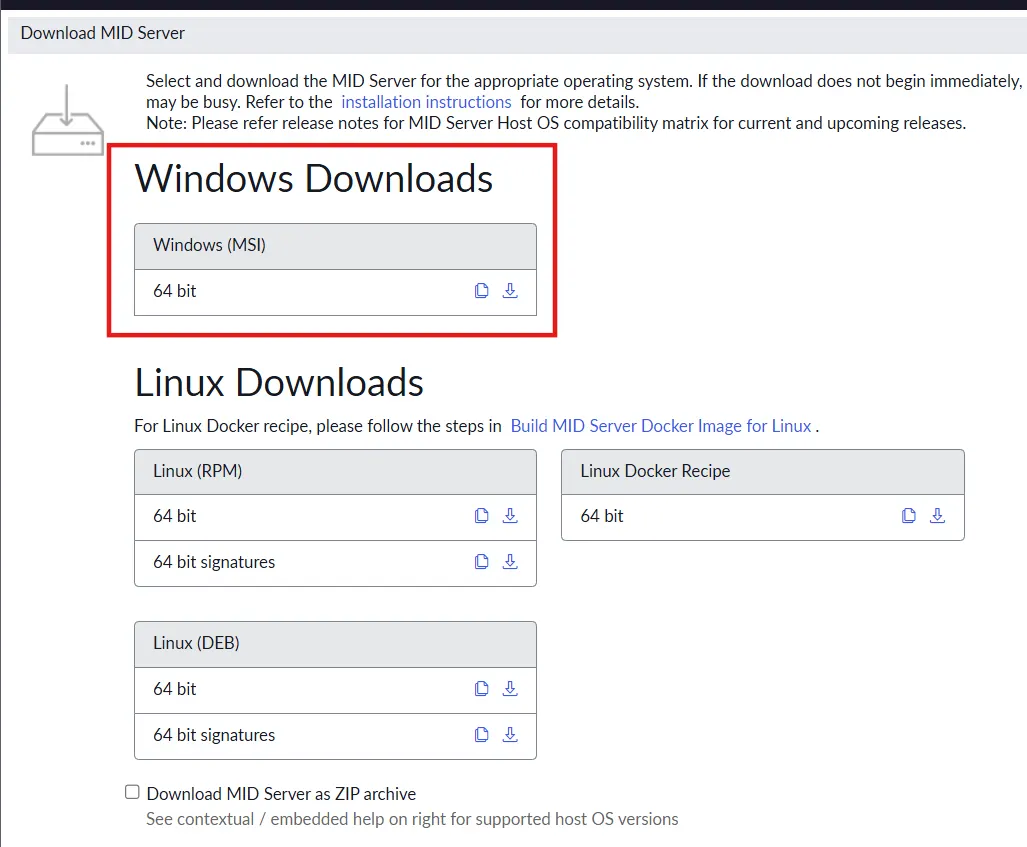
4. Configure and Install the MID Server
Firstly, double-click the downloaded MSI file to launch the installer and bring up the configuration screen.
Then enter your ServiceNow Instance URL alongside the username and password for the newly created mid_server user, then click Test Your Connection. After the test is complete, click the Next button.

Enter a MID Server Name that follows your company’s naming standards. Then, enter the credentials for a Windows Service Account with local administrator privileges on the server. If needed, click + to create a new service account.
Then click on “Validate MID Service Settings” to verify the settings. After verification is successful, click on the Next button.
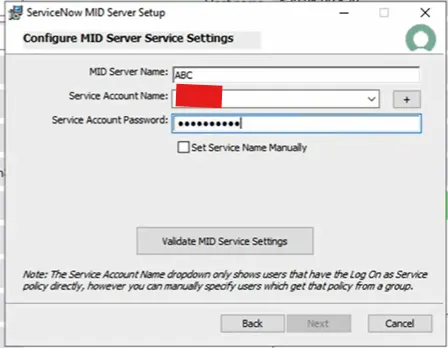
Give the path on the same Windows Server machine where you want to install the MID Server, and then click on Next.

After this, you will get a confirmation page with all the details that you have already entered. Also, you can check the checkbox “Start MID Server after Installation”. Click on Next.
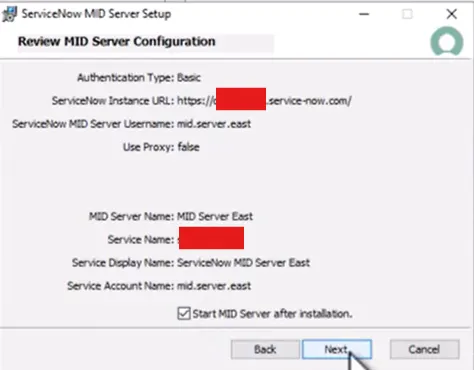
Finally, click on Install. After Installation is completed, click on Finish.

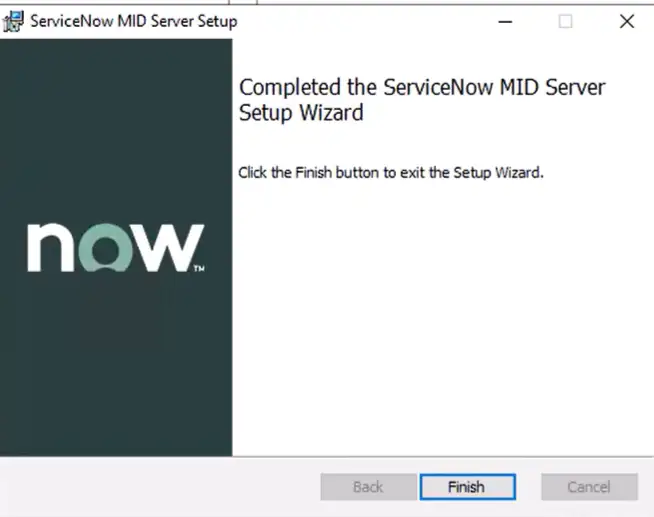
5. Verify the MID Server in ServiceNow
Navigate to All → Discovery → MID Servers, and you should see your MID Server. Ensure that the status of your MID Server is “Up”. If it doesn’t appear immediately, give it a couple of minutes, and it should be available.

Click on your newly created MID Server and open the MID Server record. Then click the “Validate” button under Related Links as shown in the screenshot below.
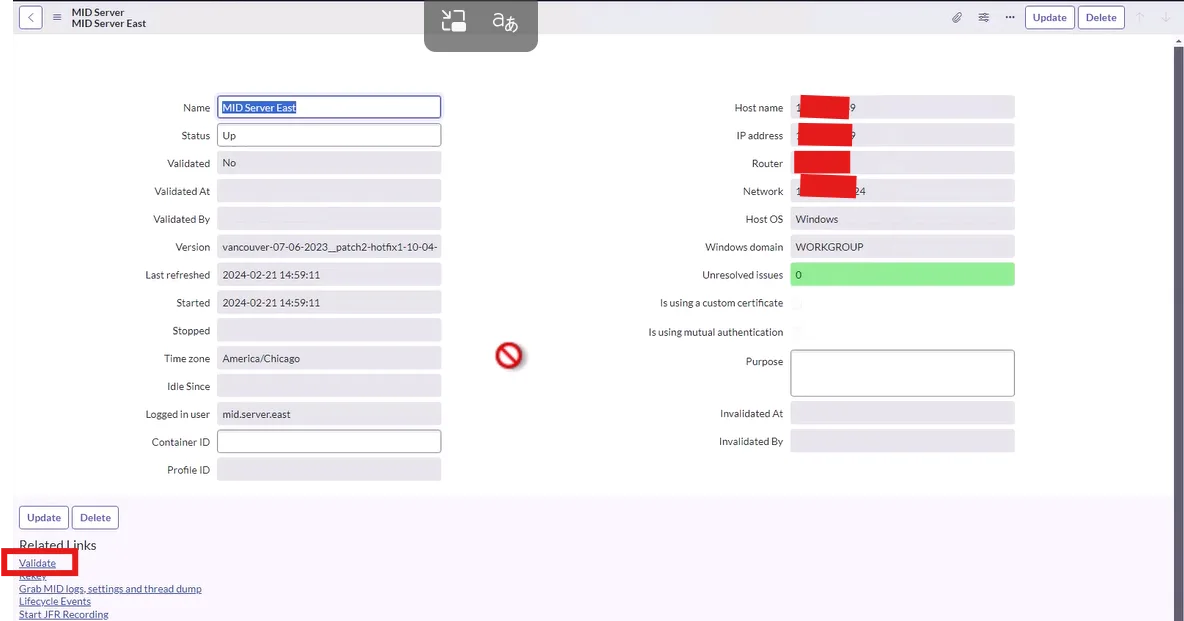
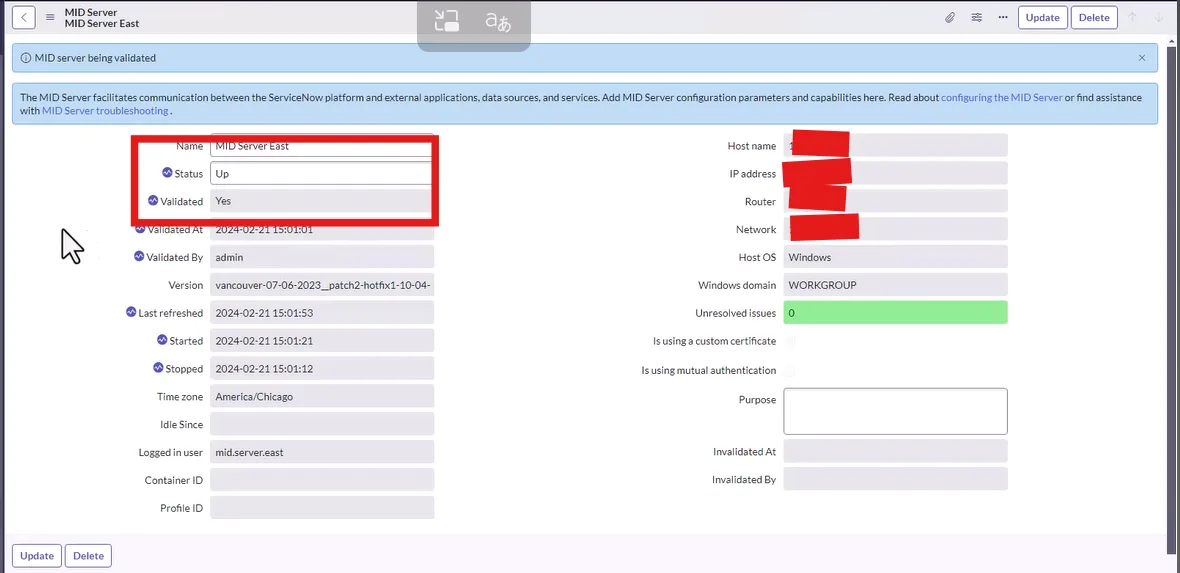
After you click on “Validate”, ServiceNow will restart your MID Server, and it will take a while to validate it. Once it is done, your MID Server will be up and ready.
My Personal Experience
In my experience working with ServiceNow integrations and enterprise implementations, the MID Server can look like a small component, but it becomes extremely important once you start working with enterprise environments.
The concept is actually quite simple: ServiceNow is in the cloud, your internal systems are behind the firewall, and the MID Server provides the communication path between them.
Where things usually become challenging is not installing the ServiceNow MID Server itself. The real challenges are often around network connectivity, firewall rules, credentials, proxies, permissions, and understanding which systems the MID Server needs to access.
My advice is to think about the MID Server as part of your integration architecture, rather than treating it as just another ServiceNow installation task.
Before installing one, ask yourself the following questions:
- What does ServiceNow need to communicate with?
- Where is that system located?
- What network access is required?
- What permissions should the MID Server have?
Answering these questions upfront can save a lot of troubleshooting later.
Final Thoughts
A MID Server is not one of those ServiceNow components that you think about when working with cloud-based applications, until you need to connect ServiceNow with something sitting inside a customer’s network.
It provides a secure and controlled way for ServiceNow to communicate with on-premises systems, infrastructure, databases, and applications without exposing those systems directly to the internet.
Once you understand the basic architecture of a ServiceNow MID Server, the concept becomes much easier to understand: ServiceNow → MID Server → Internal System.
Whether you’re working with Discovery, Service Mapping, Integration Hub, Orchestration, or enterprise integrations, having a good understanding of MID Servers is an important skill for any ServiceNow Developer, Administrator, Consultant, or Architect.