





ServiceNow’s Australia release taught developers to work with AI, but the Brazil release asks them to supervise it. The release extends AI beyond generating components into planning, testing, troubleshooting, and deployment preparation.
Requirements can become implementation plans, and approved plans can become work items that are built and tested in parallel. Humans approve the plan at the start and review the output at the end. Architecture, security, data modelling, and business outcomes remain with the developer.
Brazil at a Glance
| Enhancement | Lifecycle stage | Prerequisite or caveat |
| Autonomous Engineer | Plan | Installed separately from the ServiceNow Store; subject to entitlement. |
| Build Agent | Build, test, document | Trial active by default from Brazil; requires ServiceNow Otto for Creator and the admin role. |
| Developer Sandboxes | Isolate | Entitled capability; pooled sandboxes refresh every 24 hours. |
| Flow Troubleshooting Agent | Troubleshoot | Enabled via system property. |
| Expanded Playbook and Test Automation Support | Govern and validate | Some features need the AI Agent plugin. |
Here are the five, in lifecycle order.
1. Autonomous Engineer: From Requirements to Implementation
Development rarely starts with code. It starts with interpreting requirements, identifying ambiguity, analyzing existing platform capabilities, defining an approach, and breaking work into deliverable components.
Autonomous Engineer brings AI directly into that planning process.
Developers provide requirements through a prompt or uploaded document, and Autonomous Engineer turns them into an implementation plan of structured work items, each with acceptance and test criteria. After approval, it builds the items in parallel, tests them, and exports an update set for UAT or production.
Autonomous Engineer must be installed separately from the ServiceNow Store, and its use remains subject to entitlement.
Key Capabilities
- Clarify ambiguous requirements.
- Query the instance for existing artefacts.
- Generate a plan with acceptance and test criteria.
- Create a background agent per approved work item and build in parallel.
- Generate and run ATF tests, and attempt to fix failures.
- Surface unresolved items for human review.
- Export an update set for deployment.
Why It Matters
A large proportion of development effort occurs before implementation begins. Requirements are often incomplete, terminology varies between stakeholders, and reusable platform capabilities are frequently underutilised.
Autonomous Engineer does not replace architectural decision-making. Instead, it provides a structured first draft that developers can review, refine, and govern. Rather than beginning with a blank page, developers begin with an implementation plan.
Real Developer Use Case
A delivery team receives requirements for a request-management application incorporating approvals, notifications, role-based security, reporting, and audit tracking. The requirements are uploaded into Autonomous Engineer. The platform identifies relevant existing artefacts, proposes work items with acceptance criteria and test criteria, and generates an implementation plan.
The developer reviews the assumptions, validates architectural decisions, edits the work items where necessary, and approves only those activities that should proceed. Nothing is built until the plan is approved. The AI performs the initial decomposition. The developer remains accountable for the solution.
Brazil Delta
The Australia release expanded AI-assisted application development. The Brazil release introduces specification-driven planning and coordinated implementation through Autonomous Engineer.
2. Build Agent: Building, Testing, and Documenting in One Experience
Build Agent provides a conversational development experience for creating, modifying, testing, documenting, and packaging ServiceNow applications. Developers can describe requirements in natural language and use Build Agent to generate application components spanning both user-interface and server-side implementation.
Build Agent (Trial) is active by default starting with the Brazil release and requires ServiceNow Otto for Creator.
Key Capabilities
- Create and update full-stack applications.
- Generate user-interface and back-end components.
- Enhance existing applications.
- Generate application documentation.
- Perform code compilation and quality checks.
- Generate and execute ATF suites.
- Report test execution status and errors within the conversational experience.
- Create custom AI agents, skills, and agentic workflows.
- Package application changes for controlled deployment.
Brazil also updates the Studio experience. New conversations can begin from the central chat area on the Studio home page, while existing conversations are available through the Navigator and Build Agent panel.
Why It Matters
Developers spend significant time understanding existing implementations before making changes. Poor documentation, unknown dependencies, inherited configurations, and testing gaps can represent a greater effort than writing new functionality.
Build Agent expands AI assistance beyond application creation into comprehension, modification, testing, documentation, and packaging.
Important Consideration
At the time of writing, ServiceNow documents that Build Agent requires the admin role. Organizations using delegated-development models should therefore assess this constraint before standardizing Build Agent as part of their development approach.
Build Agent may support a broad range of development personas, but that does not mean every persona can currently access it under a least-privilege role model.
Real Developer Use Case
A developer inherits a customized application containing tables, business rules, flows, roles, and user-interface components, but the technical documentation is incomplete. Before implementing a change, the developer uses Build Agent to understand the application structure and relevant artefacts.
After completing the enhancement, the developer can use the same experience to generate and run an ATF suite, review execution errors, perform quality checks, and produce updated application documentation.
The value is not simply faster code generation. It is reducing the effort required to safely understand, modify, test, and document an application.
Brazil Delta
Brazil adds specification-driven development, expanded ATF capabilities, MCP support, Fluent domain-separation support, and an updated Studio experience.

3. Developer Sandboxes: Faster Isolation With Less Provisioning Friction
Development delays are not always caused by coding effort. Sometimes the bottleneck is simply obtaining an isolated environment in which development can occur safely.
Developer Sandboxes provide isolated development spaces that allow administrators and delegated developers to request, access, and manage individual sandboxes on the same underlying development instance.
What Does Brazil Add?
- Sandbox pooling
- Automatic update set-source configuration
Instead of waiting for a new sandbox to be provisioned, developers can claim an environment from a pre-created pool. Automatic update set sources reduce the manual configuration required to transfer update sets between sandbox and base environments.
Important Caveats
Because pooled sandboxes are created in advance, they may not immediately reflect the latest state of the base instance. ServiceNow documents that:
- Pooled sandboxes are refreshed every 24 hours.
- Sandbox URLs are randomly generated.
- A sandbox URL no longer matches its configurable display name.
- A pooled sandbox may temporarily be out of date compared with the base instance.
Developers should therefore verify that an allocated environment contains the expected application versions, metadata, and configuration before beginning work.
Developer Sandboxes also remain an entitled capability requiring the appropriate installation and platform setup. Teams should confirm product entitlement, infrastructure requirements, and the applicable installation process before including sandboxes in their delivery model.
Real Developer Use Case
Two developers need to enhance different areas of the same application as part of separate delivery streams. One developer is changing the request experience. The other is modifying approval and integration logic.
Instead of coordinating every change within a shared development environment, each developer works independently within an allocated sandbox. Their work can be tested separately and transferred through automatically configured update set sources when it is ready.
The isolation reduces the risk of one developer’s in-progress configuration interfering with another developer’s work.
Brazil Delta
The Australia release introduced granular sandbox-administration roles and separate AI Search indices for supported non-production sandboxes. Brazil adds sandbox pooling and automatic update set-source configuration, reducing provisioning delays and manual transfer setup.
4. Flow Troubleshooting Agent: Guided Diagnosis for Errors and Unexpected Results
Flow troubleshooting can be time-consuming. Developers often need to move across execution records, trigger conditions, input values, data transformations, business rules, permissions, integrations, and platform logs before identifying the cause of an issue.
The Flow Troubleshooting Agent provides a guided starting point for that investigation. It can summarize the purpose and sequence of flow steps, analyze the data used and generated by each step, identify missing or invalid values, detect potential conflicts with business logic or system configuration, and provide evidence-based recommendations.
The Brazil documentation highlights troubleshooting scenarios involving:
- Missing or unresolved approval recipients.
- Gaps or inconsistencies in approval audit history.
- Business-rule conflicts with the approval engine.
- Flow triggers not firing as expected.
- Trigger-related role or permission issues.
- Differences between configured trigger conditions and actual data changes or events.
Why It Matters
Developers can spend more time investigating automation failures than creating the automation itself. Flow troubleshooting often involves piecing together information from execution details, triggering records, data values, security configuration, business rules, and related workflows.
Rather than beginning with raw execution data, developers can begin with a structured analysis and a more focused investigation path.
Real Developer Use Case
A flow reaches an approval action, but no approval record is created. The Flow Troubleshooting Agent can analyze how the approval recipient was resolved, trace the data through earlier steps, inspect relevant approval behaviour, and identify whether a business rule or another flow may have interfered with the expected outcome.
It can then provide evidence-based recommendations for further investigation or correction. The recommendation still requires validation. However, the developer begins with focused context rather than unexplained execution data.
Create the system property com.glide.hub.flow.launch_troubleshooting_agent to enable access to flow troubleshooting.

Brazil Delta
The Australia release focused on AI-assisted analysis of flow execution errors. Brazil introduces documented troubleshooting scenarios focused on approval actions and flow triggers, including recipient resolution, audit-history gaps, business-rule conflicts, permissions, and trigger validation.
5. Expanded Playbook and Test Automation Support
The Brazil developer story is not only about generating applications. It is also about improving governance, reusability, and testing.
The Australia-to-Brazil Build Agent documentation highlights continued expansion of playbook support, including:
- Consolidating records related to a playbook into a single XML update set file.
- Generating runtime permissions at playbook level.
- Generating runtime permissions at individual stage level.
- Configuring outputs for nested playbooks.
- Creating on-demand playbook launcher configurations.
- Configuring agentic fields on supported activities when the applicable AI Agent plugin is active.
- Defining optional activities in a playbook.
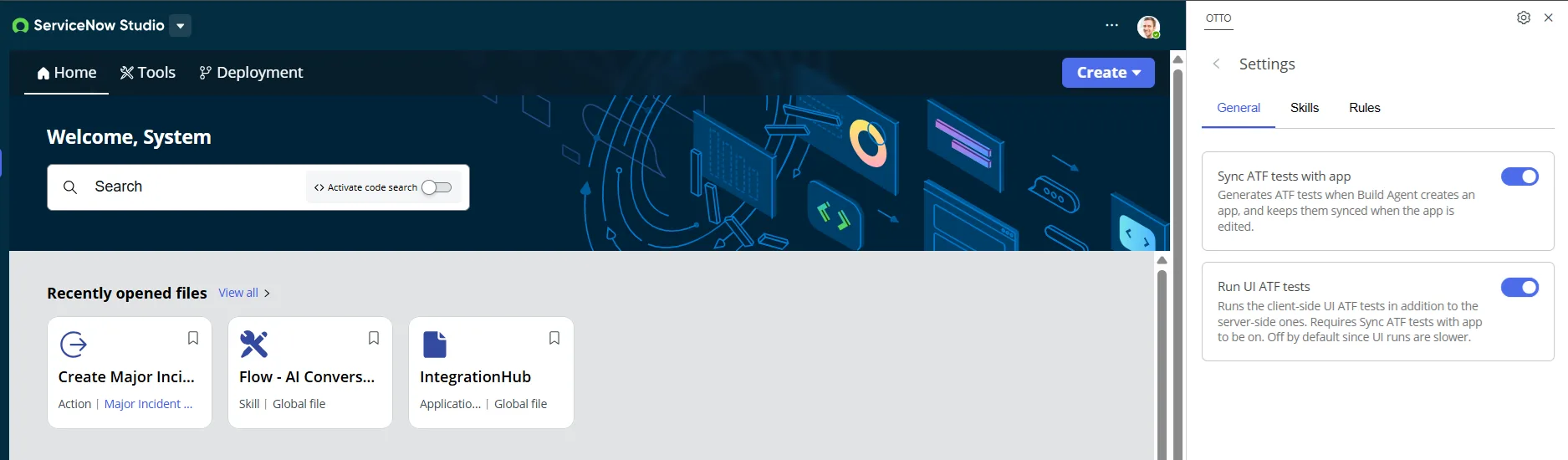
Testing capabilities also continue to expand. Developers can create and execute ATF suites through Build Agent, while Autonomous Engineer can generate and run tests for approved implementation-plan work items. Test Agent can generate list and related-list test steps, extending automated coverage beyond traditional form interactions.
Why It Matters
Reusable workflows only create value when their access controls remain intact. Stage-level permissions allow developers to protect sensitive points in a process without granting every participant equivalent access across the complete playbook.
Expanded automated testing is equally important. Enterprise applications do not operate only through forms. Lists, related lists, filters, workspaces, and role-based visibility can be central to both the user experience and the access model. Broader test generation gives development teams a stronger starting point for validating those behaviors.
It does not remove the need for a test strategy. It makes it easier to create and execute repeatable coverage across a wider range of platform interactions.
Real Developer Use Case
A case-management playbook contains stages for triage, investigation, escalation, and closure. Operational analysts can complete triage and investigation. Only managers should execute escalation and final closure.
Stage-level permissions allow the development team to model that separation within the playbook. The team can then generate relevant automated test coverage for the process, including list and related-list behaviours, before the application is prepared for release.
Brazil Delta
Brazil adds playbook-level and stage-level runtime permissions, expanded playbook generation, and broader test coverage for list-based experiences.
Other Noteworthy Developer Enhancements
Not every developer-related enhancement fits neatly into the application lifecycle described above. Several additional capabilities are still worth highlighting because they continue the broader movement towards agentic development, code-first engineering, stronger testing, and more connected tooling.
AI Agent Studio
Brazil enhances AI Agent Studio with capabilities including:
- UI validation for agentic AI processes and generative AI skills.
- Testing in the playground’s AI-native mode.
- Widgets for tool outputs.
- Improved platform agentic workflows.
- Issue tracing and suggested optimizations from result pages.
For developers creating agentic solutions, this brings more of the validation and diagnostic experience into the same environment used to design and test agents.
The significance is not simply that teams can create more agents. It is that they have more support for understanding how those agents behave, tracing issues, and improving the resulting solution.
ServiceNow SDK and Fluent
The ServiceNow SDK supports local, source-code-based application development using Visual Studio Code Desktop.
ServiceNow Fluent is a declarative language based on TypeScript for defining application metadata such as tables, roles, ACLs, business rules, and ATF tests. It supports synchronisation between source code and instance metadata for supported artefact types. Some metadata types continue to remain represented as XML rather than Fluent code.
For development teams adopting a code-first model, the direction is important. It brings source control, reusable modules, metadata-as-code, and platform-native development closer together.
MCP Support in Build Agent
Build Agent’s MCP support has continued to widen around the Brazil release. The September 2026 Build Agent store release adds Box to the servers it can connect to, and a settings pane now lets developers see the tools each connected server exposes.
Some of this arrived in late Australia patches, so check the minimum patch level for your target instance. The MCP connections and Build Agent documentation hold the current supported list.
This moves Build Agent from a contained development assistant toward one that works with outside tools. Administrators are involved before a server becomes usable, but teams should still settle a few questions before adopting it:
- How is the external MCP server authenticated?
- Which tools are exposed to Build Agent?
- What data can leave the ServiceNow environment?
- How are permissions mapped and enforced?
- How are external dependencies monitored?
- What happens when the MCP service is unavailable?
- How are prompts, responses, and actions audited?
These are architectural considerations rather than documented product claims, but they are important when moving from a contained development assistant to a development agent connected to external tools.
Lux Lab for VS Code
Lux Lab remains a useful component of the ServiceNow developer ecosystem. It supports development in Visual Studio Code, including scaffolding experiences, pages, and widgets, as well as previewing work and accessing relevant ServiceNow instance artefacts.
Before You Start Building
As AI becomes more capable, governance becomes more important. Review these before adopting at scale:
Design
- Application scope, ownership, and lifecycle.
- Existing platform artefacts to reuse.
- Table and data-model decisions.
Security
- Roles and ACLs.
- Domain-separation requirements.
- Integration credentials and connection configuration.
- MCP authentication, permissions, and external dependencies.
Quality
- Generated scripts and business rules.
- Error-handling and retry behaviour.
- ATF and user-interface test coverage.
Release
- Update set contents.
- Deployment and rollback arrangements.
- Required human-review checkpoints.
- Licensing, entitlements, and regional or regulated-environment restrictions.
The more these capabilities can create or change, the more important it is to define where human approval is mandatory: architecture, data structures, security controls, integration boundaries, production deployment, and acceptance of residual risk.
Final Thoughts
Requirements can become implementation plans. Plans can become coordinated work items. Applications can be generated, tested, documented, and packaged through conversational experiences. Troubleshooting becomes more guided, and development environments become easier to allocate and manage.
The shift is not from human development to machine development. It is from developers creating every artefact manually to developers orchestrating, validating, and governing increasingly automated delivery processes. Developers remain responsible for architecture, security, quality, and business outcomes.
What changes in Brazil is the amount of repetitive effort between a requirement and a deployable solution. Planning starts from a reviewable implementation plan rather than a blank page. Building is faster and safer through Build Agent and isolated sandboxes. Validation is stronger through guided flow troubleshooting, playbook permissions, and broader test coverage.
The tools are becoming more capable, but the accountability stays with the developer. The teams that benefit most will be the ones that decide up front where human judgment is non-negotiable.
The Australia release strengthened AI-assisted development. Brazil brings Better Planning, Better Building, and Better Validation.