





Every organization invests in growth. New products, new markets, modernized technology, better customer and employee experiences. What gets less attention is the opposite question: what happens when something stops working? For some organizations, that is order processing. For others, it is payroll, manufacturing, logistics, or regulatory reporting.
The specifics change from company to company, but the underlying need doesn’t. You have to know what is critical, and you have to make sure it can keep running when something goes wrong.
That is the problem Business Continuity Management (BCM) is there to solve. When I started looking at how ServiceNow approaches it, I expected a module built mainly around continuity plans. The more I explored it, the more I realized the plan is actually one piece of a much larger process.
That is worth pausing for a second, because it is the same assumption most organizations make before they have had to test a plan under real pressure. A plan on its own is just a document. Continuity is something you build and keep proving, not something you write once.
The ServiceNow BCM module is built around that second idea, and it changes how you should approach the whole thing. Let’s take a practical look at BCM – why it’s important and how the process works end to end.
Why Business Continuity Management Matters
Not every disruption is dramatic. It could be a data center outage, a supplier failing to deliver, a regulatory deadline colliding with a system migration, or just losing access to a critical application for a few hours during peak season. Some processes can absorb that kind of hit, but some cannot. A marketing campaign can slip a week without much damage, but payroll, order processing, or regulatory reporting usually cannot.
BCM matters because it forces an organization to actually answer the question: if this stopped today, what would break, and how fast do we need it back? Everything else in the discipline exists to answer that question with real evidence instead of guesswork.
What Business Continuity Management Covers
People often reduce BCM to “disaster recovery” or “the plan we pull out during a crisis”, but in practice it covers more ground than that:
- Understanding the business: what processes exist, what they depend on, how critical each one is.
- Quantifying impact: what happens financially, operationally, and reputationally if a process goes down.
- Setting recovery expectations: how quickly, and to what level, something needs to be restored.
- Documenting the response: who does what, in what order, with what resources.
- Managing the moment: coordinating people and decisions once a real disruption hits.
- Learning from it: testing plans before a crisis is what actually proves whether they work.
Take away the terminology, and BCM is just structured preparedness, done consistently instead of reinvented every time something goes wrong.
How the BCM Process Works End to End
It helps to walk through this in order, because each stage feeds the next one.
It starts with a Business Impact Analysis (BIA). Before you can protect anything, you need to know what is worth protecting and why, so the BIA identifies the critical business processes and puts a number on what losing them would cost – financial loss, compliance exposure, customer impact, safety risk.
From there, recovery objectives get defined. The BIA’s findings turn into targets: how long a process can be down (the Recovery Time Objective) and how much data or work can be lost (the Recovery Point Objective). These numbers aren’t picked out of the air, they come directly from the impact analysis.
Those objectives are what the continuity plan gets built against. The plan sets out the strategy, the responsible teams, the recovery steps, and the resources needed to actually hit the targets. This is the piece most people think of when they hear “BCM,” but it is really the fourth step, not the first.
Plans then get exercised, as an untested plan is just a guess. Exercises show whether the documented steps hold up, surface the gaps that only show up in practice, and build the muscle memory teams need before a real event happens.
When a real disruption does occur, crisis and recovery management takes over – coordinating the response in real time, using the plan as a guide rather than a script, because no actual incident plays out exactly the way it was written down.
What gets learned from an exercise, or from a real incident, goes back into the BIA and the plan. Neither of them is ever really “finished” – they just get more accurate the more they are tested against reality.
Where ServiceNow Fits Into the Process
What makes ServiceNow’s approach different is that it does not treat these stages as separate activities living in different spreadsheets, templates, and email threads. It puts them on one platform, and a handful of specific features are what actually make that work day to day.
Smart Assessments, built on what ServiceNow calls the Smart Assessment Engine, is probably the most important one. BIAs and other assessments are built and run through a no-code, drag-and-drop engine, so BCM teams can design and adjust their own templates – conditional logic, scoring, the works without waiting on a developer. That is a bigger deal than it sounds, because it is what lets BCM stay owned by the business rather than becoming an item in an IT backlog.
The BCM Workspace is also worth knowing. It is a single landing page for crisis events, BIAs, plans, and exercises, all shown by their status – Draft, In Review, Approved, and so on – instead of being scattered across separate records.
Because the BIA draws on the CMDB, dependency mapping stays current too. RTOs and RPOs get set against real, live dependencies rather than a diagram that was accurate a year ago and hasn’t been touched since.
Then there is Crisis Map – a geo-map view that pulls in live threat and weather alerts, shows which assets and locations sit in the impact zone, and lets a BCM manager notify stakeholders or declare a crisis right from the map. Once a crisis is declared, predefined recovery tasks and notifications start automatically, so the response doesn’t depend on someone digging up the right document under pressure.
None of these features is the point on its own. What actually matters is that they all sit on the same underlying data, so a Smart Assessment result, a dependency, and a live crisis alert are all talking about the same record instead of three different versions of the truth.
One practical note: BCM gets updated release over release. Smart Assessments themselves were a fairly major shift away from the older, developer-dependent “legacy” assessment model, and the current Australia release – ServiceNow’s latest, following Zurich – continues to build on that same foundation. If you are evaluating or upgrading, it is worth checking your own instance’s release notes directly, since GRC and BCM tend to get incremental changes almost every cycle.
Who Actually Owns What
BCM only works if it is clear who is responsible for each piece, and ServiceNow’s role structure reflects the process fairly closely.
A BIA owner creates the BIA, works through the impact categories, and submits it for review – usually pulling in business teams or subject matter experts along the way to keep the analysis grounded in how the process actually runs day to day, not just how it is assumed to run.
Once submitted, a BIA manager reviews and approves it, which is what keeps the numbers from becoming whatever the process owner would prefer them to be.
Plans and exercises follow a similar pattern – someone owns the drafting, someone else reviews and signs off, and BCM leads or programme managers sit above that to keep things consistent across the organization rather than having every business unit invent its own version of “critical.”
This division of labor is easy to skip when a BCM programme is small – one or two people often end up doing everything. But it is worth setting up properly early, because it is what makes the whole thing defensible later, whether that is to an auditor, a regulator, or your own leadership team asking “how do we know this number is right?”
How the Different BCM Capabilities Connect
On a slide, BIA, recovery objectives, plans, crisis management, and exercises look like five separate boxes. In practice, they are really one chain. The BIA feeds the recovery objectives. The objectives set the targets the plan is built to hit. The plan gets activated during crisis management. And the outcomes from that, plus whatever comes out of an exercise, flow back and update the BIA and the plan again.
Because that chain is actually linked rather than siloed, a change upstream doesn’t get lost. Say a new critical dependency gets identified – it ripples through to the objectives and plans that rely on it. That’s probably the biggest practical difference between running BCM on a platform versus running it across disconnected documents: nothing gets orphaned.
What a Practical Implementation Looks Like
For a team starting from scratch, here is roughly how I would sequence it:
- Map the critical processes first, using the CMDB dependency data already in the platform rather than starting a manual inventory from zero. Don’t try to cover everything – start with the handful of processes the business genuinely can’t operate without.
- Build a BIA template in the Smart Assessment Engine and run it against those processes. Because it is no-code, the BCM team can adjust questions and scoring themselves as they figure out what is actually useful, without waiting on a developer to change a form.
- Set recovery objectives – RTO and RPO grounded in that analysis, configured against the recovery tiers in the BCM Workspace, not copied from a generic template.
- Build plans against those objectives in the BCM Workspace, with ownership assigned to named roles, not just teams.
- Exercise the plans before you actually need them. A tabletop walkthrough, tracked as a formal exercise record, is enough to start with. It will surface gaps you didn’t expect, and it leaves an auditable trail.
- Turn on Crisis Map and the relevant threat and alert feeds once the fundamentals are working, so live disruptions show up against the assets and locations you’ve already mapped. This is a later step, not a day-one one.
- Set up a review cadence. Processes, dependencies, and risks change, so the BIA and the plans need to change with them – not once a year, but as an ongoing habit.
The organizations that get the most out of this tend to start narrow and deliberate, doing one or two critical processes properly, rather than trying to bring every business process into BCM at once.
The Lifecycle at a Glance
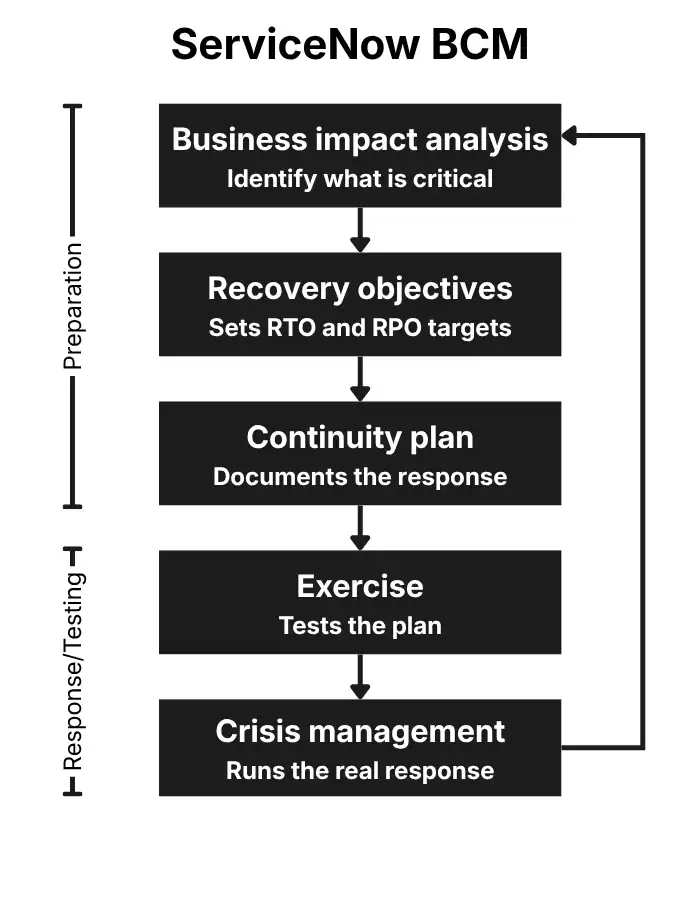
The loop is really the whole idea in one picture. Nothing in this process is meant to be final – an exercise or a real incident always feeds back into the BIA and the plan, which is why the arrow at the bottom of the diagram doesn’t stop – it goes back around to the top.
Where to Start If You Are New to ServiceNow BCM
If there is one thing worth taking away, it is this: don’t jump straight to writing a continuity plan. Start by understanding the business – what services it provides, what capabilities enable those services, and which of them are most critical to the organization. From there, the Business Impact Analysis can help establish what happens when those services are disrupted, what the consequences are, and how quickly they need to be recovered.
From there, the opportunity is to connect the dots – from impact analysis to recovery objectives, from recovery objectives to continuity planning, and from the plan to how the organization actually responds when something goes wrong.
I would also treat the first few months as a period of building and learning, not as an exercise in shipping a finished programme. You will learn things along the way. The business will change. Exercises will expose gaps. Plans will need to evolve.
Before I looked into BCM properly, I assumed it was mostly about writing a recovery plan and hoping you never had to use it. What I found instead was a much bigger discipline – one focused on understanding what actually matters to the business, setting realistic recovery priorities, and building the resilience to keep critical operations going when things don’t go according to plan.
For anyone starting, that is probably still the best place to begin: understanding what matters most, what the business needs to be able to do, and what it would take to keep those critical services running.
And perhaps the simplest way to look at ServiceNow BCM is this: It’s a platform that can help make continuity part of how an organization operates, not just a place where continuity plans are stored.