





Security Center is one of the areas where the Australia release stands out. Not because of new features, but because of how the existing ones start to work differently in practice.
The improvements here are less about adding more visibility and more about making that visibility actionable. Hardening exceptions can now be handled in context, Security Center administration can be delegated more cleanly, access findings move closer to remediation, and identity and access capabilities are brought into a more connected working context.
Taken together, these changes reshape the Security Center from a place where issues are surfaced to a place where they can be actively worked on and governed. The examples below are illustrative scenarios used to show how these release changes may play out in real platform governance.
1. Accept Risk for Hardening Settings
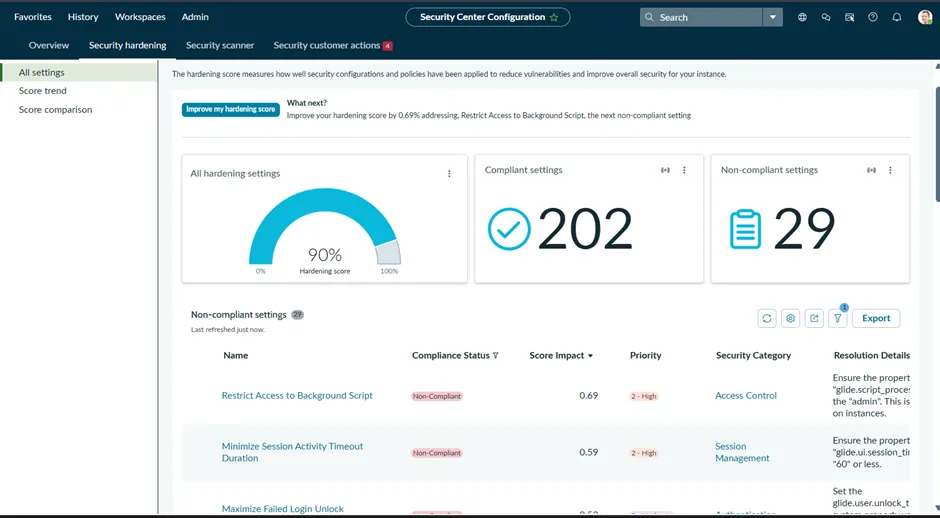
One of the most practical additions in Australia is the ability to accept risk for hardening settings that are not applicable to the organization’s security requirements. The decision requires a mandatory justification, shows the projected security score impact before saving, updates the compliance status to Accepted Risk, and reflects that status in security score calculations.
The release also adds an Accept Risk Settings filter to help identify and manage accepted-risk items across the instance.
Why This Matters
This matters because hardening exceptions are a normal part of enterprise security governance, but they are often poorly represented in the platform record.
The recommendation remains open in the tool while the actual decision sits somewhere else – in an exception register, an audit note, or an email trail. That weakens traceability and creates a gap between the security issue and the governance decision attached to it.
Australia improves this by allowing the exception to be handled where the issue already lives. That gives teams a cleaner security record, a more accurate score model, and a more credible audit story.
A Practical Example
A business-critical integration depends on a platform behaviour that a hardening recommendation would restrict. The security team has already reviewed the exposure, documented compensating controls, and agreed that the setting will remain unchanged.
The issue is not a lack of review. The issue is that the control finding and the exception decision are being tracked separately.
Accepted Risk closes that gap. The team can record the decision inside the Security Center with justification and a visible score impact instead of leaving the item to look like an unresolved failure.
2. Granular Admin Role for Security Center
Australia also adds a granular admin role for the Security Center. This role allows developers and administrators to complete Security Center administrative configuration tasks without requiring the full admin role.
Why This Matters
This matters because the Security Center often needs to be operated by security or governance personnel who do not require unrestricted platform administration. Without a more targeted role, customers usually end up choosing between two poor options: over-privileging users, or routing routine Security Center work through a full admin.
Neither model is clean. One expands access too far. The other slows down security operations for no good reason. A dedicated Security Center role gives customers a more workable least-privilege model.
Practical Example
A lot of customers are not comfortable giving platform admin to everyone who needs to work on Security Center, and from a security perspective, that concern is completely justified.
Full platform admin is not a narrow operational role. It carries broad authority across the instance, far beyond posture review, hardening oversight, or remediation tracking. In well-governed environments, that kind of access is tightly controlled because every unnecessary expansion of admin privilege increases risk in its own right.
That is where the tension usually appears. Security leads, governance teams, or control owners often need direct access to the Security Center so they can review findings, manage hardening decisions, and drive follow-up work. But customers do not want to meet that need by granting unrestricted platform control to everyone involved in the security process.
Without a more granular role, the choice is usually uncomfortable: either broaden admin access more than the customer would like, or keep it restricted and accept that Security Center work becomes slower because it depends on another administrator.
The dedicated role matters because it resolves that tension in a much cleaner way. It lets customers support security operations without compromising their broader access control posture.
3. Access Management Console Moves Security Center Closer to Action
This is where the Security Center starts to feel more operational.
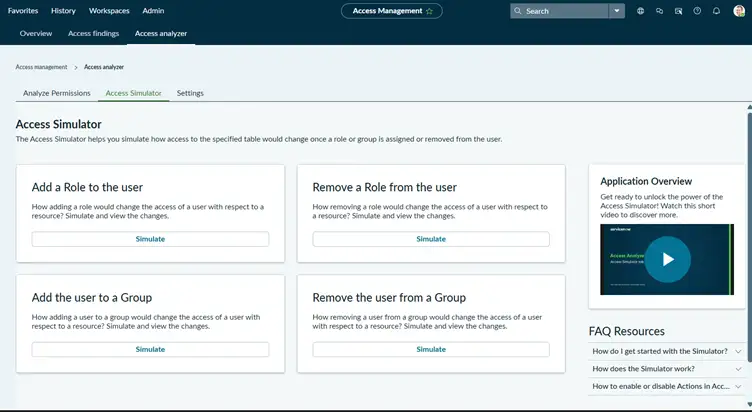
Australia adds the Access Management Console, described as the new Access Controls console within Security Center. It allows admins to review and remediate access issues and misconfigurations, provides enhanced visibility into Access Analyzer findings, and streamlines remediation by allowing teams to track, prioritize, and resolve access issues through task assignment.

Another key capability in this area is Access Analyzer, which focuses on identifying access risks and misconfigurations across the instance.
While the Access Management Console brings findings together for review and action, Access Analyzer is what surfaces those findings in the first place. It evaluates access patterns and highlights areas where permissions may be overly broad, misconfigured, or not aligned with expected controls.
Why This Matters
This matters because access findings rarely fail at the point of detection. They fail in the handoff between identification, validation, ownership, and remediation.
In most environments, those responsibilities are split. Security identifies the issue, the platform team owns the access model, and an application owner has to assess impact. That separation is where momentum slows down and findings lose traction.
The improvement here is not just better visibility, but tighter coupling between findings and follow-up. When validation, ownership, and remediation sit closer to the original finding, Security Center becomes an operating surface for access governance rather than just a reporting layer.
Practical Example
An access review surfaces a potentially over-permissive path to a sensitive table through Access Analyzer. On the surface, it looks like a straightforward exposure, but the underlying access is not coming from a single role. It is the result of a combination of inherited roles, ACL conditions, and indirect access paths.
That is where the complexity starts. The security team identifies the issue, but the platform team needs to understand how that access is actually being granted. At the same time, an application owner needs to confirm whether the access is required for a legitimate use case.
Without a connected workflow, this kind of issue typically gets fragmented. The finding is noted in one place, validation happens somewhere else, and remediation is tracked separately. That is where delays and misalignment start to build.
The Access Management Console brings those steps closer together. Access Analyzer surfaces the finding, the console provides a structured way to review and prioritize it, and follow-up actions can be assigned and tracked without losing context. That makes it easier to move from identifying the issue to understanding it and driving the right remediation.
4. IAM Tools Are Pulled into the Same Security Context
Another important addition in Australia is the way Identity and Access Management (IAM) capabilities are brought closer into the Security Center. Rather than being handled across completely separate administrative areas, capabilities such as access analysis, access validation, and machine identity visibility are now brought closer together within the Security Center.
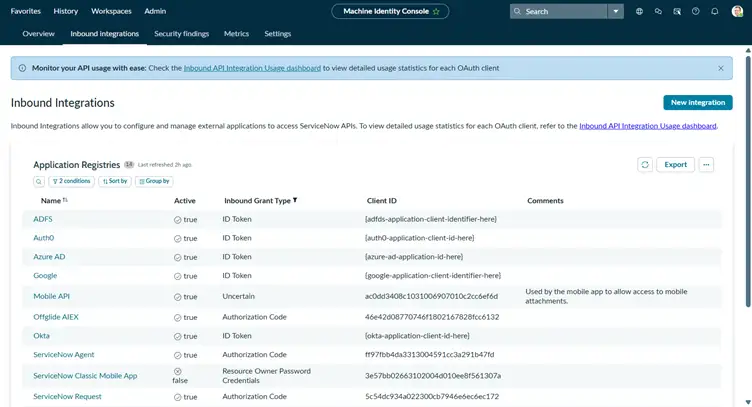
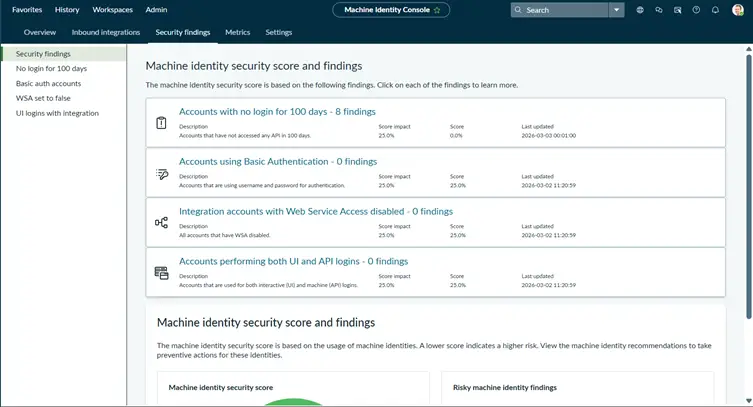
In addition to visibility into integrations and OAuth clients, Security Center brings machine identity risk into a more structured security context through findings and scoring.
The view highlights machine identity findings such as:
- Accounts with no activity over extended periods.
- Accounts using basic authentication.
- Integration accounts with weak or inconsistent access patterns.
- Accounts used for both UI and API access.
Each finding contributes to a machine identity security score, giving teams a measurable way to assess how securely integrations and service accounts are being managed.
Why This Matters
This matters because identity and access reviews often lose momentum when the relevant signals are spread across disconnected administration areas. Access analysis, identity tooling, and governance context frequently sit in different places, owned by different teams.
That separation makes even simple reviews harder than they need to be. It slows down decision-making and forces teams to reconstruct how access is actually being granted across the platform.
Bringing IAM capabilities closer into the Security Center improves continuity of context. It allows teams to move more directly between identifying access risks, validating access behaviour, and understanding how both user and machine identities interact with the platform.
Practical Example
A platform team is reviewing the security impact of recent integration changes and starts by looking at inbound integrations and OAuth clients. At a glance, the integrations appear legitimate and operationally healthy.
However, a closer review reveals gaps: some integrations have not been used for extended periods, others still rely on basic authentication, and a few have unclear ownership.
At the same time, machine identity findings highlight additional patterns such as inactive accounts, mixed UI and API usage, and inconsistent access behaviour across integrations. Individually, these issues may not appear critical, but together they point to a lack of consistent governance around machine identities.
Without a connected view, this type of review becomes fragmented. Integration details, access behaviour, and risk indicators are spread across different areas, requiring the team to piece together how access is actually being used across the platform.
Bringing these IAM capabilities closer into the Security Center changes that. It allows the team to review integrations, access patterns, and related risk findings in a more connected context, reducing the need to switch across multiple administrative areas and making it easier to identify gaps, validate ownership, and act on outdated or risky integrations.
5. Version-Based Hardening Settings
On paper, this may look like a smaller enhancement. In practice, it is one of the cleaner usability improvements in the release.
Australia introduces a more version-aware approach to hardening by ensuring that recommendations are aligned to the instance’s family and baseline. Instead of presenting a broad set of controls, the platform now focuses on surfacing only those that are relevant to the version being evaluated.

This is reflected in views such as hardening score comparison, where settings are associated with specific baselines. Version-based filtering builds on this by ensuring that only applicable controls are surfaced during review.
Why This Matters
This matters because irrelevant hardening recommendations create review noise, waste validation effort, and gradually reduce confidence in the tool.
In practice, administrators often spend time validating controls that do not apply to their current instance version. Over time, that effort adds up, and the review process becomes slower and less reliable because attention is split between real risks and version-mismatched guidance.
Version-based hardening improves the quality of the review by improving the relevance of what is presented in the first place. It reduces the need for manual filtering and allows teams to focus on controls that actually require attention.
Practical Example
A platform team is reviewing hardening posture before and after a family upgrade. As part of that process, they compare changes in hardening settings and assess how their security posture has evolved.
Without version-aware filtering, the review can become cluttered with recommendations that do not apply to the version under assessment. The team ends up spending time filtering out irrelevant controls rather than focusing on meaningful changes.
With version-based hardening, the recommendations presented are aligned to the instance’s baseline and version. This makes the comparison more focused and allows the team to concentrate on relevant controls, making the review both faster and more reliable.
6. The Hardening Baseline Has Also Been Updated
One detail that should not be missed sits under Changed in this release. The Security Hardening tool has been updated to the latest Instance Security Hardening Settings V7.
Why This Matters
This matters because workflow improvements are only part of the story. If Security Center is going to support better hardening decisions, the underlying hardening baseline also needs to stay current. A smoother process is useful, but only if the baseline behind it is still relevant.
The V7 update strengthens the overall hardening story in Australia. Accepted Risk is more useful when the baseline is current. Version-based filtering is more valuable when the underlying guidance is being maintained as well.
Practical Example
Hardening discussions are only as strong as the baseline behind them. If the reference point is stale, the workflow may look better while the decision quality remains uneven. Updating the baseline to V7 gives the review process more credibility because both the process and the underlying content have moved forward together.
7. Security Tasks Fit More Naturally into the Flow
This is not the biggest change in the release, but it supports the overall direction well.
Admins can create Security Tasks directly from any Platform Security page using a chatbot experience within the Now Assist panel. The access console enhancement also ties access remediation to task assignment as part of the resolution flow.
Why This Matters
This matters because security work often slows down at the handoff. The finding is identified in one place, the task is created somewhere else, and part of the context gets diluted on the way. That is one of the most common reasons remediation loses momentum.
Keeping task creation and remediation closer to the original security review reduces that gap. It does not remove the work, but it does make the operating flow more direct.
Practical Example
A security review identifies an access issue that needs investigation by the platform team and validation by an application owner. In a less connected model, the finding is reviewed in one area and then manually converted into a task somewhere else. That is usually where ownership becomes less clear and the original security context has to be re-explained.
Keeping task creation closer to the review reduces that friction and makes follow-up easier to govern.

Security Monitoring Completes the Loop
While security metrics are not introduced as part of the Australia release, their role becomes more relevant in the context of the improvements made to Security Center.
As hardening, access management, and IAM capabilities become more actionable, metrics provide a way to track whether those actions are actually improving security posture over time.
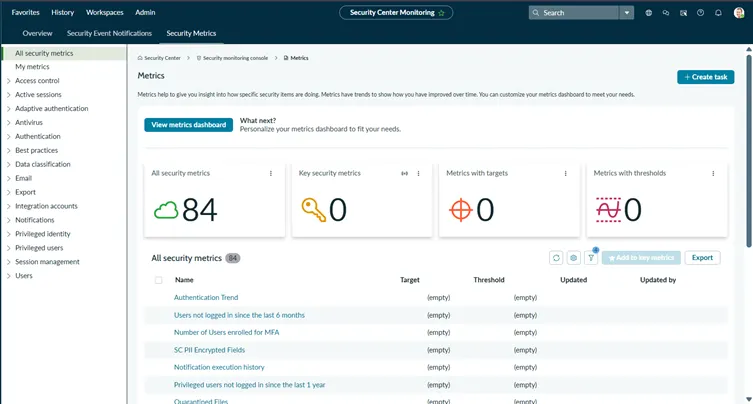
These metrics cover areas such as:
- Authentication trends
- Inactive users
- MFA adoption
- Encryption coverage
Why This Matters
Security work does not end with identifying issues or completing remediation tasks. It also requires understanding whether those actions are having the intended impact.
Metrics provide that feedback loop. They allow teams to move beyond individual fixes and start measuring progress at a broader level.
In that sense, while not new, metrics complete the overall flow – from identifying issues to acting on them, and ultimately measuring the outcome.
How Security Center Feels Different in Australia
What stands out in Australia is not one headline feature. It is the shape of the improvements when viewed together.

Hardening decisions become more realistic through accepted risk. Administration becomes easier to delegate through a more targeted role. Access findings move closer to remediation. IAM capabilities sit in a more connected security context. Hardening guidance becomes more relevant to the version actually being assessed. And the hardening baseline itself is refreshed to V7.
That combination makes Security Center feel less like a dashboard you inspect periodically and more like a place where actual platform security work can happen.
Final Thoughts
The more I looked at Security Center in the Australia release, the less it felt like a simple feature update.
The real value is not just in the individual enhancements, but in how they address some of the most persistent points of friction in platform security work. Handling exceptions in context, delegating access without over-privileging users, moving access findings toward actionable remediation, bringing IAM capabilities into a more connected view, and reducing noise in hardening reviews are all practical improvements that change how the platform is operated.
Taken together, these changes shift the Security Center from a place where issues are identified to a place where they can be actively worked and resolved.
This is AAA – Australia, Access, Accountability where risk, access, and ownership are no longer separate, but part of the same working context.
In Australia, the Security Center feels less like something you inspect and more like something you operate from.