





Zurich marks a major leap forward in ServiceNow’s platform, blending powerful AI-driven tools with intuitive design enhancements to supercharge how you build, test, and deploy workflows. With AI-powered Build Agents and conversational assistants, creating apps and workflows is faster and smarter than ever.
Visual workflow design gets a boost through features like subflow creation from images and improved debugging tools. Across Studio, UI Builder, and Mobile App Builder, new dark mode and automatic data binding make development more comfortable and efficient.
Testing is also easier with expanded automated test suites, while Dev Sandboxes provide safe, isolated environments for innovation without risk. Altogether, Zurich empowers creators and developers to deliver seamless, high-quality experiences with speed and confidence. Let’s take a closer look.
1. Feature with a Healthy Twist: Dark Mode
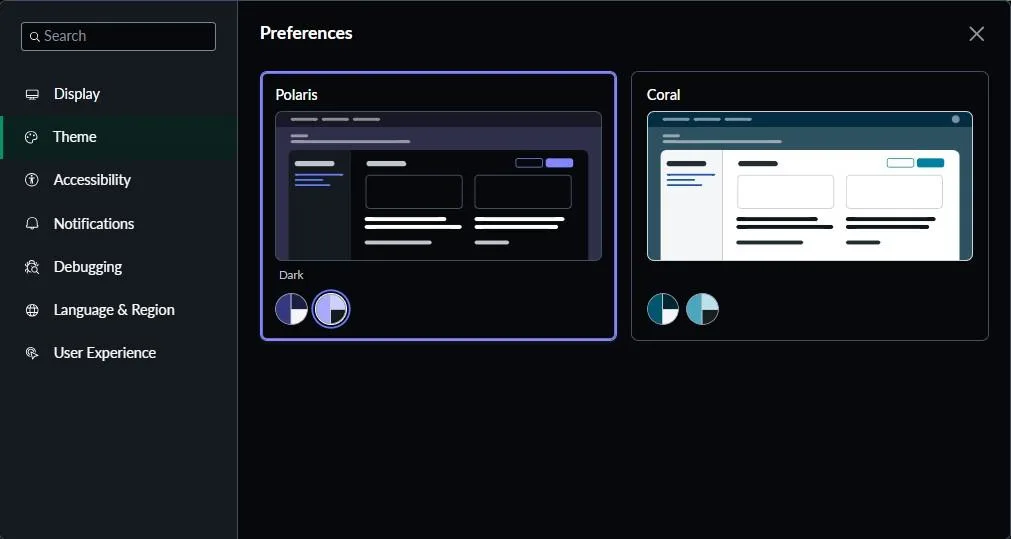
Let’s begin with a small change that brings big value – the introduction of Dark Mode. More than just a visual refresh, this feature is designed with well-being in mind. It’s easier on the eyes, especially during long development sessions, and adds a sleek, modern touch to the interface. Whether you’re coding late into the evening or navigating complex workflows, Dark Mode offers a more comfortable and focused experience.
Why It Matters
With the new dark theme, you’re not just switching colours – you’re reducing eye strain, improving focus, and enhancing accessibility for users who prefer or require a darker interface. It’s like moving from a glaring spotlight to a comfortable, ambient setting that lets you concentrate longer without discomfort.
2. From Whiteboard to Workflow: A Seamless Leap in ServiceNow
Imagine a high-energy brainstorming session: ideas are flowing, whiteboard diagrams take shape, and teams are aligned on a vision. Traditionally, the next step – turning those rough sketches into functional workflows – meant hours of translating visuals into tools like Visio, then rebuilding them manually in platforms like ServiceNow.
That process just got a major upgrade.
With its latest release, ServiceNow introduces an innovative capability that allows users to convert images directly into subflows and playbooks. By simply uploading an image, Now Assist can instantly generate actionable workflows, reducing the friction between ideation and execution.
This new feature doesn’t just save time; it redefines the way teams move from concept to solution. It brings agility to process design, ensures continuity from whiteboard to implementation, and empowers teams to deliver faster and more efficiently.

Points to consider while using this feature:
- Make sure your image is the right format and size – the image should be in JPG, JPEG, PNG, or WEBP format.
- Upload an image that is clear and visible to the human eye. Make sure that any writing is legible. If you can’t see what’s in an image, neither can Now Assist.
- If the image is unclear in any way, Now Assist returns an error and cannot generate a preview. This error is also displayed if an image is not a business process.
- When uploading an image, it is the primary input by default. You can use the text description to add more context about the business process in your uploaded image.
- Note: Since an image is the primary input, you will receive an error for an unusable or unclear image even if you include a valid text input.
Why It Matters
With Image to Playbook, you’re not redrawing diagrams or translating sketches line by line – you’re uploading a visual concept and instantly getting a structured workflow. It’s like turning a whiteboard snapshot into a working blueprint in seconds. It transforms ideation into action, making automation design fast, intuitive, and shockingly visual.
3. Loading… Still? Fix That With Performance Analyzer
Ever found yourself waiting on a page that just won’t load fast enough? You’re not alone. Bottlenecks in UX frameworks can silently drag down performance, frustrating users and obscuring the root cause.
Enter the new Performance Analyzer – a powerful tool introduced in this release that empowers you to pinpoint performance issues on UX framework pages independently. No more guesswork. No more endless debugging.
Now, you can isolate delays, identify page-level pain points, and take targeted action – all with clarity and speed.

The new Performance Analyzer brings powerful visibility into UX performance. Here’s how it helps you troubleshoot smarter and optimize faster:
- Visualize Request Flows: View detailed waterfalls of request execution, displayed as structured, tree-like timelines, making it easy to trace delays and dependencies across the stack.
- Get Real-Time Load Insights: Instantly receive page load time data, delivered directly within your instance. No external tools or waiting required.
- Analyze Aggregated Metrics: Access performance metrics grouped by application and route, helping you identify trends, outliers, and high-impact areas at a glance.
Why It Matters
With Performance Analyzer in ServiceNow, you’re not just glancing at today’s metrics – you’re turning Task Manager snapshots into strategic playbooks. It doesn’t just show performance numbers; it tracks them over time, forecasts what’s coming, spots trends, and lights up exactly where teams need to focus. It’s the difference between reacting to today’s problems and proactively steering service delivery toward continuous improvement.
4. Master Your Releases: Deployments Made Easy with ReleaseOps
Managing releases in ServiceNow has often been more art than science.
You’ve got multiple developers working on different update sets. Someone’s cloning a dev instance, another is manually exporting changes, and a third is renaming update sets mid-flight. Update sets get overwritten. Others go missing. You’re trying to remember which ones were applied to test, which were pushed to prod, and which still live on someone’s local instance. And don’t even mention the time someone accidentally deployed an unfinished script include to production. It’s stressful. It’s chaotic. It’s… normal.
In the traditional ServiceNow release process, things often feel manual and fragmented. The release manager creates a release linked to a pipeline. Developers juggle update sets, promoting them, adding them to deployment requests, or creating new ones. Changes move through stages like assessment, where tests and scans catch issues. If something fails, tasks get bounced between testers and developers until it’s fixed. Finally, after passing all checks, the release deploys to production-often a complex, multi-step effort with room for error.
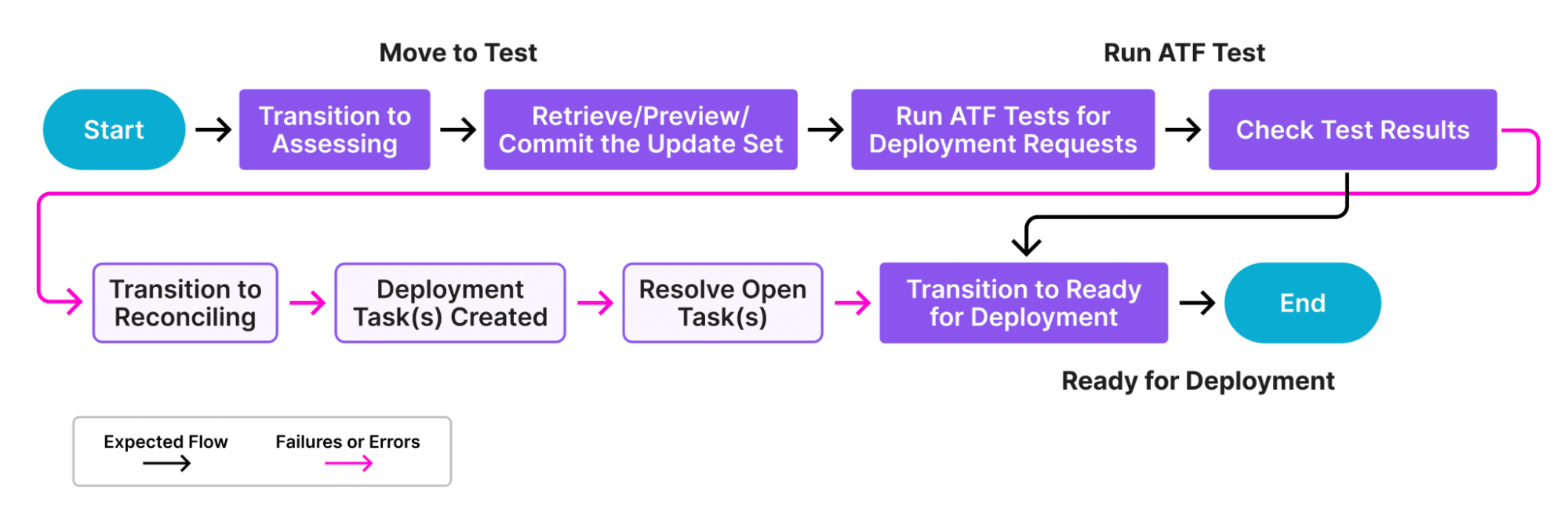
How ReleaseOps Transforms This

ReleaseOps streamlines every step with clear roles and automated tools:
- Pipeline Manager sets clear requirements and workflows through pipelines, defining exactly how changes flow.
- Release Manager oversees the entire deployment process using releases, coordinating what goes where and when.
- Developers package their work in deployment requests whether update sets or app installs and push them through the pipeline.
- The Deployment Analyzer scans these requests to spot differences or issues before deployment, enabling smarter decisions and reducing risk.
Why It Matters
With ReleaseOps, you’re not just managing update sets – you’re managing the whole release lifecycle in an automated, predictable way. Roles have clear responsibilities, workflows are defined, and deployments become more reliable and less chaotic. It’s the difference between firefighting and smooth sailing!
5. Developer Sandboxes: Managing Overload Across Teams
Developer Sandboxes offer isolated, parallel environments for developers and admins to safely build and test changes without affecting shared systems.

Imagine giving every developer on your team their private workspace – no more stepping on toes, accidental overwrites, or endless coordination just to avoid breaking each other’s code. That’s exactly what Developer Sandboxes deliver.
With up to 30 fully isolated environments per instance, each sandbox is a lightweight clone of your base instance where developers can build, test, and experiment independently.
Say goodbye to:
- Accidental code overwrites.
- Constant back-and-forth just to avoid conflicts.
- Manually managing feature branches.
Instead, each sandbox can connect to source control with its own dedicated branch, enabling clean, modern Git workflows – no more “one branch per app” limitations.
Note: There’s a 30 sandbox limit per instance, and you’ll need to coordinate with ServiceNow to get it set up. But paired with modern pro-code tooling, Developer Sandboxes open the door to a drastically smoother, faster, and more scalable development process – no more wrestling with XML-based app development.
Why It Matters:
With the Sandbox Dashboard, you’re not juggling a shared sandbox or tiptoeing around team members’ edits – you’re launching isolated development spaces instantly, each tied to its own Git branch. It’s like moving from a chaotic workshop to your own clean studio on demand. You get true isolation, streamlined collaboration, without fear of overwriting someone else’s work. It puts parallel development on autopilot – safe, fast, and conflict-free.
Summary
Before we wrap, let’s talk about a few Zurich quick wins that are Precise, Powerful and Human:
- Flow Designer just got two upgrades at once:
- Wait for Email Reply: Now your flows can pause until someone replies to an email. No more messy loops or workarounds-just smooth, natural automation.
- Version history & Restore: Made a change that didn’t work out? Roll back to a previous version with one click. It’s like an undo button for your flows – total peace of mind.
- Alerts that stick around: Ever miss an alert because it vanished too quickly? Zurich fixes that. Head to Accessibility → Do not auto-dismiss page alerts and keep notifications visible until you decide to dismiss them. Simple, but game-changing.
- Forms that talk to you: Zurich adds four new form message types: Grey (Low), Lavender (Moderate), Yellow (High), and Green (Success). They don’t disappear after a few seconds – they stick until you close them. Finally, guidance that helps you get things done.
These updates aren’t flashy, but they make a real difference in day-to-day work. Flows behave smarter, alerts respect your pace, and forms give you guidance that sticks. It’s small touches like these that make Zurich feel smoother, safer, and more human.
Important note: ServiceNow doesn’t ship out-of-the-box workflows starting with Zurich. The Zurich features are building blocks for smarter automation. Think of it as giving you sharper tools – you still get to decide how to craft the experience.
The Zurich release of ServiceNow introduces thoughtful enhancements that make automation smarter, user interactions clearer, and form guidance more effective. Together, these updates reinforce ServiceNow’s commitment to improving usability, control, and efficiency-empowering users and developers to work more confidently and effectively.