





First introduced in the Yokohama release, Agentic AI brings intelligent digital teammates into the workplace. These AI agents are not just answering questions – they are handling multi-step tasks, collaborating across departments, and making everyday decisions. Think of them as reliable colleagues who never take a coffee break – except that they can finish your work while you are away.
So, how do these digital teammates manage to get things done so quickly? Let us break down their quick-win ingredients.
AI Agent Orchestrator – The Team Captain
Imagine your digital teammates are a team of specialists, each one skilled in their own areas. Some handle duplicate tickets, others gather logs, and some analyze patterns. But how do we stitch everything together? That is where our captain chips in.

The orchestrator sequences tasks, handles handoffs between agents, retries if something fails, and keeps everyone on track. It is the team captain making sure no task slips through the cracks, so your multi-step request gets completed while you sip your latte.
AI Agent Studio – Tailor-Made Solutions
Every teammate needs guidance. Agent Studio is where you train and customize your digital teammates. Here you can:
- Build new agents with prebuilt templates
- Test them in a safe sandbox
- Track their behaviour and refine their skills
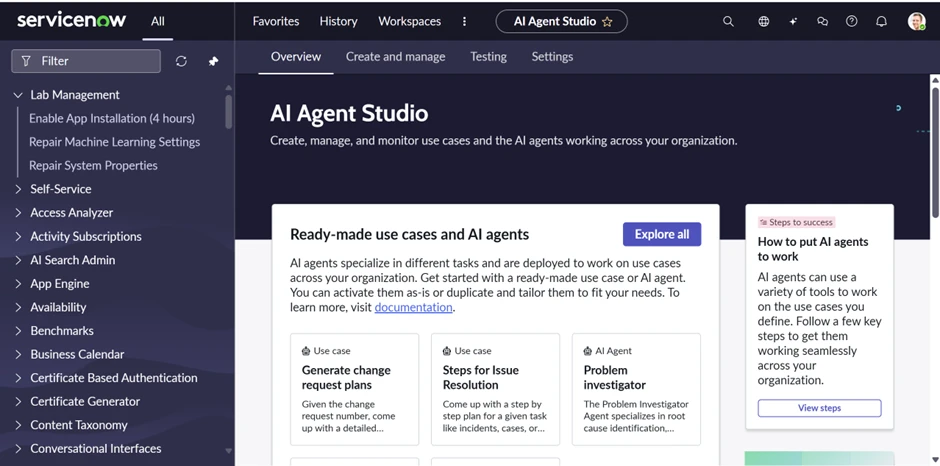
Think of it as coaching your teammates so they know exactly what to do in every scenario, without you hovering over them.
AI Control Tower – The Sentinel Steer
Even the best teams need oversight. The Control Tower ensures your digital teammates operate safely and securely. It watches for errors, enforces policies, audits actions, and can step in if something risky is about to happen.
In our coffee break analogy, the Control Tower is like the manager who keeps an eye on the floor while you are away – making sure everything runs smoothly, compliantly, and without surprises.
Jumpstart Your AI Agent Experience
If you have been hearing the buzz about AI agents and wondering what the hype is all about, you are not alone. Let us break it down for you.
Imagine you have a super-smart assistant who does not just give you answers but gets things done for you. That is an AI agent.
Unlike a regular chatbot that stops at answering your question, an AI agent can:
- Understand what you need
- Decide the best way to do it
- Take action without you micromanaging every step
Instead of just creating an incident, an AI agent can categorize it, assign it to the right team, and even auto-resolve it if the solution is straightforward. How cool is that?
How Does Auto-Resolve Work?
Here is the magic: AI agents do not just follow static rules – they learn from patterns. In platforms like ServiceNow, out-of-the-box agents can look at historical data, predict the right resolution, and apply it instantly when confidence is high.
Take the IT Support Agent in ServiceNow as an example:
- It can detect that a password reset request is a common issue
- Instead of waiting for a human, it triggers the reset process automatically
- The user gets their access back in seconds – no ticket queues, no delays
That is the power of moving from manual intervention to intelligent automation.
What About Agentic Workflows?
Now, imagine not just one agent, but a team of agents working together like a pit crew. One agent handles the incident, another updates the knowledge base, and a third notifies the user. They collaborate, adapt, and keep the workflow moving without you lifting a finger.
This is what we call agentic workflows, where AI agents do not just act, they coordinate.
Note: Agentic workflows were first named as Use Cases in the Yokohama release.
Let us pick up an OOB Agentic Workflow and explore it.
Investigate and Resolve ITSM Incidents
This is the overall workflow that helps resolve incidents automatically.
Note: Description plays a key role in an agentic workflow.
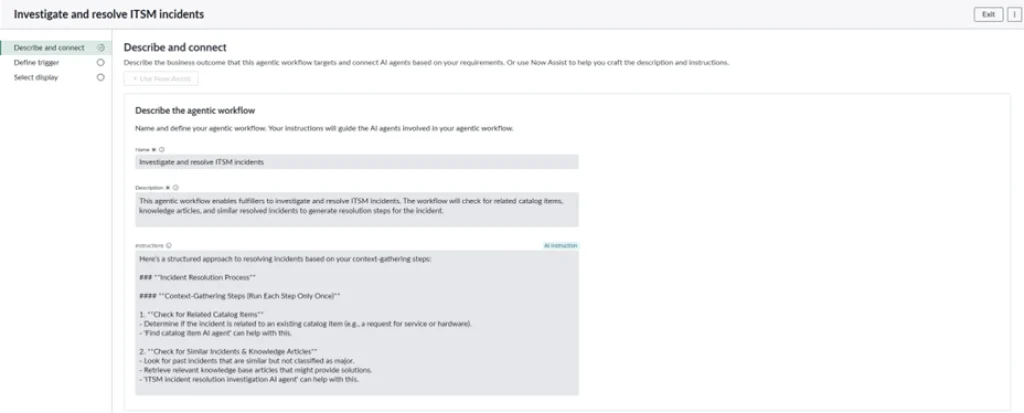
Why Descriptions Matter in Agentic Workflows
Imagine you are working with a team of super-smart assistants (these are your “agents”). They are ready to help, but they don’t read minds – they rely on what you tell them. Before you head out for your coffee break, make sure you give them the right input, or you might come back to surprises instead of solutions.
Descriptions vs. Instructions: The Duo That Makes OOB Agents Work
Every Agentic Workflow in ServiceNow comes with two little helpers: a description and a set of instructions. At first glance, they might look like normal details, but together they are the secret sauce that makes agentic workflows work.
The description is the big-picture story – it is like a job posting for the agent. Here is what I do, here is where I fit, here is what you can expect from me. For example, the Investigate and Resolve agent is not just about logging tickets – it is designed to actually dig in, enrich them with context, and even fix simple issues automatically.
The instructions are the how-to guide. Think of them as the recipe card the agent follows step by step: gather the data, check the knowledge base, try an auto-fix if it looks safe, or hand it over to a human if not. No guesswork, no improvising – it’s all laid out.
The best part? Now Assist makes both pieces easy to read. Instead of staring at dense technical logic, you see a simple description anyone can understand, and a set of instructions you can scan like a checklist. Leaders can see the “why” at a glance, while operators can trust the “how” under the hood.
That mix of context and execution is what turns agents from mysterious automation into reliable teammates. It is not just about saving clicks – it is about building trust, so you actually want to switch them on.
Gathering the Right Agents
Once we have set the description and instructions, it’s time to bring in the team – the agents who will actually get the work done.

ITSM Incident Resolution Investigation AI Agent
Just like we did with the agentic workflow, start by writing a clear description and instructions for the AI agent.
Let us explore each agent and uncover what goes on behind the scenes:
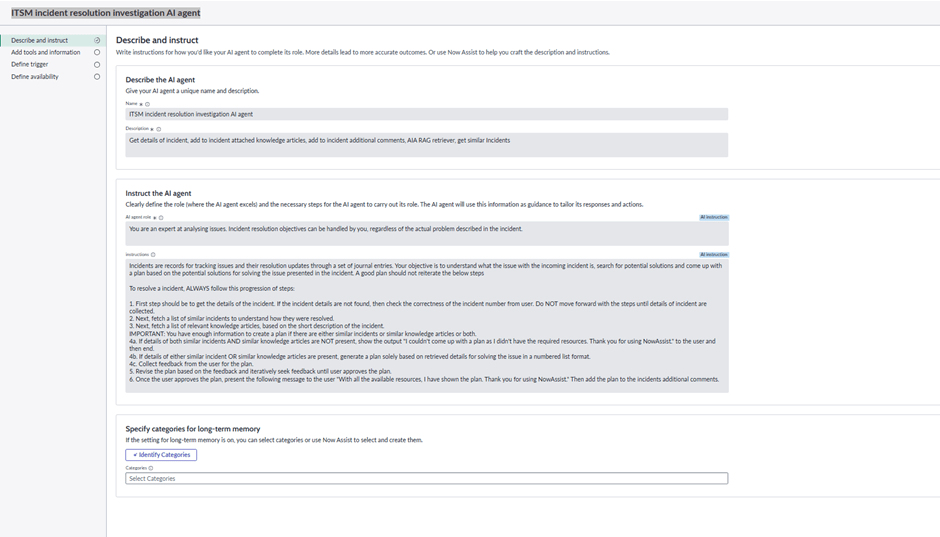
The next step is to define the tools, connectors, or capabilities that each agent uses to conduct its instructions in the workflow. In the Agentic AI context, these “tools” are what enable the agents to interact with systems, retrieve information, update records, or suggest actions.
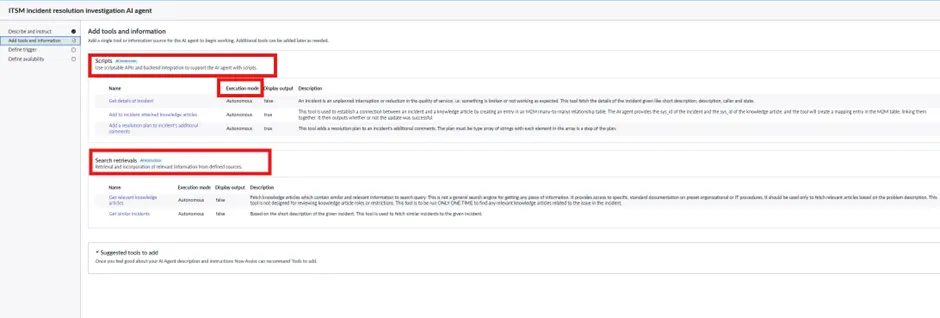
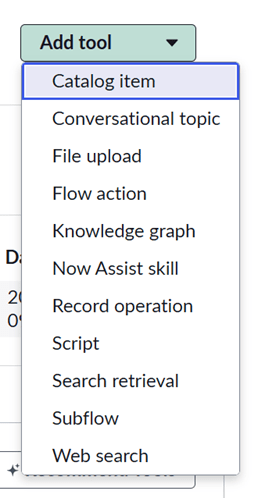
Tools Behind the Instructions: How Agents Get Work Done
As part of the instructions we wrote for each AI agent, we need ways for them to perform tasks. In ServiceNow, these are called tools, and the dropdown you see here lists all the options you can attach to an agent.
In this example, we are using Scripts and Search Retrievals to execute the tasks mentioned in the instructions. Scripts let the agent run custom logic, while Search Retrievals help it gather the right information quickly.
Here is the full set of tools available:
| Tool | What It Does |
| Catalog item | Launches existing service Catalog requests and workflows. |
| Conversational topic | Guides users through structured, multi-step dialogues. |
| File upload | Accepts and processes files provided by users. |
| Flow action | Invokes predefined flows or orchestrations in the platform. |
| Knowledge graph | Retrieves facts and relationships from structured knowledge. |
| Now Assist skill | Executes specialized AI skills for domain-specific tasks. |
| Record operation | Creates, updates, or deletes records in ServiceNow tables. |
| Script | Runs custom JavaScript logic or automation steps. |
| Search retrieval | Fetches relevant knowledge or data from enterprise sources. |
| Sub flow | Calls modular, reusable sub-workflows within a process. |
| Web search | Pulls in real-time information from the internet. |
These tools are the building blocks that turn your instructions into actions. Combined with the clear description, they give each agent context and capability – so when you set them up correctly, the agent knows both what to do and how to do it.
Execution Mode decides how much freedom the agent has: whether it runs fully on its own (autonomous) or under human oversight (supervised).
In our out-of-the-box use case, the agent runs in fully autonomous mode. Once it kicks in, it just gets on with the job – no handholding, no ‘are you sure?’ prompts. That is perfect for the kind of low-risk, repeatable tasks this workflow is designed for.
Supervised Mode, on the other hand, is like keeping a co-pilot in the seat. The agent still lines everything up, but a human gives the final thumbs-up before action. That is the way to go if the stakes are higher – think finance approvals or production changes where you don’t want to risk a wrong move.
Triggers: What Gets an Agent Moving
Agents do not just wake up on their own – something must nudge them and say, “Hey, it’s your turn.” That nudge is the trigger.
Think of it like the doorbell for your agent. The moment it rings – maybe a new incident is logged, or an existing ticket gets updated – the agent knows it’s time to step in.
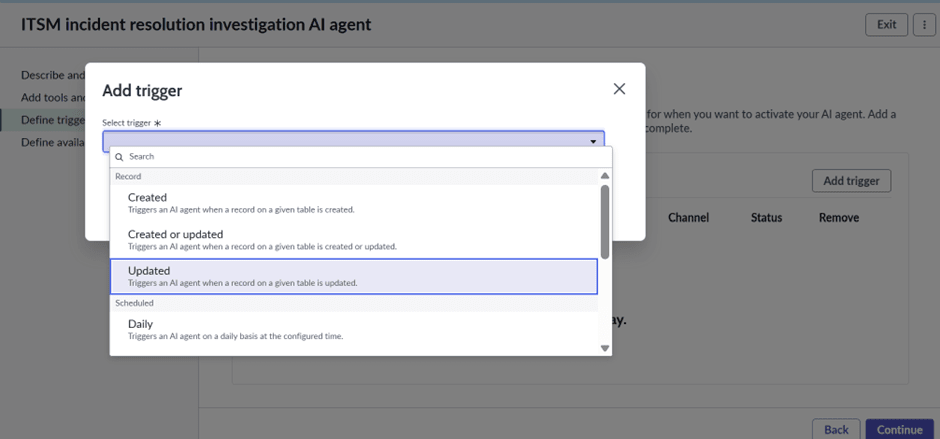
In our out-of-the-box ITSM example, the trigger is simple: a fresh incident comes in. From there, the agent jumps into action, pulling context, checking the knowledge base, and even trying a quick fix if it looks safe.
Triggers make sure agents do not run around aimlessly – they step in exactly when their intervention is needed.
How the Two Agents Work Together
With the Incident Resolution Investigation AI Agent and the Find Catalog Item AI Agent, your digital teammates have all the tools they need to get the job done efficiently:
- Incident Resolution Investigation AI Agent enriches and investigates incidents, attaches knowledge articles, adds comments, and identifies similar past issues.
- Find Catalog Item AI Agent interprets user queries, searches the Catalog, and recommends the right service items.
Once the right triggers are set (e.g. a new incident is logged, or a Catalog request is made), the Orchestrator sequences their tasks:
- Agent 1 gathers and enriches the incident.
- Agent 2 finds Catalog items or related solutions.
- The Orchestrator ensures the steps happen in order and manages any retries.
- The Control Tower monitors for errors, policy compliance, and escalates if needed.
By the time you return from your coffee break, your digital teammates have collaborated seamlessly, executed their tasks, and delivered the output – all without you lifting a finger.
After a well-earned coffee break, we are back and ready to build some brilliant new agents.
With the Zurich release, our digital teammates got a serious upgrade:
- Multilingual Support: Now they can speak your language.
- Integration with Large Language Models: Smarter, more context-aware responses.
- Better Access to Workflow Data: Everything they need at their fingertips.
- Industry-Specific Modules: Tailored to real-world tasks.
These improvements make the agents faster, sharper, and more aware, but they are not here to replace us. Humans are still in the driver’s seat, making complex decisions and nuanced judgment calls.
As we explored the transformative potential of AI agents in ServiceNow, it is equally vital to ground this innovation in responsible AI governance.
Final Thoughts
Agentic AI is not a sci-fi robot overlord. It is your practical, intelligent teammate, turning routine tasks into smart actions. With the right triggers, orchestration, and collaboration between agents, your digital teammates handle the heavy lifting – so your human team can focus on what really matters.
In short, coffee breaks just got a lot more productive.