





The world is spinning fast, and so are ServiceNow updates and upgrades. If you have ever skipped an upgrade, you know that FOMO (the fear of missing out!) hits hard, and it is more than just a feeling – it can impact performance and security.
With the Xanadu release reaching end-of-life, this is the perfect time to get ahead. In this guide, you will find what matters most: upgrade checklists, the Upgrade Monitor module, pre- and post-verification steps, and documentation links that make the process easier.
But that’s not all – don’t forget the essentials like cloning and testing in sub-production, managing skipped records, running ATF for validation, and having a solid backup and rollback plan. We will also touch on integration reviews, stakeholder communication, and timing strategies to avoid common pitfalls.
Ready for a smooth, productive upgrade experience? Let us keep everything intact. When you have lived through multiple ServiceNow upgrades, you know it is never about ticking boxes. It is more about confidence, clarity, and collaboration.
Experience Speaks Volumes
There is always that one upgrade you will never forget. For me, it was Paris.
Once, during an upgrade cycle, we missed a critical notification from the HI ServiceNow team (Now Support). The next day, boom! The platform had jumped to Paris. Suddenly, things broke: ACLs scattered, access issues everywhere, and rollback was not an option we wanted to take. It was chaos caused by a simple lack of preparation.
That day, we learned upgrades are not about ticking boxes – they are about being truly ready. This playbook is built from that lesson. It is not a box-ticking list – it is a readiness system that keeps you in control, risk-aware, and value-focused so your organization truly stays upgraded.
What Does “Stay Upgraded” Really Mean?
Staying upgraded is a mindset and a muscle:
- Continuously ready: You reduce drift, tame customizations, and keep tests current so each upgrade gets easier than the last.
- Proactive, not reactive: You plan, simulate, and validate before anything touches production.
- Value-first: You do not upgrade to a version – you upgrade for outcomes (stability, features, performance, security, cost).
The N-1 Comfort Zone vs. ServiceNow’s Recommendation
Back‑to‑back releases are exciting when they mean something. Yokohama put AI Agents squarely in the hands of platform teams (GA on March 12, 2025) – a milestone for agentic AI at scale. Zurich then doubled down, pushing multi‑agent orchestration, developer “vibe coding,” and enterprise‑grade AI governance to the forefront.
But hype does not mean readiness. Most organizations traditionally aim for N‑1; ServiceNow officially supports the current and previous release, which is why many teams adopt N‑1 as a risk‑managed stance. If you slip beyond that, you’ll hit end‑of‑life (EOL) programs and lose patching/support – so the real game is staying truly upgraded, not just “checking boxes.”
Pro tip: If you want to upgrade only once a year and stay compliant, aim for the fall release and join the Early Adopter program for testing. This keeps you within the N-1 policy without scrambling twice a year.
1. Make “Release Awareness” a Habit
Know what’s coming: Skim the official Yokohama/Zurich launch hub for features, upgrade kits, and events. Keep Yokohama’s AI Agent context view to understand how Zurich evolves it.
Remember the cadence: ServiceNow ships two major releases a year. Build your internal rhythm around that (planning, freeze windows, comms, and automation).
Use official release notes & deprecations early: Don’t wait – scan Zurich highlights and Yokohama deprecations to spot feature shifts before you plan tests or stakeholder sign‑offs.
Handy Links:
Why this matters: If you don’t know what’s coming, you can’t plan for feature adoption or risk mitigation. Awareness is the first step to avoiding last-minute chaos.
Pro tip: Bookmark the release hubs and set a reminder for every ServiceNow family release. Two minutes of scanning now saves hours of firefighting later.
2. Clone Smart, Then Upgrade Sub‑Production
Clone from Production to Sub‑Production to get realistic data and config baselines. Use the Clone Admin Console (on‑demand backups, exclusions/preservers, clone chaining). This speeds up multi‑environment preparation and keeps results consistent.
If you keep a “train/sandbox” sub‑prod instance for user drills, upgrade that first; if not, pick Test/UAT as your proving ground. ServiceNow doesn’t prescribe a “train” instance name – treat it as any sub‑production environment in your promotion path (Exploring Instance Clone).
Why it matters: Realistic data = realistic testing.
Pro tip: Regularly clone your sub-production environments from production – not just before upgrades. This keeps your test environments realistic, reduces surprises during upgrade rehearsals, and ensures automated test framework (ATF) and integration tests reflect real-world data and configurations.
3. Orchestrate With Upgrade Center
One home for upgrades. Upgrade Center gives you a preview of releases, an Upgrade Monitor, Upgrade History, and Upgrade Plans to automate post‑upgrade steps (plugins, skipped records, etc.). It is a huge time saver.
Upgrade Center helps you:
- Preview upcoming upgrades so you know what is changing before you start.
- Schedule and track your upgrades in one place for better control.
- Review your upgrade history to keep an audit trail and learn from past cycles.
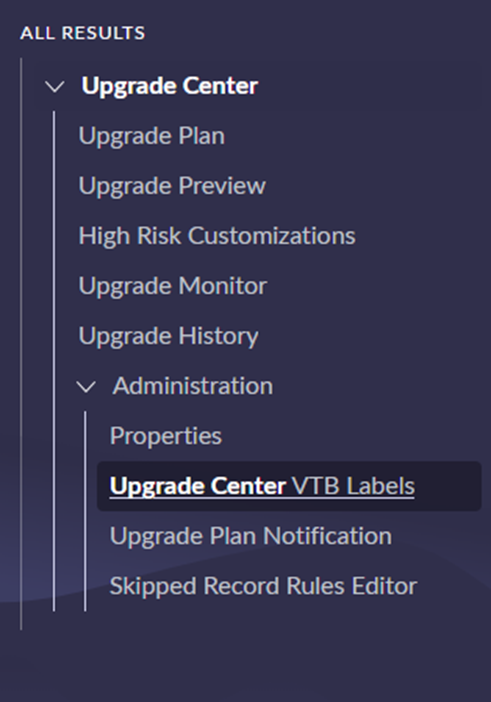
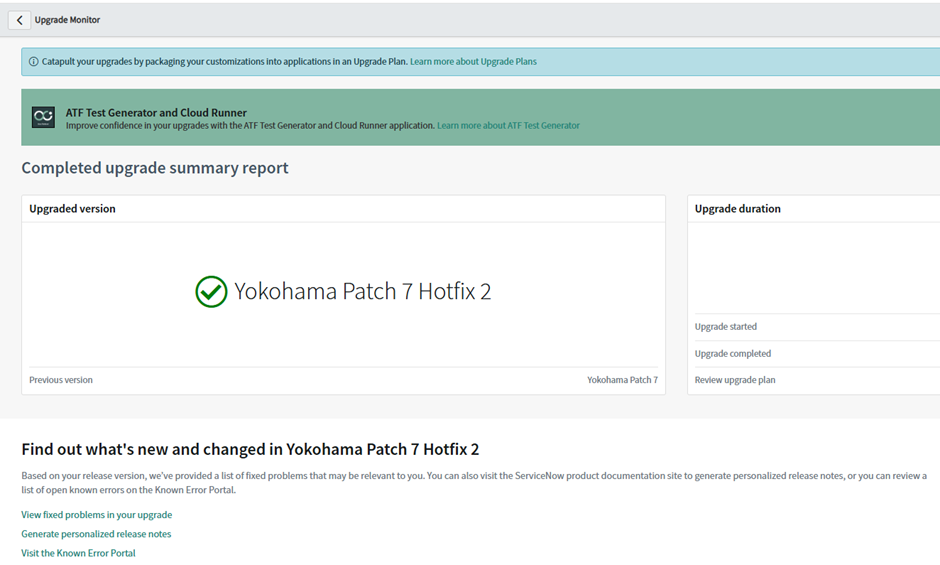
Track progress in real time with Upgrade Monitor: Upgrade Monitor gives you visibility into upgrade status, skipped records, and post-upgrade actions. Use it during sub-production and production upgrades to catch issues early and keep stakeholders informed.

Schedule in Now Support (formerly HI): Use the Upgrade Wizard in Now Support to plan sub‑prod → prod in a controlled cadence, reschedule if needed, and keep everyone aligned
Handy links:
Why it matters: Upgrade Centre is your friend. It centralizes upgrade planning, monitoring, and skipped record management.
Pro tip: Create an Upgrade Plan in Upgrade Center and export skipped records early to decide on customizations versus out-of-the-box (OOB).
4. Map the Impact of Change: Features, Deprecations, Customizations
Deprecations and replacements: Use the official deprecation pages (plus your product‑area notes) to list removals, replacements, and remediation work (config, ACLs, spokes, workspaces).
Customized areas: From Upgrade Center, pull skipped records and capture decisions (keep customization vs. revert to OOB) in your upgrade plan so you can replay actions across environments.
Why it matters: Every upgrade introduces new capabilities and retires old ones. If you do not map these changes early, you risk broken workflows, ACL surprises, and frustrated users. Knowing what is coming and what is going away helps you plan remediation, update ATF coverage, and keep stakeholders aligned.
Pro tip: Maintain a single source of truth (sheet or backlog) with: Module/Process, Change Type, ATF coverage, Owner, Integration impact, KB/Doc link for change. This becomes your audit trail and user acceptance testing (UAT) plan.
5. Automate the Grind With ATF
Automated Test Framework (ATF) is your upgrade superpower – run suites for regressions, reuse quick start tests, and schedule off‑hours runs. Add custom steps where needed.
If you are new to ATF, the community primer is excellent for ramping up and articulating ROI (less manual testing; faster, safer upgrades).
Handy link: ATF product docs
Why it matters: Manual testing is slow and error-prone; ATF accelerates validation and reduces risk.
Pro tip: Start with Quick Start Tests for common modules, then layer in custom steps for your unique processes.
6. Don’t Forget Integrations and MID Servers
Integration tests. Prioritize critical inbound/outbound flows (authentication, payloads, rate limits). Keep owners (Security, HR, CSM, finance) in the loop with concrete UAT scripts. (Pair this with your ATF where possible).
MID Servers auto‑upgrade to match the instance. Ensure their hosts can reach install.service-now.com, check OS support (no 32‑bit), and verify services restart cleanly. Keep a manual recovery runbook handy.
Handy link: MID Server upgrades (requirements & behaviour)
Why it matters: Integrations and infrastructure issues can silently break critical workflows.
Pro tip: Maintain an integration inventory with owners and test scripts. For MID Servers, verify connectivity and logs post-upgrade, even though they auto-upgrade.
7. Cutover With Confidence and Measure It
Pick the right window. Aim for off‑hours with stakeholders on standby. Schedule via Now Support and monitor the Upgrade Monitor during execution.
Post‑upgrade sanity: smoke tests, reconciliation of skipped records, error logs, MID Server status, and integration telemetry. Track findings in your upgrade plan for repeatability.
Close the loop. Use the Upgrade planning checklist to ensure you’ve hit release‑specific tasks, then archive decisions and metrics for the next cycle.
Why it matters: A smooth go-live minimizes business disruption and builds trust.
Pro tip: Schedule during off-business hours, keep a war room open, and monitor via Upgrade Monitor. Post-upgrade, run sanity checks and share a “What Changed” summary.
8. Use the Upgrade Run Sheet Template
Planning is where most upgrades succeed or fail. ServiceNow’s Upgrade Run Sheet Template from Now Create is a game-changer.
Why it matters: Keeps roles and responsibilities clear, tracks pre-upgrade, upgrade, and post-upgrade tasks in one place, and aligns stakeholders without endless email threads.
Pro tip: Add ATF coverage columns, link KB articles for deprecations, include integration owners for sign-off, and use it as your cutover war-room guide.
9. Handle Customizations Wisely
Customizations are often the silent blockers during upgrades. Every skipped record you see in Upgrade Center is a decision point:
- Keep the customization because it is business-critical.
- Revert to OOB to simplify future upgrades and leverage new features (revert customized record to OOB).
Why it matters: Reduces technical debt, accelerates future upgrades, and ensures compatibility with new features.
Pro tip: Review skipped records early in Upgrade Center, document decisions in your run sheet, and plan for change management if reverting impacts users.
10. Post-Upgrade Review and Continuous Improvement
Most guides stop at cutover, but the real value comes from learning and optimizing after the upgrade.
The upgrade doesn’t end at go-live. A structured post-upgrade review ensures you capture lessons learned, refine processes, and make the next upgrade cycle smoother and faster. This is where you turn experience into a repeatable playbook.
Why it matters: Continuous improvement ensures each upgrade gets faster, smoother, and less risky.
Pro tip: Hold a short retrospective, update your run sheet with lessons learned, and refine ATF suites for next time.
Final Thoughts
Being “truly upgraded” is not about ticking boxes – it is a mindset. It is about creating a rhythm that makes every upgrade feel like progress, not panic. For me, that rhythm comes down to three things:
Awareness → Automation → Alignment:
- Awareness is about staying ahead of the curve. You are tuned into what is happening globally – whether it is a change rolling out in Yokohama or a shift in Zurich, and you are thinking about how it impacts your teams before it hits.
- Automation is your co-pilot. With ATF, Upgrade Center, and Upgrade Monitor by your side, you are not flying solo through upgrades.
- Alignment is what makes it all click. When platform owners, process owners, and stakeholders are moving together, upgrades stop being painful and start driving real progress.
When you work this way, every release – Yokohama, Zurich, and beyond – becomes a force multiplier for your business, not a fire drill. That is what staying upgraded really means.