





While incident management focuses on restoring services quickly, problem management is about preventing incidents from happening again. Instead of repeatedly fixing symptoms, problem management helps organizations identify root causes and implement long-term solutions.
In ServiceNow, problem management provides a structured, data-driven way to reduce recurring issues and improve service stability.
What Is a Problem?
A problem is the underlying cause of recurring incidents. If incidents occur repeatedly, we create a problem ticket.
Problem tickets focus on resolving the root cause of the incidents, rather than quickly fixing the incident within SLA (service level agreement) timelines. Problem tickets generally don’t have SLAs, so the technical teams have enough time to find the underlying issue to fix the incident permanently.
Some examples of problems include:
- Users report slow internet every Monday morning.
- Applications fail after every software upgrade.
- Login failures after every system upgrade.
Many teams confuse incidents and problems, but they serve very different purposes in IT service management. Here is the difference between an incident and a problem:
| Incident | Problem |
| Focuses on restoring the service as soon as possible. | Focuses on finding the root cause and fixing the issue permanently. |
| It is more reactive as we fix the issue after it has occurred. | It is proactive as it will avoid similar issues in the future. |
| It is user-facing as the end-user raises incidents when they actually see the issue. | It is backend-focused as technical teams only work on these, and there is no end-user interaction. |
| It is a short-term fix as the focus is on restoring the service. | It is a long-term solution because technical teams are finding the root cause and fixing it permanently. |
In simple terms, incidents fix the pain and problems cure the disease.
Why Do We Need Problem Management?
Without problem management, organizations end up fixing the same issues again and again. Problem management helps reduce noise, improve service quality, and save time in the long run.
Some key benefits include:
- No recurring incidents.
- Better system stability.
- Support teams can focus on real issues.
- Improved customer satisfaction.
- Stronger knowledge base.
Problem Records in ServiceNow
A problem record is a record in ServiceNow where we save the details and the root cause of the issue, along with workarounds and the progress of the problem ticket.
There are some important fields on a problem record:
- Number: It is a unique identifier for tracking problem numbers. Every issue will have its own unique number. In ServiceNow, it generally starts with ‘PRB’.
- Problem Statement: It is a brief summary of the issue, where you explain it in a few words. It is essential that you put in meaningful and explanatory text in this field, as it will be easier to understand the issue, and this text is also used to train Now Assist.
- Example: Multiple users are experiencing slow performance while accessing the CRM application during peak hours.
- Description: This is the field where you will give a detailed explanation of the problem or issue. You should put in each and every detail of the issue, as it will be beneficial for other technical teams as well when they are helping you resolve the problem or for future needs.
- Example: The CRM application becomes noticeably slow between 10 AM and 12 PM on most working days. Several incidents have been logged by different teams reporting timeouts and long page load times during this period.
- Related Incidents: This is a list of incidents that are linked to the current problem ticket. As there can be multiple incidents raised for the same issue, we can look at the related incidents on the same page.
- Impact and Urgency: These fields are used to capture how big the problem is from a business point of view. The impact is assessed by how many users are affected by this issue, while the urgency is how quickly the issue needs to be addressed. When a new problem ticket is created, the impact and urgency may not always be fully clear. As more incidents get linked to the problem and more analysis is done, these fields can be evaluated again.
- Example: Sales and customer support teams are impacted during peak business hours, leading to delays in customer responses. So, the Impact is 1-High, and Urgency is 1-High.
- Priority: Priority is automatically calculated based on impact and urgency. This is also typically influenced by how many incidents are linked to it, how critical the affected service is, and how much disruption it is causing to the business.
- Example: High priority as the CRM system is critical for daily sales operations, and multiple teams are impacted regularly. So, the Priority of the ticket is automatically calculated to 1-Critical.
- Workaround: This includes any temporary solution that we currently have to fix the issue temporarily. Until this point, we don’t have a permanent fix, but a way to fix the issue so that the users can still continue to work.
- Example: Users are advised to access the CRM system outside peak hours, where possible or use a lightweight reporting view as a temporary alternative.
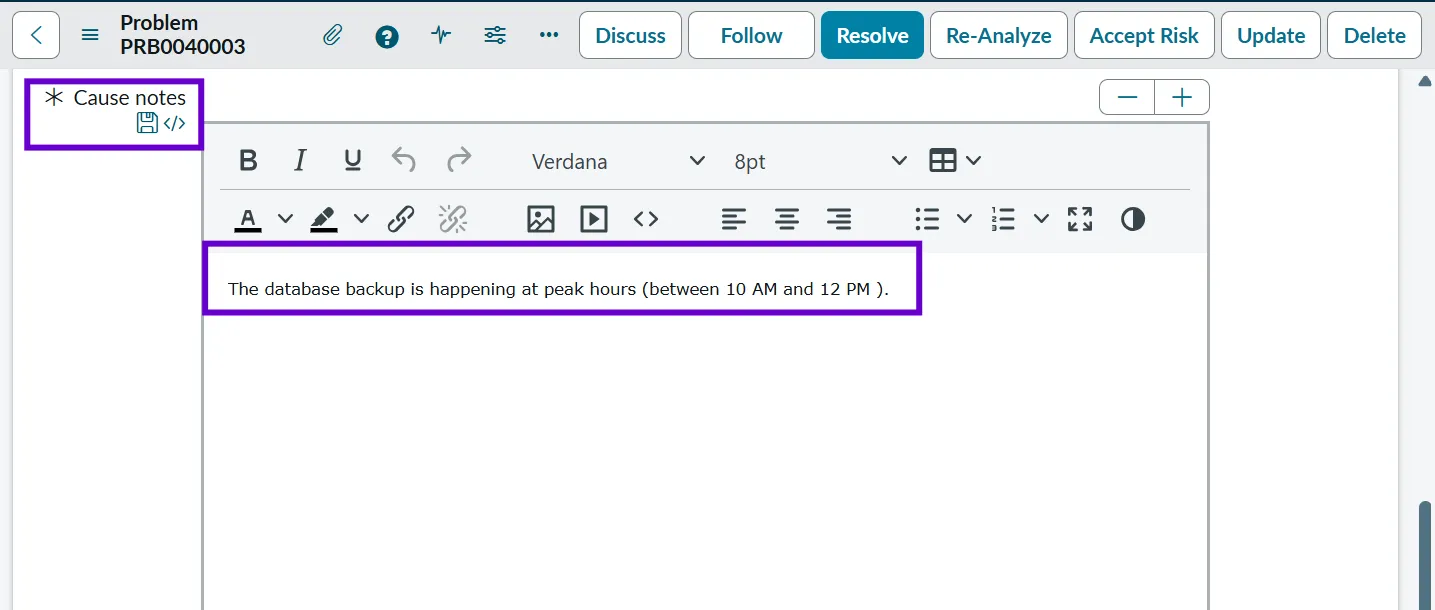
- Cause Notes: Cause notes capture investigation findings, observations, and evidence that support the identified root cause. This is more detailed and technical than the root cause field and helps with documentation.
- Example: Database CPU spikes observed between 10 AM and 12 PM. Backup job logs indicate high resource consumption during this window, correlating with reported performance issues.
- Fix Notes: Fix notes describe what permanent actions are planned or have been taken to address the root cause. This field may be updated as the fix progresses.
- Example: Planned to reschedule database backup jobs to 1 AM. Change request to be raised and reviewed by the DBA team.
- Work Notes: Work notes are used to capture internal progress, discussions, and next steps. These are not user-facing and may include technical details or coordination notes between teams.
- Example: Discussed findings with the DBA team. Backup schedule confirmed. Next step: propose a new backup window and test the impact in a lower environment.
- State: The state shows where the problem currently stands in its lifecycle, helping everyone quickly understand whether it is still being investigated or is close to resolution. We will discuss more about states in the upcoming sections.
- Example: State of a Problem ticket can be “Root Cause Analysis” where the technical teams are finding the root cause of the issue.
How Problems Are Created in ServiceNow
Problems can be created manually or automatically based on incident trends and operational insights:
- Manual Creation: Support teams log problems after identifying patterns.
- From Incidents: Multiple similar incidents trigger a problem record.
- Major Incident Review: Post-incident analysis leads to problem creation.
Problem Lifecycle
The problem lifecycle describes the journey of a problem ticket from its initial identification until it is closed. It helps in understanding how a problem ticket will be resolved and where it is currently.

Here are the states of a problem ticket:
- New: When a new problem is identified in an organization, we log it in ServiceNow, and the state of the ticket is “New”.
- Example: After seeing multiple incidents about CRM slowness during peak hours, the service desk creates a Problem record to track the underlying issue.

- Assess: The Problem Manager performs an initial assessment of the problem ticket. They look at how many users are affected, which services are involved, and whether the problem is ongoing or intermittent.
- Example: The problem manager reviews linked CRM performance incidents and confirms that the issue impacts multiple teams every day during peak hours, affecting business productivity.

- Root Cause Analysis (RCA): Once the problem is confirmed by the Problem Manager, the ticket moves to RCA. This is where deeper technical investigation happens. The goal is to identify why the problem is occurring, not just what the symptoms are.
- Example: The team analyzes system logs and performance metrics and finds that a scheduled database backup job is consuming heavy resources between 10 AM and 12 PM, causing the CRM application to slow down.

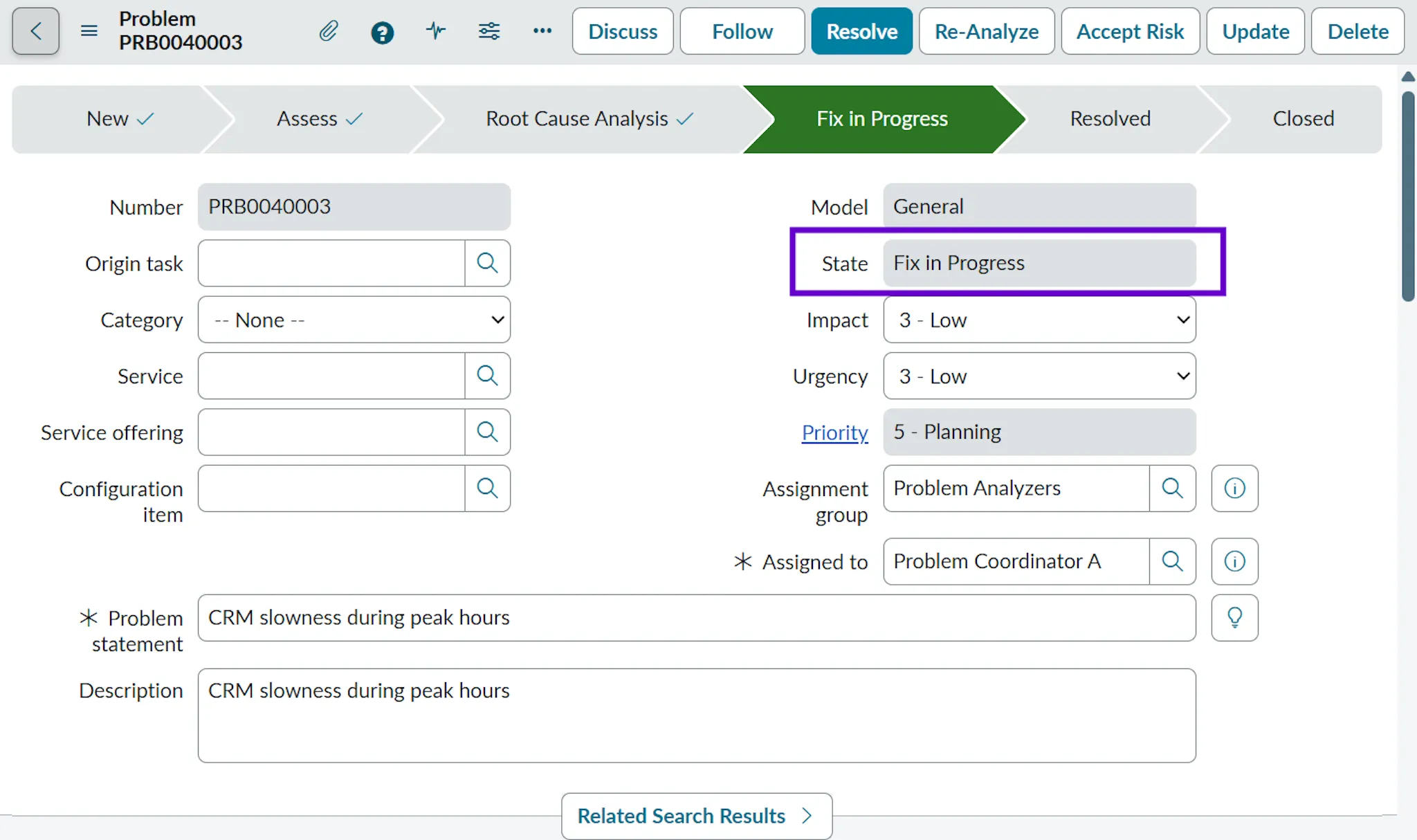
- Fix in Progress: Once the root cause is identified, a permanent fix is planned and implemented. This may involve changes to system configuration, infrastructure, or processes. When we move to this state, we have to provide “Cause Notes” and “Fix Notes”.
- Example: A change request is raised to reschedule the database backup job to run at 1 AM instead of during business hours. The fix is being tested and rolled out to production.

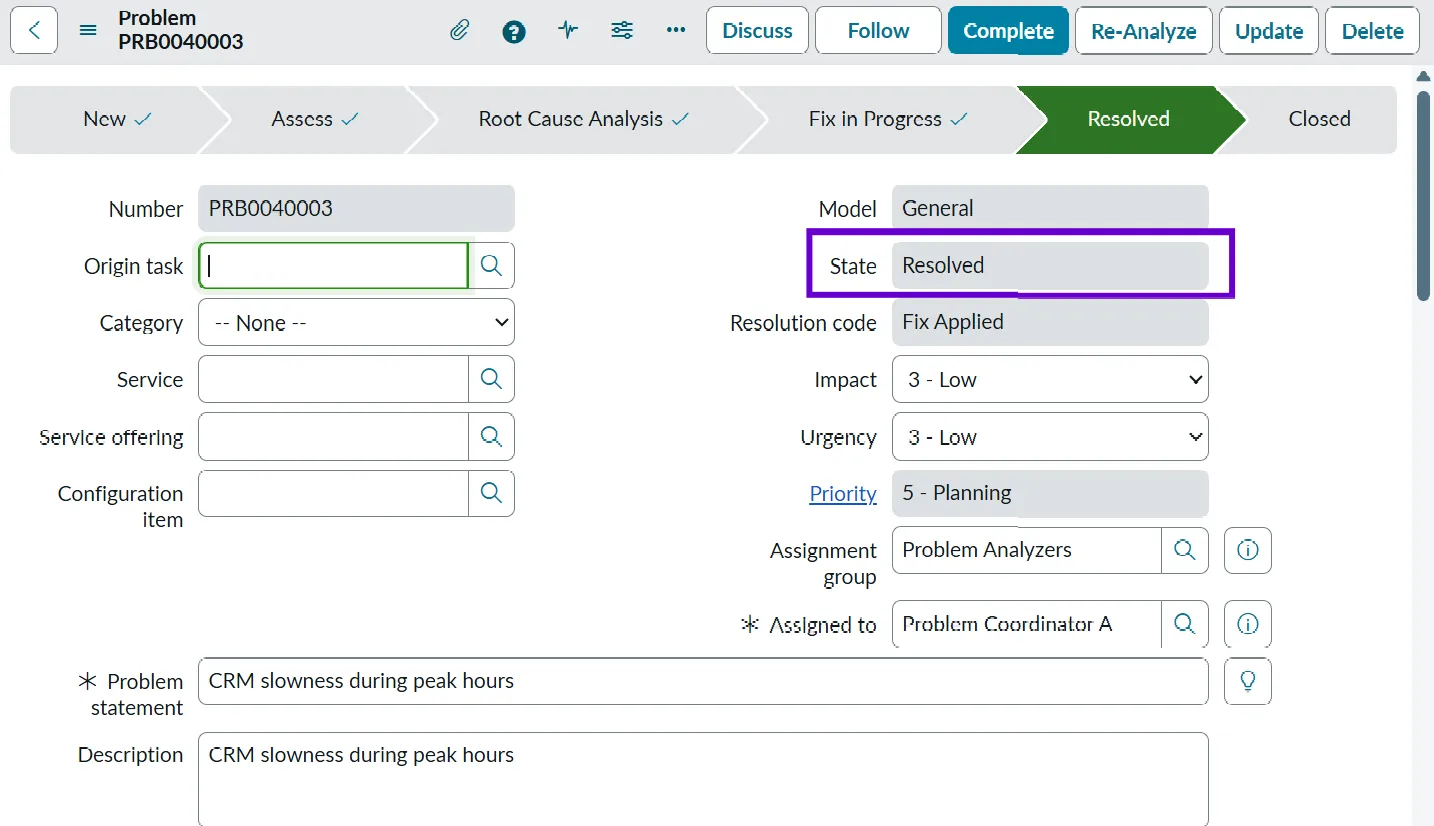
- Resolved: We move the problem ticket to Resolved once the fix has been implemented and verified. The team monitors the system to ensure the issue no longer occurs. The implementation is generally done using the Change ticket.
- Example: After rescheduling the backup job, the CRM application performance remains stable during peak hours for several days. The problem is marked as resolved since the root cause has been addressed.
- Closed: The problem is formally closed after confirming that the solution is effective and documenting the learnings. Any relevant knowledge articles or documentation are updated.
- Example: The problem record is closed after documenting the fix details and creating a knowledge article for future reference on performance issues caused by backup jobs.
Root Cause Analysis
Root Cause Analysis (RCA) is the most important part of problem management. In practice, RCA is not a single step, but an ongoing investigation process, focusing on understanding why an issue occurred in the first place so it can be prevented from happening again.
The exact approach may vary based on the type of problem and the teams involved, but typically it involves a combination of data analysis, technical review, and discussions with the right stakeholders.
RCA usually includes activities such as:
- Reviewing related incidents and looking for recurring patterns or trends over time.
- Analyzing system logs, alerts, and overall system behavior to identify anomalies.
- Speaking with support engineers and technical teams to understand what has already been tried and observed.
- Attempting to reproduce the issue in lower environments, where possible, to better understand the conditions under which it occurs.
In ServiceNow, this process is supported by the ability to link multiple incidents to a single problem record and view the complete history in one place. This consolidated view helps teams connect the dots and form a clearer picture of what is actually causing the issue.
Once RCA is complete, teams typically:
- Document the root cause in the problem record.
- Define a workaround (if needed).
- Plan a permanent fix, often through change management.
- Update or create knowledge articles (Known Error).
What Is Knowledge Management?
Knowledge management plays a vital role in problem management, where we manage documents like workarounds, root cause, known errors, and permanent fixes.
Without Knowledge Management, users or the service desk team might be raising the same tickets over and over again. Knowledge Management helps transform problem resolutions into reusable information.
Knowledge Management is used for storing all the important documentation of problems. Whereas problem management is for finding the root cause of the issue, such that it is permanently fixed.
Known Error Management
Known Error Management is a key part of Problem Management and focuses on handling issues where the root cause is already understood. The main idea here is that, when the same issue occurs again, support teams should not have to start troubleshooting from scratch. Instead, they can rely on previously documented findings to respond more quickly and in a more consistent way.
A known error refers to a problem where the root cause has already been identified and documented. At this stage, the issue may still exist in the environment, but teams have a clear understanding of why it happens and what typically triggers it. This information is useful even when a permanent fix has not yet been implemented.

Workarounds
A workaround is a temporary solution that helps restore service or reduce the impact of an issue without actually fixing the underlying root cause. Workarounds are often used when implementing a permanent fix will take time due to dependencies, approvals, or change processes.
An example of a workaround would be if an application is known to crash due to a memory-related issue, restarting the service might be documented as a workaround until a permanent fix (such as a patch or configuration change) can be deployed.
Workarounds allow teams to keep services running and minimize user impact while longer-term solutions are being planned and implemented.
My Experience With Problem Management
Back in 2012, I was working as an HP Service Manager developer at a client location in Mumbai, India, for a Fortune 500 company. At that time, our team was responsible for managing everything ourselves: application servers, load balancers, and database servers.
One evening, our application suddenly started responding very slowly. Users reported performance issues, so we did what most teams do under pressure – we raised an incident ticket for the database team. They restarted the database server, and within minutes, everything was back to normal. Incident closed. Issue solved – or so we thought.
The very next day, at almost the exact same time, the issue happened again. Once more, we raised an incident, restarted the database server, and restored the service. The focus was clear: get the system up and running as quickly as possible.
On the third day, when the same issue surfaced yet again, it was obvious that something deeper was wrong. This time, along with the incident, we raised a problem ticket and decided to dig into the root cause instead of just fixing the symptom.
During the root cause analysis, we discovered something interesting – the database backup job was scheduled to start every day at 8 PM, right when user activity was still high. This backup process was consuming resources and causing performance degradation in our application.
The fix was simple but effective: we rescheduled the database backup to 1 AM, a time when system usage was minimal. After that change, the performance issues disappeared completely.
This experience clearly showed the difference between incident and problem management.
- Incident management helped us restore service quickly.
- Problem management helped us understand why the issue kept happening – and prevented it permanently.
That was the moment I truly understood the long-term value of problem management.
Final Thoughts
Problem Management is not just a process. Instead of repeatedly fixing the same issues and moving on, it encourages teams to pause, investigate, and learn from what went wrong. This shift from reactive firefighting to proactive improvement is what truly strengthens IT operations.
ServiceNow makes Problem Management practical and effective by connecting incidents, problems, and knowledge in one unified platform. Teams can easily spot recurring issues, perform root cause analysis, document known errors, and ensure that the same mistakes are not repeated. What once felt like a heavy, documentation-driven activity becomes a natural part of daily operations.
With the added support of automation, reporting, and intelligence from ServiceNow, problem managers can spend less time writing and more time thinking – focusing on prevention rather than recovery. Over time, this leads to fewer incidents, more stable systems, and greater trust from business users.
In simple terms, incident management helps you survive the day, but problem management helps you build a better tomorrow.